
Arrange a tailored demo with our DevOps experts. Kick off the process with a 15-minute call to discuss your requirements.
Why DevOps matters
Key takeaways:
- DevOps helps Salesforce teams to balance release speed, safety, and collaboration across complex environments.
- Where manual release methods slow delivery and introduce errors, DevOps automates and streamlines.
- Modern DevOps practices help teams scale confidently as the Salesforce platform evolves.
Every Salesforce team has to do release management — there’s no way around it. The big question is how. Tracking and releasing changes manually with spreadsheets and basic deployment tools slows delivery and increases the risk of errors. Rigid release windows create bottlenecks and leave users waiting. To improve speed, safety, and collaboration all at once, more and more teams are turning to DevOps.
At Gearset we know DevOps is essential for managing environments and making Salesforce deliver for your business. As the platform has evolved and teams need faster, more reliable, and secure deployments, development practices have to be able to keep pace.
So how does DevOps stand out? To understand that, it helps to look at where Salesforce development has come from, what the alternatives look like, and what DevOps brings to the table.
A short history of Salesforce development
When Salesforce was new, teams often worked directly in production, making manual edits to fields, page layouts, and automation, with no defined approach to release management. But as orgs grew and became more business critical, teams needed more advanced methodologies and tools to deliver on Salesforce.
“Deployments were like whack-a-mole. You had a problem to the left, so you deployed code, and a problem from six months ago would reappear on the right. It was really frustrating.”
Chris Fowles, Senior Director of Technology, Norstella
Salesforce release management methodologies
With implementations becoming more complex, larger teams often gravitated towards Waterfall development. Deployments were so painful that release days were delayed or bundled up into big batches simply to avoid the disruption. As the tooling around Salesforce deployments developed, teams could begin to adopt more Agile practices and ship work more regularly.
Today, most teams release in weekly or biweekly sprints, while high-performing teams ship several times a week or even several times a day. As this pace becomes more common, more teams are embracing DevOps: a collaborative, automated, and feedback-driven way to deliver changes with confidence.
Tools for Salesforce release management
As the Salesforce ecosystem has expanded, teams have also had a growing set of tools to choose from. Change sets were the first native option, suitable for simple deployments but slow and error-prone as complexity increased. Over time, third-party solutions launched and evolved to give teams faster, more reliable ways to move metadata. Salesforce also introduced Salesforce DX, bringing source-driven development, a modern CLI, and new workflows built around version control.
More recently, Salesforce introduced DevOps Center, designed to give teams better visibility and release pipelines built on version control. Some organizations still rely on their own scripts and processes, which can provide flexibility but often require heavy maintenance. Many others turn to third-party platforms such as Gearset, which offer complete, enterprise-ready functionality across the full DevOps lifecycle.
The rise of DevOps in Salesforce
In the wider software world, DevOps emerged as a response to the problems of high-stakes release days, expensive bugs, and users waiting far too long for the improvements they needed. It broke down silos between development and operations teams, emphasized collaboration, and promoted an iterative, continuous way of deploying software.
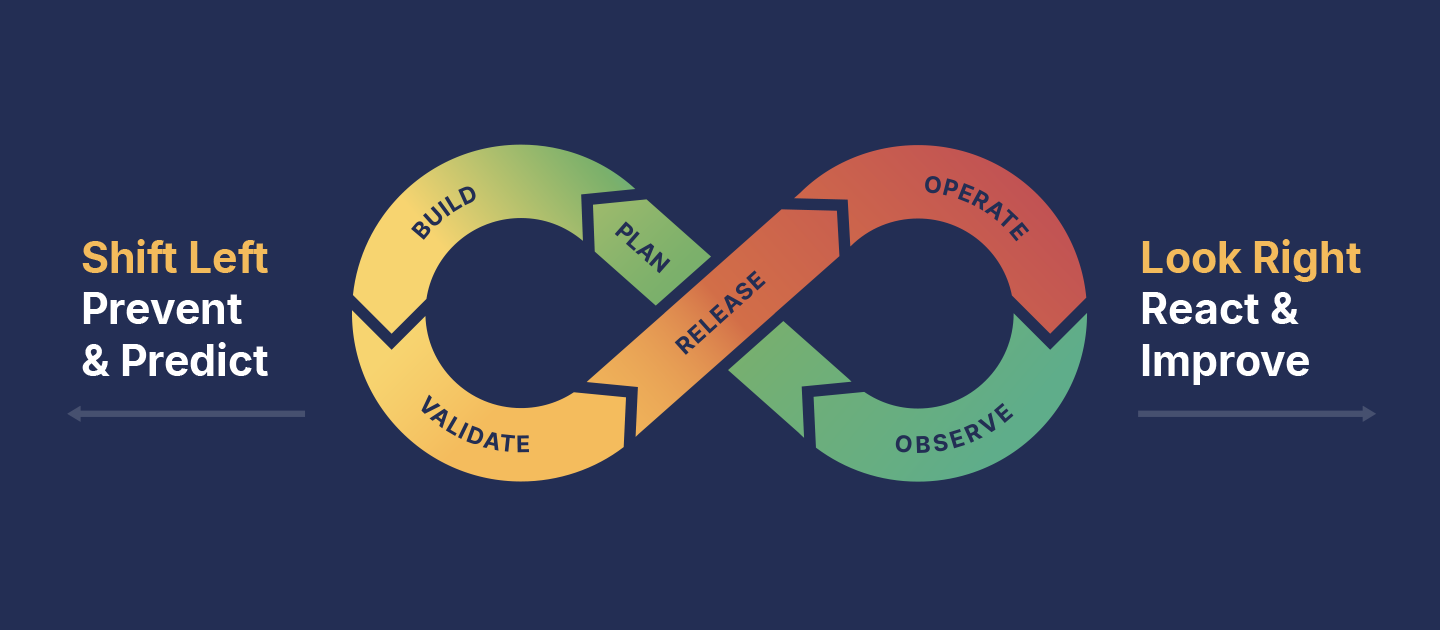
For Salesforce, DevOps means bringing together admins and developers, business stakeholders and QA, to deliver changes safely, quickly, and continuously. It encourages teams to shift left by catching issues earlier, when they’re cheaper to fix, and to look right by making sure releases run smoothly in production with backups and observability in place to protect end users.
DevOps is now the gold standard for Salesforce release management. According to Gearset’s State of Salesforce DevOps 2025 report, only 13% of teams have no ambition to begin their DevOps journey — meaning the vast majority are either already adopting DevOps practices or planning to do so.
—> Read more: What is Salesforce? A guide to the CRM’s products and ecosystem
What is Salesforce DevOps?
Key takeaways:
- Salesforce DevOps brings people, processes, and tools together to deliver changes efficiently and reliably.
- It focuses on improving collaboration, shortening feedback loops, and raising release quality across both low-code and pro-code work.
- A Git-based source of truth, automated testing, and CI/CD pipelines are the foundations that make Salesforce DevOps work at scale.
Salesforce DevOps is the application of DevOps principles and practices to the Salesforce platform. At its core, DevOps is about bringing people, processes, and tools together to deliver changes more efficiently, securely, and reliably.
The underlying goals remain the same — improve collaboration, shorten feedback loops, and raise the quality of releases — but Salesforce DevOps is about applying those principles to a platform where low-code, pro-code, and PaaS dynamics all come together.
—> Read more: What is Salesforce DevOps?
Why your team needs DevOps
The aim of Salesforce DevOps is simple but powerful: help teams ship more value to their users faster, with fewer service disruptions. By adopting DevOps practices, Salesforce teams can:
- Collaborate more effectively — break down silos between admins, developers, QA, and business stakeholders.
- Iterate continuously — deliver smaller, safer releases more often, so production sees a higher frequency of value delivered.
- Automate repeatable steps — free up time, cut down on human error, and increase developer productivity by automating testing and deployments.
- Build in security — catch issues early, share accountability, and ship changes with fewer bugs reaching production.
- Improve quality — strengthen testing through automated checks and create more relevant changes through closer collaboration with end users.
- Gain confidence to innovate — work in environments that are backed up, observable, and resilient, with faster restore times if incidents occur.
- Deliver at greater speed — shorten lead times and accelerate release cycles without sacrificing the stability or quality of new features.
- Reduce burnout and boost happiness — remove the stress of manual releases and high-stakes go-lives so teams can work at a sustainable pace.
The State of Salesforce DevOps 2025 report shows that teams adopt DevOps not only to improve speed and stability, but also to increase job satisfaction, accelerate digital transformation, and focus on release quality over quantity. The same report highlights that the barriers to DevOps adoption that teams face, from budget constraints to compliance concerns, are often the very challenges DevOps helps to resolve.
How DevOps applies to the Salesforce platform
DevOps principles are universal, but applying them to Salesforce comes with its own considerations. Salesforce’s mix of low-code configuration and pro-code customization within a managed PaaS environment creates both opportunities and challenges when introducing DevOps.
Low-code development
Salesforce teams work across a wide range of development modes: some changes are built with clicks in tools like Flow Builder, others are written in Apex, and AI agents are starting to contribute as well. Bringing all of that work together and deploying Salesforce metadata safely to your org remains one of the biggest challenges on the platform. This is where DevOps solutions like Gearset add value with reliable deployments, dependency resolution, and rollback options.
Blended teams
Salesforce teams are often made up of both admins and developers, each with different tools and approaches. When those groups work in silos, admins might build directly in production while developers work from version control — a setup that can lead to overwritten work or missed changes. That makes collaboration essential. DevOps practices like version control and CI/CD pipelines become the shared source of truth and process that align the whole team, regardless of their technical background.
Salesforce’s PaaS model
Salesforce ships three major releases every year, automatically updating every customer org. The platform also handles the underlying infrastructure and security patches for each update. At the same time, those regular releases can create a moving target for teams — UI elements change, features are retired, and new capabilities appear. DevOps practices such as automated testing and monitoring help teams stay ahead of these changes, ensuring business-critical customizations continue to function.
Integrated ecosystem
Salesforce sits at the center of a broader ecosystem — both across internal Salesforce applications like Marketing Cloud, Service Cloud, and custom apps, and through integrations with external platforms such as ERP systems and marketing automation tools. DevOps practices ensure these connections remain reliable, with automated end-to-end testing, sandbox seeding, and observability giving teams confidence that data flows correctly and integrations continue to work as expected.
—> Read more: Accelerate digital transformation with DevOps
The DevOps lifecycle
The DevOps lifecycle is the best way to visualize the DevOps process in its entirety. It’s shown as an infinity loop to represent the continuous flow of work and iterative development.
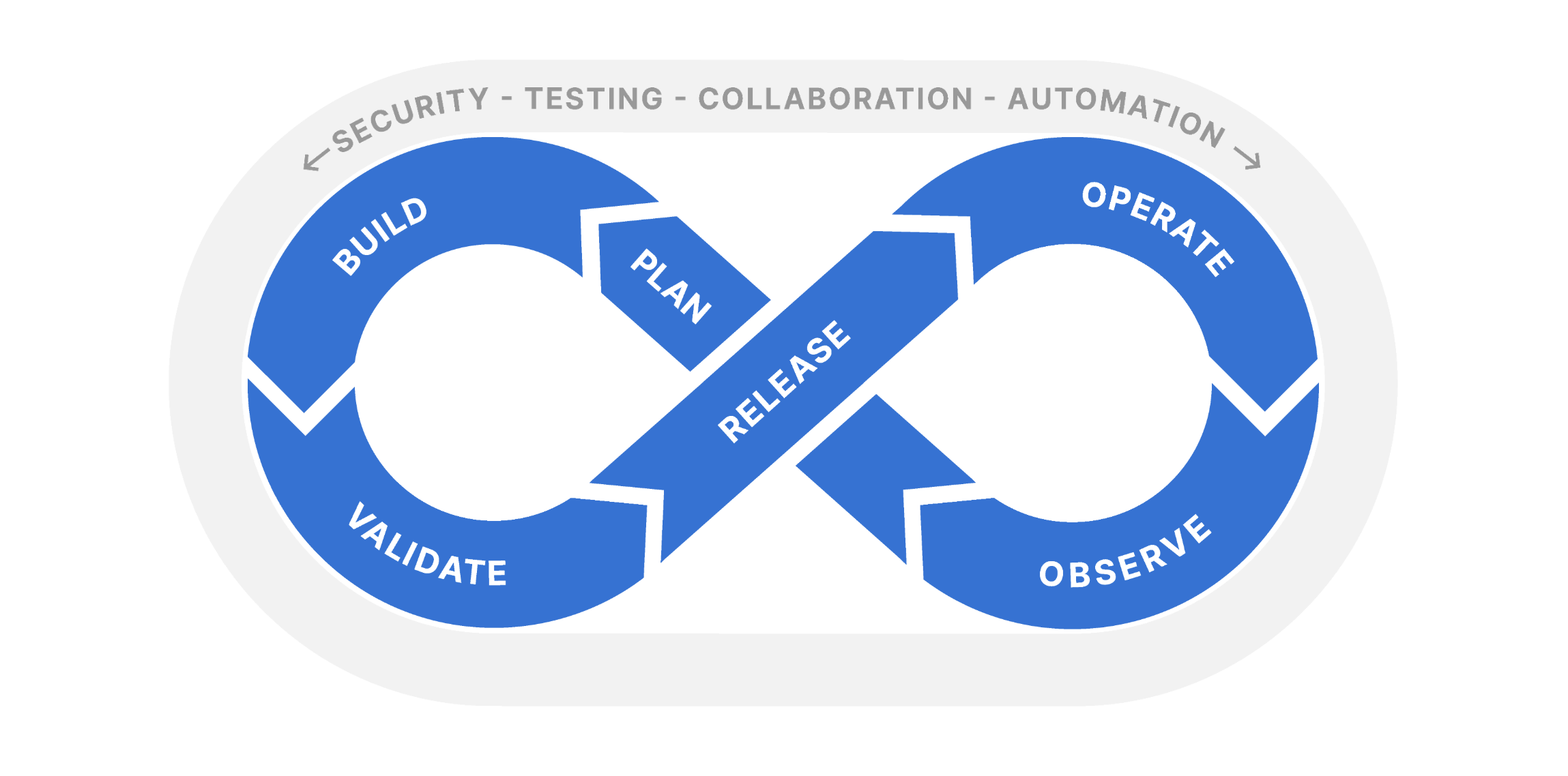
The DevOps lifecycle has six stages:
- Plan — collaborate with stakeholders to define requirements, understand the current state of the org and carefully design solutions.
- Build — make changes in your sandboxes or scratch orgs, using either low-code builders (e.g. Agent Build, Flow Builder) or pro-code tools (e.g. Agentforce Vibes IDE in VS Code.
- Validate — ensure changes are secure and high-quality, perform as intended in upper environments, and meet user requirements.
- Release — deploy quickly and reliably into your production environment, using automation to cut out manual effort and reduce errors.
- Operate — keep environments performing and secure with backups, archiving, and a clear process for handling incidents.
- Observe — monitor your orgs proactively, to catch errors and avoid hitting org limits before they cause issues.
Each stage of the DevOps lifecycle flows into the next. Insights from observability feed into planning; better validation makes releases smoother; robust operations provide the stability that makes rapid iteration possible.
Around the infinity loop sits the “halo” of essential DevOps practices: collaboration, automation, security, and testing. These aren’t confined to one stage — they’re built into every step of the process.
Most Salesforce teams begin their DevOps adoption journey at the release stage, because that’s where the pain of manual change sets is felt most acutely. But the biggest performance gains come when teams embrace the full lifecycle, shifting left to catch problems earlier and looking right to secure and monitor production. That’s when DevOps stops being just a set of tools and becomes a way of working that transforms how teams deliver on Salesforce.
—> Read more: What is the DevOps lifecycle?
—> Read more: Shift left, look right: a roadmap for adopting Salesforce DevOps
DevOps practices, tools, and processes
At Gearset, we’ve built a complete DevOps platform that covers every stage of the lifecycle, aligned with modern DevOps best practices, and tightly integrated with the tools your business already relies on.
Here’s how the main practices, tools and processes fit together:
Org intelligence
Before you can plan new work, you need a clear picture of the org you’re building on. Gearset’s Org Intelligence gives teams instant insight into how fields, flows, and automations connect, how they’ve changed over time, and where potential risks or blind spots might sit. With rich dependency mapping, usage analysis, and historical context, teams can design changes confidently, avoid rework, and make informed decisions from the start.
Ticketing (ALM tools)
Tools like Jira or Azure DevOps track tasks, user stories, and defects. Gearset integrates directly with ALM systems so work items flow seamlessly into your DevOps process.
Pro-code development and Salesforce DX
While a lot of Salesforce customization is metadata-driven, pro-code developers also need the flexibility to test and manage complex workflows. Modern DevOps embraces both worlds: low-code changes made in the UI and pro-code development in a source-driven workflow like VS Code, Salesforce DX, and the Salesforce CLI.
Metadata deployments
Moving changes safely between environments is a foundation of Salesforce DevOps. Gearset makes deployment processes simple and reliable, with dependency analysis, problem analyzers, and rollback options that remove the pain of change sets.
Version control
A Git-based version control system (VCS) is at the core of any Salesforce DevOps process. Version control allows your team to track and review your changes, while making it possible for multiple contributors to work on the same features at the same time.
With Gearset’s version control integration, you can move changes between any Git hosting provider, like GitHub or GitLab, and Salesforce just as easily as org to org, collaborate without overwriting each other’s work, and build a true source of truth for your orgs.
CI/CD pipelines
Continuous integration (CI) builds on a Git-based workflow and automates the process of testing and validating changes, making sure they can be deployed. Continuous delivery (CD) means releasing frequent, small changes to users via an automated process. CI/CD pipelines turn ad-hoc deployments into a reliable development process, where every change is tested, validated, and versioned before reaching production.
To get the most out of CI/CD, you need a solution that builds automation and visibility into your development lifecycle end-to-end. Gearset Pipelines let you build continuous integration and delivery directly into your release flow — automatically running tests, checks, and promotions as work moves from development to production.
Testing
Automated testing provides fast, repeatable checks that run on every commit or deployment, catching issues before they reach production. “Shifting left” — catching issues early — reduces the cost of fixing bugs, and gives teams confidence that their changes won’t break critical processes. Manual testing still has an important role — exploring complex user journeys, validating edge cases, and providing the human perspective on usability. Automated and manual approaches work best together: automation delivers speed and consistency at scale, while manual testing adds depth and context.
Gearset supports automated testing across every layer:
- Unit testing — helps you catch failing code in production and track your code coverage. With Gearset, you can create customized automated tests for your orgs, schedule test runs, set desired code coverage thresholds.
- UI testing — user interface (UI) testing assesses how elements of the application behave when the end user interacts with them. Gearset integrates with popular testing solutions such as Provar, ACCELQ, Testsigma, Tricentis, and Keysight Eggplant.
- Code analysis and reviews — code scanning tools for static code analysis improve code quality, catch security issues, poor patterns, and performance risks early. Gearset’s Code Reviews scans configuration as well as code and supports Apex, Flows, Lightning Web Components, Visualforce, and Aura.
—> Read more: Salesforce test automation: A complete overview — find out more about how DevOps supports integration testing, regression testing, functional testing, and User Acceptance Testing (UAT).
Data deployments and sandbox seeding
Data deployments, whether that’s reference data, configuration records, product catalogs, CPQ configuration or Vlocity DataPacks, keep environments consistent and representative of production.
A sandbox seeding solution lets you migrate data from production to lower environments for more realistic testing. With Gearset’s sandbox seeding you can seed data from your production org, another sandbox, or from a backup to any kind of org. And, with data masking you can mask sensitive data and ensure you’re compliant with any relevant data regulations.
Backup and recovery
Backups are a core foundation of Salesforce DevOps, giving teams the confidence to release quickly with the assurance they can recover fast if something goes wrong.
Gearset automates backups for Salesforce data and metadata. Secure, off-platform storage means your backup data is safe even if Salesforce goes down, while change visualization and alerts give you full visibility into what’s changed and when.
Archiving
Archiving helps teams manage storage limits and keep orgs running efficiently in the operate stage of the DevOps lifecycle. Gearset automates Salesforce archiving with secure, off-platform storage that reduces costs and keeps environments streamlined.
Observability and monitoring
Observability strengthens the DevOps lifecycle by showing whether the work you’ve built, tested, and deployed is actually behaving as expected in production. It’s always better to catch bugs before they get that far, but the few that slip through are often the ones users notice most.
Gearset’s observability tools catch Flow errors, Apex exceptions, and unusual data changes, helping you resolve issues before they impact users.
How to get started with DevOps
Most Salesforce teams begin their DevOps journey at the release stage, because that’s where the pain of change sets and manual deployments is felt most sharply. Replacing change sets with automated deployments is often the quickest win — instantly saving time, reducing errors, and building confidence that changes will succeed. From there, teams can layer in version control, CI/CD pipelines, and automated testing to shorten feedback loops and strengthen quality.
If you’d like to talk through where your team should start and how to build from there, you can book a demo with Gearset’s DevOps experts to see what a tailored DevOps journey could look like.
How to adopt Salesforce DevOps
Key takeaways:
- DevOps adoption is a journey: start small, prove value early, then expand across the lifecycle.
- Culture and training matter as much as tooling — shared ownership, clear standards, and space to learn are what make DevOps stick.
DevOps moves your team away from fragile, manual processes and towards a collaborative way of working that makes releases faster, safer, and more sustainable. Adoption doesn’t happen overnight, instead it’s built step by step through new practices, the right tools, and a culture that supports continuous improvement.
DevOps culture
At its heart, DevOps is cultural. It’s about breaking down silos and encouraging collaboration across everyone who contributes to Salesforce: admins, developers, architects, release managers, QA engineers, business analysts, end users and more. Instead of treating tests, releases, backups and other processes as isolated responsibilities, DevOps encourages shared ownership of quality and delivery.
This can feel like a big shift. Teams that have spent years working in orgs directly, or in rigid release windows, may worry that DevOps practices like version control and CI/CD are too complex, or that more frequent releases will create more risk. In reality, the opposite is true: when everyone works from the same source of truth, shipping smaller increments of work, with automated testing and transparent pipelines, Salesforce deployments become both safer and less stressful.
Building confidence takes time, but it grows as teams see early wins: successful deployments, fewer rollbacks, and the ability to collaborate without treading on each other’s toes. Supporting this cultural change means giving admins and low-code builders the training they need to thrive in DevOps processes, and creating an environment where questions are welcomed and mistakes are treated as opportunities to learn.
“My wife hated it. I’d finish my normal day around 5pm or 6pm, have dinner with the family, but then by 8pm, I’d say, ‘Sorry, honey, I’ve got to jump back online for the weekly deployments.’”
Stirling Smith, Senior Manager, Business Systems, Granicus
—> Listen to Dan Appleman (CTO and Co-Founder, Full Circle Insights) break down The Challenge of Building a DevOps Culture in the Salesforce Ecosystem
DevOps adoption challenges and how to overcome them
There are common roadblocks Salesforce teams run into when adopting DevOps — some are cultural and some are technical:
- Confusion about what DevOps means — For some teams, “DevOps” is still a buzzword. For others with experience on different platforms, it’s not clear how DevOps works on Salesforce, where you don’t manage your own infrastructure. Overcome this hesitancy through shared training, clear documentation, and starting small with simple, visible wins that demonstrate value.
- Resistance to frequent releases — Legacy release windows feel familiar and safe, but batching up months of changes creates risk. DevOps encourages smaller, faster releases — which actually reduce the chance of disruption. The key is communicating that frequent, automated deployments bring more value with less risk.
- Distributed teams and misaligned requirements — Most Salesforce teams aren’t in the same room, and feedback from end users can be incomplete or inconsistent. Without strong communication channels, features stall in UAT or fail to meet real needs. Iterative development, visible backlogs, and clear feedback loops keep work moving and ensure value is delivered.
—> Read more: Common cultural and technical Salesforce DevOps obstacles and how to overcome them & How to overcome DevOps challenges faced by distributed Salesforce teams
Steps to build a DevOps culture
Salesforce DevOps tools and processes alone won’t deliver Salesforce DevOps success. The highest-performing teams are those that invest in culture — the attitudes, values, and ways of working that underpin collaboration. To build that culture, Salesforce teams can take these key steps:
1. Secure buy-in
DevOps won’t stick unless everyone on the team understands and believes in its value. Simply teaching people how to use Git or a deployment tool isn’t enough — buy-in is what ensures team members follow the process and don’t cut corners.
2. Encourage collaboration
For Salesforce teams, true collaboration means admins and developers working together within an agreed process, not in silos. The biggest challenges often arise when team members revert to old habits or work around the process. Keeping everyone aligned on a shared way of working is what allows DevOps practices to deliver real value.
3. Commit to continuous improvement
Elite teams treat improvement as part of the job. They’re open about what isn’t working, willing to learn from each other, and quick to adopt new practices that streamline the release process. Continuous improvement turns DevOps itself into an iterative journey, where every cycle brings an opportunity to refine how the team works.
4. Invest in training
Even motivated teams need support. Training helps Salesforce developers, admins, and business stakeholders share the same understanding of process and tools. Free resources like DevOps Launchpad make it easier for Salesforce teams to upskill at their own pace.
5. DevOps center of excellence
As adoption matures, many organizations benefit from creating a center of excellence to guide their DevOps journey. This isn’t a separate team that owns deployments, but a group that champions best practices, shares knowledge, and supports others in adopting new ways of working. A center of excellence provides consistency across distributed teams, helps avoid duplicated effort, and keeps cultural and technical improvements aligned with business goals.
—> Read more: Secret to Salesforce success: DevOps culture
DevOps maturity
One of the most common pitfalls for teams starting out is treating DevOps as a fixed goal — expecting overnight results from a “big bang” rollout. In reality, even the most advanced Salesforce teams keep evolving their practices as they implement DevOps. Thinking of DevOps maturity as a journey makes it easier to introduce new tools and processes step by step, while gaining buy-in from your team and proving the value along the way.
Maturing across the DevOps lifecycle
True maturity isn’t about excelling at separate stages of DevOps like deploying faster, but strengthening practices across the entire lifecycle. The State of Salesforce DevOps 2025 report shows a strong correlation between teams who adopt an end-to-end approach — often with fewer, more integrated tools — and better performance, regardless of organization size or maturity level.
—> Read more: 5 ways to improve your DevOps strategy and Salesforce DevOps maturity: change sets, DevOps Center, and beyond
How DevOps improves Salesforce performance
Key takeaways:
- DevOps improves both delivery speed and release reliability, so teams ship more value with less risk.
- Version control and CI/CD shorten lead times and reduce bottlenecks by turning releases into a repeatable flow.
- Automated testing and validation lower change failure rates by catching issues before they reach production.
- Backups, rollback, and observability cut recovery time and protect business-critical data when incidents happen.
The business case for Salesforce DevOps
Gearset’s State of Salesforce DevOps 2025 report found that almost all teams surveyed (95%) say that investing in Salesforce DevOps yields a return on investment (ROI). That return shows up in several ways.
The clearest gains come from efficiency. Manual, error-prone releases don’t just slow teams down during deployment. They also demand hours of preparation: tracking changes, wrestling with change sets, and then troubleshooting failures when something breaks. DevOps removes that overhead. With intuitive tooling and automation across planning, testing, monitoring, and deployment, teams can deliver the same work far faster and with fewer resources.
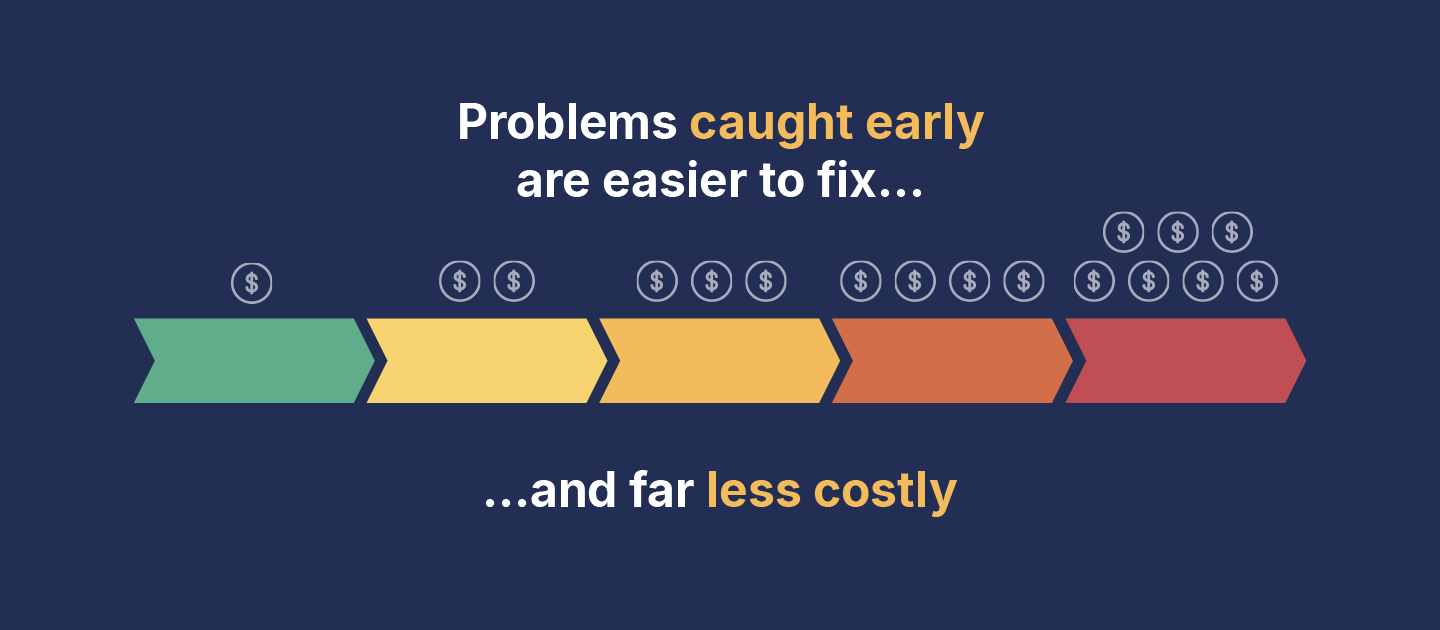
Gearset users, for example, are 32% more likely to deploy within an hour and 40% more likely to release at least weekly compared to teams using other solutions. And with success rates of over 95%, there’s less wasted effort and time spent recovering. Shifting left compounds this benefit. Catching issues earlier saves significant time and rework, reducing the cost of mistakes long before they reach production.
DevOps also strengthens resilience. Salesforce orgs evolve constantly, and incidents will happen — whether through a bad deployment, a faulty integration, or simple human error. Protecting your environments and the data they contain is essential. Automated testing and monitoring help teams spot issues early and prevent small problems from turning into major outages. And with reliable backups and fast rollback capabilities, the impact of an incident is dramatically reduced. This is the insurance that DevOps provides: fewer disruptions, shorter recovery times, and confidence that even unexpected failures won’t cause permanent loss.
DevOps also improves culture. By uniting admins and Salesforce development teams in a shared process, healthy DevOps processes reduce bottlenecks and duplication, give admins and developers a shared, predictable way of working, and remove the stress of manual releases and high-stakes deployments.
Taken together, these benefits make Salesforce DevOps not just a technical upgrade, but a strategic investment that improves agility, resilience, and the ability to meet business goals.
—> Read more: What’s the real ROI of Salesforce DevOps?
How to measure DevOps success
Whether you’re making the case for Salesforce DevOps or already putting it into practice, it helps to understand how to measure its impact.
DORA metrics
The most widely recognized way to measure DevOps performance is with the four DORA metrics, developed by Google’s DevOps Research and Assessment (DORA) team. These benchmarks give teams a clear picture of their speed, stability, and overall effectiveness.
1. Deployment frequency
How often your team delivers changes to production. Elite DevOps teams release smaller changes frequently, rather than bundling up risky waterfall style releases. In Salesforce, this means tighter feedback loops with business users, quicker delivery of value, and reduced risk when something does break.
2. Lead time for changes
The time it takes for a feature or fix to move from code committed to running in production. For Salesforce teams, reducing this lead time demonstrates that DevOps automation is working — cutting down manual steps, removing bottlenecks, and getting functionality to users sooner. Faster delivery also tightens the feedback loop, helping teams learn what works and iterate more effectively.
3. Change failure rate
The percentage of releases that cause problems in production. A high failure rate signals weak testing and manual error-prone deployments. By building automated validation and testing into your CI/CD pipelines, you can release with confidence that changes won’t disrupt business operations.
4. Time to restore service
How quickly a team can recover when something goes wrong. Integrated backup and rollback are vital here. Instead of scrambling manually to fix errors, you can restore data and environments rapidly and keep downtime to a minimum.
Together, these four key metrics capture the two sides of DevOps: speed and stability. Faster releases are only valuable if they’re also reliable, and the DORA metrics strike that balance.
—> Read more: How not to use the DORA Metrics to measure DevOps performance
—> Read more: Important DevOps metrics for your team to track alongside DORA
DevOps at enterprise scale
DevOps enables large organizations to bring multiple projects, Salesforce teams, and business units under one release process. Here, scaling means standardizing pipelines, enforcing shared governance, and ensuring visibility across hundreds of contributors — without slowing down.
Enterprise-scale delivery challenges
- Global, distributed delivery introduces coordination problems: multiple teams working in parallel often leads to conflicts, overwritten work, or slow progress caused by centralized release bottlenecks.
- Multi-org and multi-cloud environments: changes often touch CRM, industry products, revenue tooling, marketing systems, data platforms, and integrations, creating a high risk of downstream dependencies.
- Long-running programs and different release cadences: enterprises need to ship day-to-day improvements and long-term initiatives in parallel, without drifting from core standards or blocking in-flight work.
- Governance and regulatory requirements: role-based access, approval gates, audit trails, and secure handling of sensitive data need to be embedded to support frameworks like SOX, GDPR, HIPAA, and CCPA/CPRA.
How DevOps supports enterprises
- Version control is a shared source of truth across teams and regions: changes are tracked, reviewable, and attributable, reducing conflicts and enabling parallel development.
- CI/CD pipelines make releases repeatable and safe: automated validation, testing, and approval gates catch issues earlier, reduce manual effort, and allow smaller releases to ship more frequently with lower risk.
- Governance is enforced through the delivery flow: access controls, auditability, and secure data practices become part of day-to-day operations, rather than separate activities that slow teams down.
Why enterprises choose Gearset for Salesforce DevOps
Gearset is built for multi-org, global Salesforce delivery. Our CI/CD pipelines solution supports parallel development and coordinated deployments across orgs, reducing conflicts and release bottlenecks. Layered modules keep core configuration consistent while allowing regional or departmental customization, so long-term programs and day-to-day delivery can run side by side.
Gearset delivers enterprise-grade governance and compliance without sacrificing speed. Automated testing and approval gates shift quality left, while role-based permissions and detailed audit trails provide full accountability. Data masking secures sensitive information in lower environments and supports regulated industry requirements.
Gearset unifies multi-cloud DevOps in a single process, including Agentforce Revenue Management (formerly RCA), Salesforce CPQ, Salesforce Industries, Marketing Cloud, Data Cloud and Agentforce. Full support for Agentforce metadata types enables teams to test and deploy AI agents with the same standards applied to all Salesforce changes.
Gearset provides leadership-level visibility into delivery performance. Out-of-the-box dashboards show how teams are performing against the industry-standard DORA metrics.
Since Gearset is a third-party web application, not a managed package in Salesforce, there’s no in-org installation and ongoing maintenance required for customers. Enterprise customers receive a dedicated onboarding and success team, with support from DevOps architects where required, to ensure a successful rollout and measurable outcomes.
—> Read more: The complete platform for Salesforce DevOps at enterprise scale
Choosing a DevOps solution
Key takeaways:
- Native tools can help teams get started, but they often fall short once environments, teams, or compliance needs scale.
- A full-lifecycle DevOps platform reduces manual work, strengthens governance, and supports safer, faster releases.
Every Salesforce team needs a reliable way to plan, track, and release changes. Native tools offer an accessible starting point, especially for teams early in their DevOps journey. But as requirements grow most teams look beyond what’s built in. Understanding how native options compare with full DevOps platforms helps you choose the approach that will scale with your org.
Third-party tools vs native Salesforce options
Native tools like change sets and DevOps Center provide a starting point for smaller teams, but they often fall short for organizations that need automation, rollback options, and enterprise-grade visibility.
DevOps Center in detail
Salesforce introduced DevOps Center in 2022 as a major step forward from change sets. It sits inside the Salesforce UI and gives admins and developers a shared project hub with user stories, work items, and a pipeline to organize and promote changes. It integrates with GitHub and Bitbucket for version control, so teams can start building a single source of truth and track who changed what.
Compared to change sets, DevOps Center supports destructive changes, automated change tracking through Git, and a more structured workflow. Pipelines let you move work items through stages like development, testing, and production, giving you clearer governance along the way. It’s also designed with “clicks not code” in mind, so admins can participate in the release process without learning developer tools.
DevOps Center still has limitations that become more noticeable as teams move toward mature DevOps practices. It offers pipelines and Git integration, but it doesn’t provide fully automated CI/CD out of the box, and rollback still relies on manual steps through Git. Support for more complex scenarios — such as CPQ configuration, package-based development, or advanced backup and recovery — is still developing. DevOps Center also supports a limited set of Git providers for now, and deeper integrations with ALM tools like Jira remain on the roadmap.
Third-party platforms
For teams ready to go further, third-party solutions like Gearset that cover the entire DevOps lifecycle in one platform can help teams scale confidently. That includes everything from planning and designing changes, to comparing and deploying metadata, monitoring daily org activity, running automated CI/CD pipelines, managing backups and restores, seeding sandboxes with realistic data, and validating that releases behave as expected in production. Because it’s all integrated, teams don’t have to stitch together multiple partial tools or maintain custom scripts.
“Where’s that missing dependency?! I’m one component away from a successful deployment — why can’t I find it?! There’s no trail left behind by a change set, so I can’t document it. And I can’t run it again, which is always painful. Instead we have to build the same change set again, and that’s super error-prone.”
Tom Patros, Founder and CTO, Red Argyle
Build vs buy
Some teams experiment with DIY scripts and custom automation to bridge gaps in native tools. While this offers flexibility, it quickly creates a maintenance burden and introduces risk. Investing in a complete DevOps platform means teams benefit from ongoing product development, support, and compliance built in, freeing them to focus on delivery rather than tool maintenance.
Integrations
The best DevOps solutions don’t exist in isolation. They connect seamlessly with existing functionality and version control systems, ALM platforms like Jira or Azure DevOps, and testing frameworks, as well as backup and monitoring tools. Gearset is designed to integrate directly with these tools, so teams can build a connected ecosystem rather than juggling disconnected point solutions.
—> Read more: How to pick the right Salesforce DevOps solution for your needs
Gearset: the full lifecycle DevOps platform
Gearset was built with this lifecycle completeness in mind. It’s an end-to-end Salesforce DevOps platform that scales from your first successful deployment to fully automated release pipelines with org intelligence, backup, monitoring, data management, and observability baked in. By covering the full lifecycle in one platform, Gearset helps teams avoid the pitfalls of fragmented tooling and keeps admins, developers, and release managers aligned.
As the State of Salesforce DevOps 2025 report showed, there’s a strong link between performance metrics and toolstack size: the more tools teams used across their DevOps lifecycle, the worse their performance against DORA metrics and other key indicators. Teams who’ve consolidated their tooling are 5x more likely to deploy in under an hour and 5x less likely to need a whole day to deploy when compared to teams using the largest number of deployment tools. It’s exactly this kind of consolidated, unified experience that Gearset is designed to provide.
“I don’t want my whole DevOps process running out of Salesforce. It can feel a bit frantic and clunky so having a third-party platform feels so much better – plus the Gearset UI is a lot more user-friendly.”
Jeb Garrott, Platforms Solutions Manager, Morgan & Morgan
Start your free trial today to explore Gearset for yourself, or book a demo with our team to see how we can tailor DevOps success to your organization.
Take your next step in DevOps
Salesforce DevOps isn’t one big change, but a capability teams build over time. If this guide has shown where your current process could evolve, why not book a demo with Gearset’s DevOps experts and find out how to make a start.
We can help you benchmark your approach against proven practices, understand the options available on the platform, and identify the most valuable next improvements for your team.

