


Find everything you need in one place
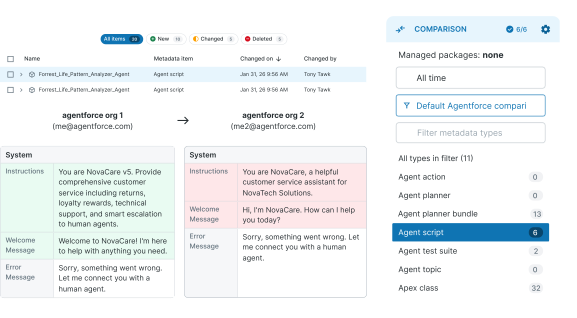
A dedicated filter retrieves all Agentforce metadata — plus the Apex and Flows they depend on.
Gearset for Agentforce
Salesforce Agentforce deployments fail in ways that are hard to predict and painful to explain. Gearset surfaces issues before you deploy — not after.
Planners, topics, actions, prompt templates — each with dependencies on Apex, Flows, and custom objects. Miss one or deploy in the wrong order, and the whole thing fails. Gearset treats Agentforce as what it is: Salesforce metadata. The same secure deployment process your team already relies on, extended to cover everything agents need.
Gearset gives you complete visibility over what you're deploying, before a single change moves.
A dedicated filter retrieves all Agentforce metadata — plus the Apex and Flows they depend on.
Gearset's visual diff presents each component clearly, so you can review every change before it goes near production.
A single missing component or incomplete Data 360 configuration can bring an entire deployment down. Gearset makes sure neither happens.
Gearset’s expertise helps showcase our expertise, and makes deploying Agentforce smooth and stress-free. I appreciate having Gearset as a trusted partner.
Salesforce MVP
Agents that fail in front of customers are worse than no agent at all. Gearset makes sure yours are tested, handled, and ready before they ever go live.
Agents evolve constantly and as more developers touch Agentforce, the risk of something going wrong in production grows. Gearset gives every release the process it deserves — repeatable, reviewable, and built to the standards your team already works to.
Gain complete visibility into your org before any change is made, so you understand the impact of agent updates upfront.
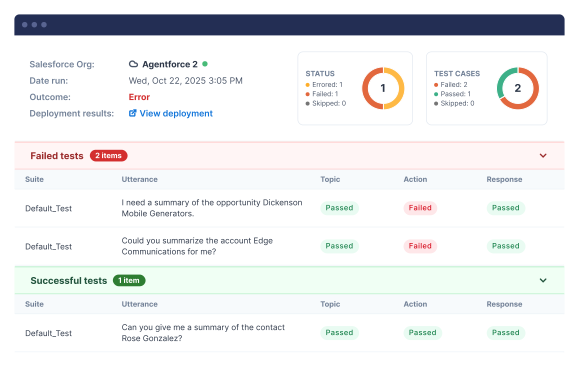
Automated UI testing simulates real conversations, confirming Planner logic, Topics, and Actions work together before any release goes live.
Git integration gives compliance teams the audit trail they need
Include Agentforce in your CI/CD pipelines and promote agent changes through dev, staging, and production with consistency and control.
Sandbox Seeding fills sandboxes with realistic data like accounts and case histories, so agents have meaningful context to test against.
Automated daily backups with on-demand rollback keep your agent configurations safe from a bad deployment.
Gearset supports all key Agentforce metadata types, including GenAiPlannerBundle (agents), GenAiPlugin (topics), GenAiFunction (agent actions), GenAiPromptTemplate (prompt templates), and AiEvaluationDefinition (testing centre suites). Gearset also supports Agent Scripts (AiAuthoringBundle), available from API version 65.
Note: the SDR Agent and Sales Coach Agent must currently be configured manually in each environment as they are not supported via the Metadata API.

When you compare environments, Gearset visualises your Agent Script in a clear table view, with each component organised into sub-sections so you can quickly see how the agent is put together — even if someone else built it.
Agent Script is also a versioned metadata type. Rather than seeing every version as a separate row in your comparison, Gearset groups them into a single row with the active version selected by default. You can switch between versions using a dropdown selector and choose exactly which one you want to deploy. And as with every other metadata type in Gearset, dependencies are surfaced and handled as part of your deployment, so nothing gets left behind when your Agent script moves between environments.
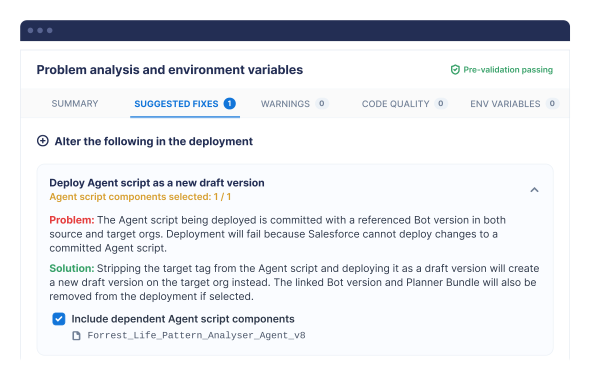
Gearset gives you two layers of dependency handling. Firstly, you can drill into any Agentforce component to see its full dependency tree — every Prompt Template, Flow, Apex class, Topic, and Action it relies on. Then before deployment, Gearset’s Problem Analyser inspects your package and flags anything missing across both planner bundles and agent scripts, so nothing gets left behind.
Gearset also catches the subtler issues that cause silent failures: Prompt Templates referencing deprecated LLMs are flagged with a recommended alternative, org-specific retriever IDs are detected and swapped for the correct version in the target environment, and if a deployment would overwrite an already-committed agent script, Gearset flags it and offers to deploy it as a new draft instead.
Our documentation maps known error messages to their root causes so teams can fix problems quickly.
Gearset’s Problem Analyser catches the most common issues before validation runs, flagging missing dependencies so you can fix them in one click rather than discovering them mid-deployment.
That matters because Salesforce’s own Agentforce validation errors are often vague and don’t tell you which specific dependency is missing. Common causes include missing GenAiFunction or GenAiPlugin components in the target org, supporting metadata (like Apex classes or custom objects) not yet deployed, or Retrievers that don’t yet exist in the target environment. That last one catches many teams off guard. If your agent references a Retriever that hasn’t been deployed, validation will fail.
Gearset also makes it straightforward to deploy individual Retrievers via Direct Deploy, resolving this before it becomes a blocker. And for any errors that do slip through, our documentation maps validation messages to their root causes so your team can self-serve a fix quickly.
Yes. Gearset supports Agentforce deployments between any two Salesforce environments — sandbox to sandbox, sandbox to production, or production to sandbox — using the same comparison and deployment workflow you’d use for any other metadata.
For teams ready to automate, Agentforce metadata can also be included in Gearset’s CI/CD pipelines, promoting agent changes through development, staging, and production with consistency. This matters more for agents than for most Salesforce changes. Because agents interact with customers directly and in real time, anything that hasn’t been properly validated, tested, and reviewed can have an immediate and visible impact. A structured promotion pipeline is the best way to know your agents work as expected before they ever reach a customer.
Agentforce Testing Center is a Salesforce sandbox environment tool for evaluating AI agent behaviour before changes reach production. Gearset Pipelines integrates with it and triggers tests automatically. Whenever a pull request contains Agentforce metadata, the relevant test suites run after deployment, and the results surface on the next PR downstream, so you see how your agents performed in one environment before promoting to the next. If tests fail, promotion is blocked until the failure is resolved or dismissed.
You can also deploy the test suites themselves through Gearset, so test coverage moves through environments alongside the agents it covers. And because Testing Center tests are only as good as the data in the sandbox they run against, Gearset’s sandbox seeding tool can populate dev and QA environments with realistic accounts, contacts, and case histories.
No. Everything is handled natively within Gearset. No additional tools, no automation scripts, and no extra licences are required. Gearset works at the metadata and API level, so manual steps are eliminated entirely rather than automated through fragile UI scripting.
Yes. Businesses getting the most from Agentforce typically run Data 360 alongside it. Gearset supports deployments of both, so teams can manage changes to agents and Data 360 configuration in a single, seamless workflow, rather than maintaining two separate processes.
Gearset works entirely at the metadata and API level — the same way Salesforce itself manages deployments. There are no UI scripts to set up in your org, no automation touching live customer data, and no black-box processes. Every change is visible, reviewed, and logged before it’s deployed, giving your security and compliance teams full auditability over what changed, when, and by whom. Learn more about Gearset’s security.
API version requirements vary depending on the Agentforce metadata types you’re working with. Agentforce (GenAi) metadata types were introduced in API version 60, but some types require higher versions. You don’t need to track this manually — Gearset detects the API version you’re using and flags it if you’re on the wrong one for the metadata in your deployment. For the full breakdown and guidance on how to set your API version in Gearset, see our documentation.
Yes. Gearset will automatically reactivate the new agent version immediately after the deployment stage completes, so your agent doesn’t have to be taken offline. You stay in control of which version goes live: you select the specific version to deploy, along with the relevant test suites, and that’s the one Gearset activates on the other side.
Join 300+ teams who've made Agentforce a production-ready reality. Book a demo and we'll show you how it works with your setup.