
Gearset fully supports Agent Script deployments — but the metadata model behind Agent Script is more involved than a typical Salesforce component, and getting it wrong leaves you with a broken deployment or an agent stuck in draft.
This post covers what Agent Script actually is, how Salesforce’s draft and committed lifecycle affects deployment, and how to move an Agent Script between orgs with Gearset.
What is Agent Script?
Agent Script, aka AIAuthoringBundle, is Salesforce’s way of defining how an Agentforce agent reasons, acts and communicates.
Think of it as the instruction manual for your AI agent, blending prompt engineering and business logic. An Agent Script file tells the agent who it is, what it’s allowed to do, and how to use Salesforce tools. Importantly, this component is easy to read and edit by humans and agents alike, as well as being the shared source of truth.
Agent Script is central to what Salesforce calls “hybrid reasoning”. This is the idea that production-grade agents need more than just a capable LLM. They need deterministic rules, clear checkpoints, and tight control over what context the model sees at every step.
With Agent Script, you get:
- One source of truth. Your agent’s full configuration lives in a single, versioned component, not spread across dozens of screens.
- Human and AI collaboration. Because the format is clean, structured text, both builders and AI assistants can read, write, and reason about it natively.
- Precision control. You can enforce deterministic logic for routing, validation, and permissions, while keeping model reasoning for the moments where it adds value.
- Full portability. The file can move through code reviews, version control, and deployment pipelines just like any other piece of Salesforce metadata.
Salesforce DevOps in the age of AI: is your custom pipeline ready?
Ask the Cam Team
What happens when you commit an Agent Script
When you build an agent with Agent Script, the logic lives in a Salesforce metadata type called AiAuthoringBundle. Each bundle has two parts: a standard XML registration file (
An Agent Script moves through two states. In draft, you can edit and test the agent in Agentforce Builder, but Salesforce hasn’t generated anything from it yet. When you commit a draft, Salesforce compiles and validates the script, then generates a versioned, numbered snapshot of the bundle (for example, My_Agent_1) along with three dependent components: a Bot, a BotVersion, and a GenAiPlannerBundle — the immutable execution plan that actually runs the agent. In a deployment, this means that if the Agent Script in the target org is already committed, the target org will only allow the deployment of a draft version to prevent the overwrite of active logic.
That’s the detail that matters for deployment. Although they will show up as dependencies, Bot, BotVersion, and GenAiPlannerBundle aren’t components you need to deploy alongside an Agent Script, because Gearset will deploy your Agent Script as draft and automatically commit it to the target org. Salesforce generates the Bot, a BotVersion, and GenAiPlannerBundle automatically the moment the draft gets committed in the target org.
Committed versions are fixed. If the agent’s logic needs to change, that means committing a new version, which generates a new GenAiPlannerBundle. You can’t edit a committed version of the agent in place.
Deploying Agent Scripts with Gearset
Gearset makes it easy to deploy Agentforce metadata, and that includes Agent Script.
1. Compare source and target environments
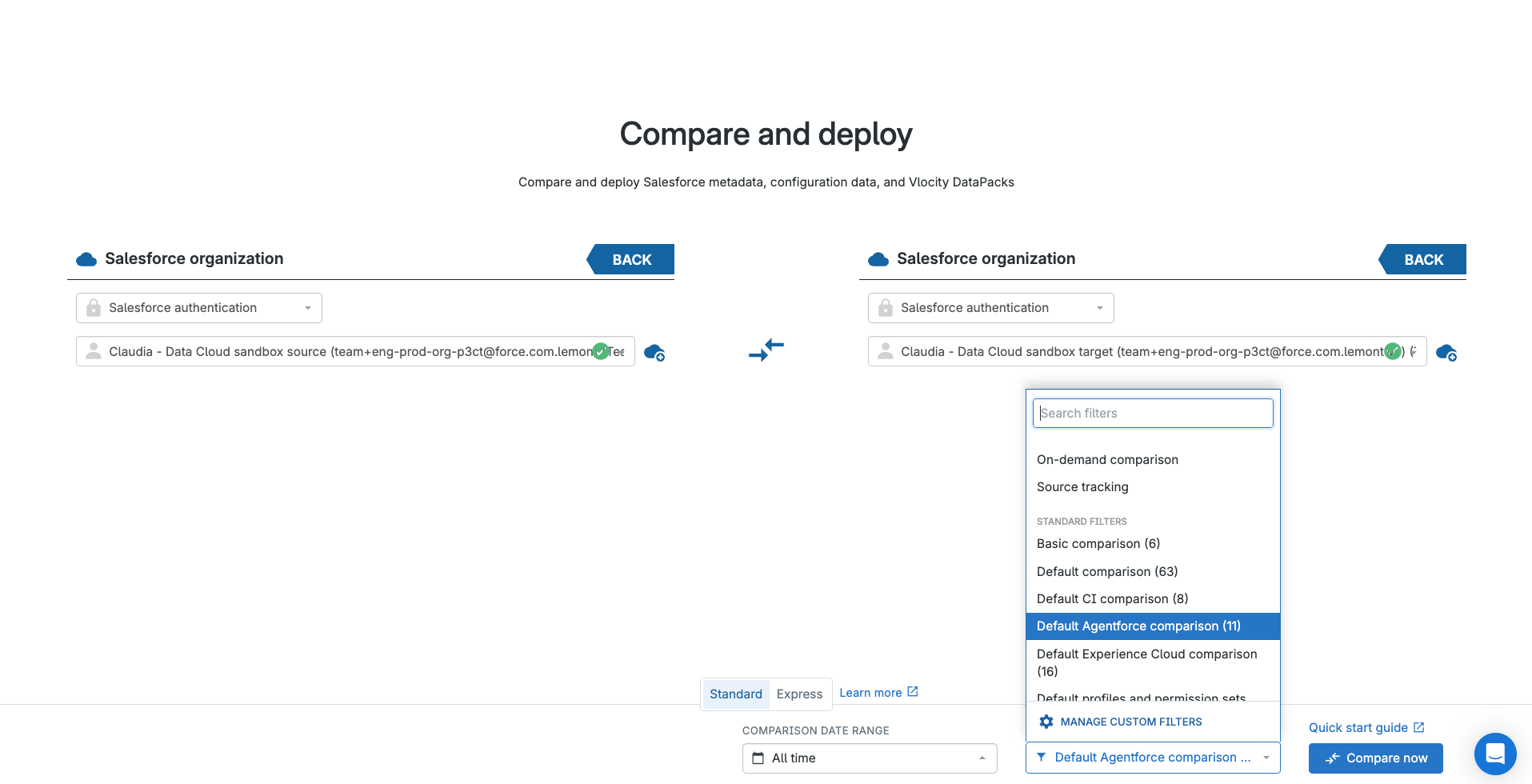
First, select the environments you need to move the Agent Script between. In this example, the source environment is a developer org and the target is a Git branch. Gearset’s default filter for Agentforce deployments is a solid starting point. It picks up Agent Script along with the rest of the metadata you need. Hit Compare now.
In the comparison view, you can see what’s new, changed and deleted. This Agent Script sits under the Changed tab, meaning it exists in the source and target but in different states. Click any item to see how it compares between environments and to check its dependencies.
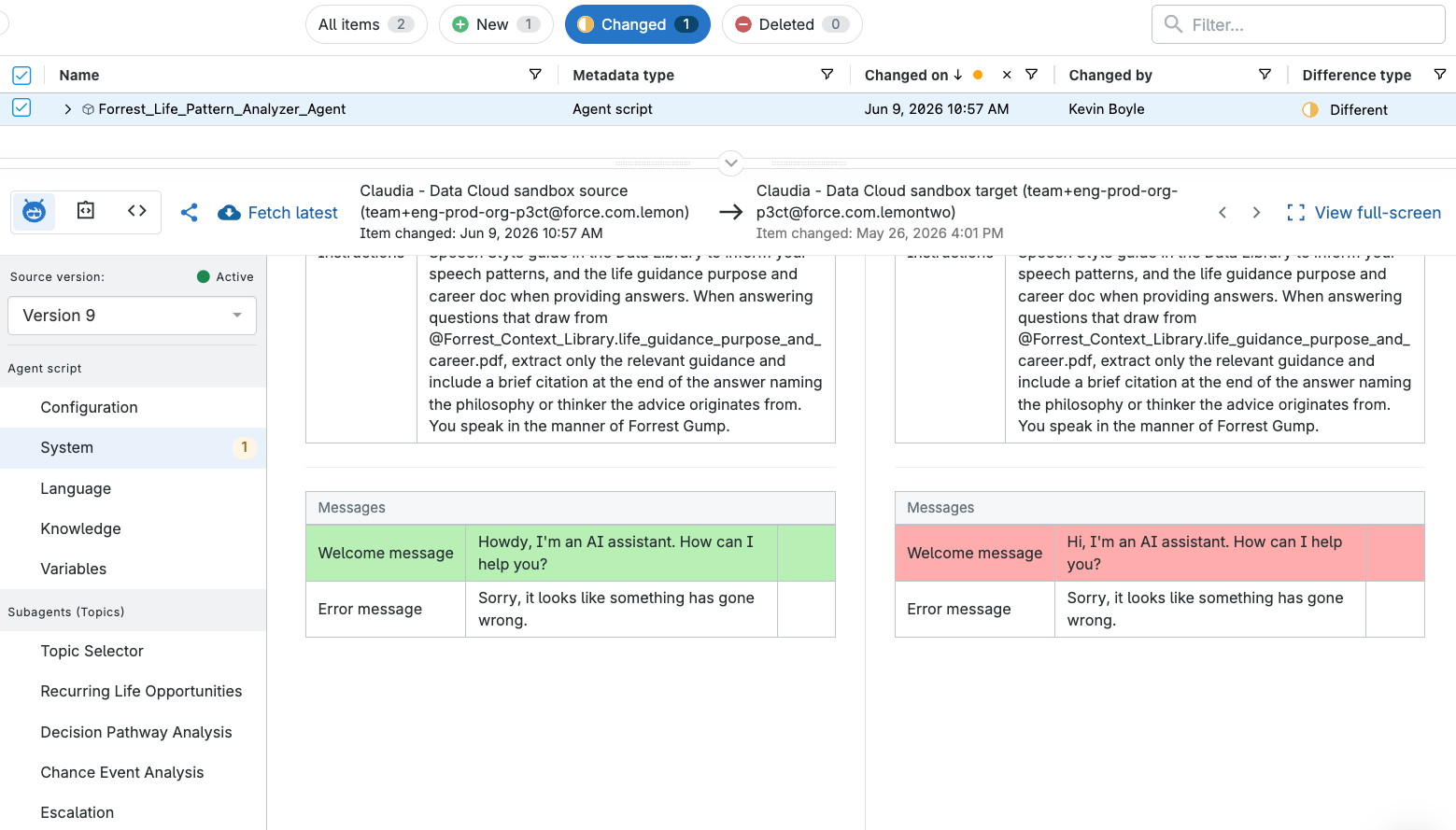
A note on versioning: Gearset’s comparison shows the latest version of the agent from the source against the latest version in the target. If your source org has multiple versions, use the Agent Script Visualizer to confirm which one’s current, or pick a different version from the dropdown if you need something other than the latest. For Git-to-org comparisons, Gearset always selects the latest version, so changes from different developers to the same agent merge correctly through your pipeline.
2. Select the changes to deploy
Deploying an Agent Script update means deploying the AiAuthoringBundle itself, nothing else. Skip Bot, BotVersion, and GenAiPlannerBundle: Salesforce generates all three automatically once the draft is committed in the target org, so they don’t belong in your deployment package.
If the Agent Script in the target org is already committed, Salesforce only allows a draft version to be deployed there, to stop active logic getting overwritten by accident. Gearset’s problem analysis checks for this and adjusts your deployment to a draft automatically, so you don’t hit a rejected deployment.
One error worth knowing: deploying a committed version against another committed version in the target gets rejected outright, with Salesforce returning a “you cannot deploy to a published bundle” error. Gearset’s automatic draft conversion is what keeps you from running into it.
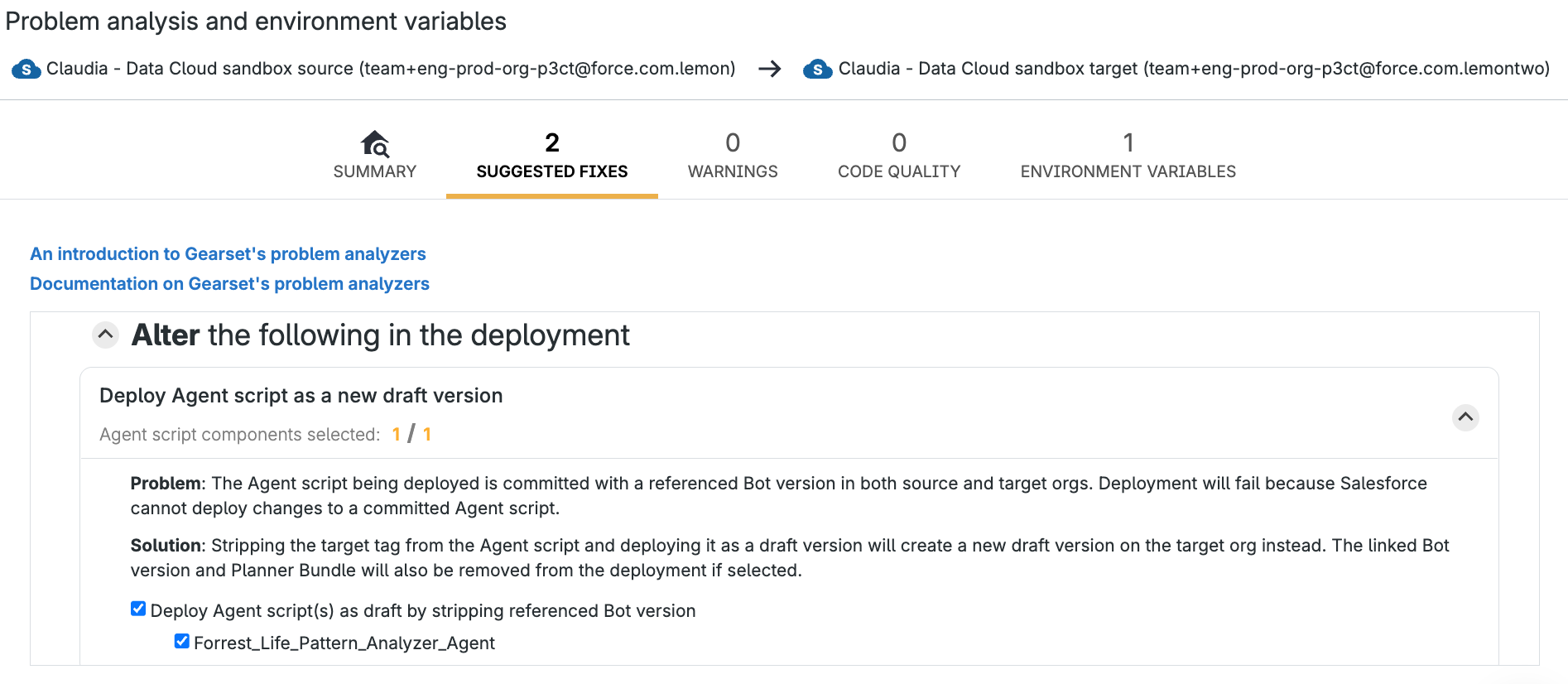
3. Deploy — and commit automatically
The next screen shows a summary of your deployment. Give it a name and leave a note. That becomes your deployment history, and doubles as the commit name and message if you’re committing to Git.
Turn on Commit Agent Script after deployment here. Without it, your Agent Script lands as a draft in the target, and someone still needs to log into Agentforce Builder and commit it before Salesforce generates the Bot, BotVersion, and GenAiPlannerBundle that make the agent actually run. Skip that step and the agent just sits there, deployed but inert. With it on, Gearset triggers the commit automatically once the draft deployment finishes, generating every dependent component with no manual step required. It’s currently available for org-to-org deployments, with pipeline support on the way.
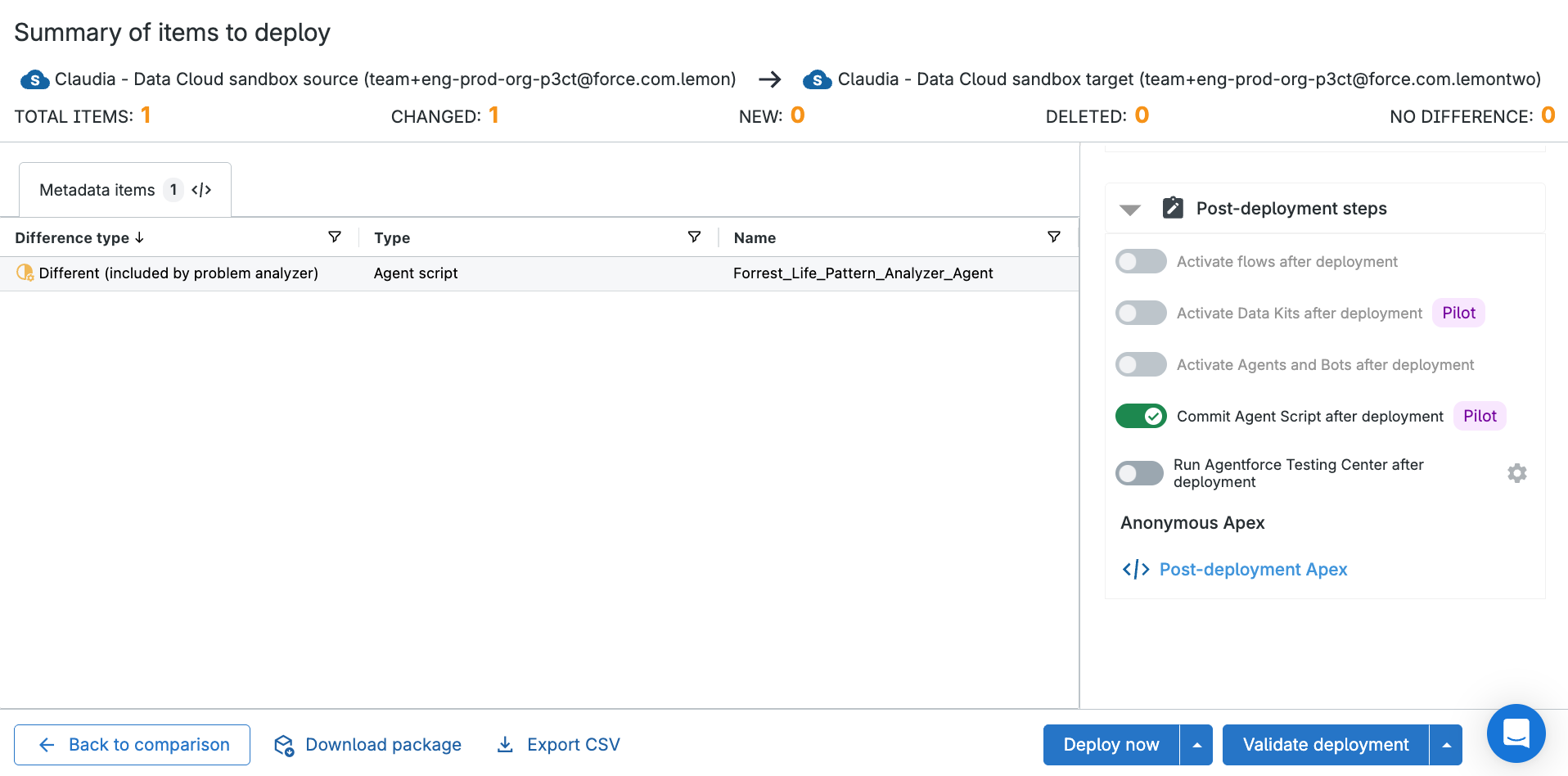
If you’ve integrated an issue-tracking solution such as Jira, attach the deployment here too. Deploying to a Salesforce org lets you kick off a Salesforce validation first, to confirm the deployment will succeed. When you’re ready, deploy or commit the changes, or schedule for later if a release window calls for it.
Once your Agent Script has deployed or committed successfully, Gearset’s results page surfaces the most likely next actions. Here, that’s probably opening a pull request. Full or partial rollback are options too, if you need them.
DevOps fundamentals for Agentforce success
To deliver success with Agentforce, your agents need to be built, tested, deployed and monitored like other Salesforce metadata. Deploying Agent Scripts with Gearset is just the start. The wider Gearset platform gives you an end-to-end process for the DevOps lifecycle, so you can innovate on the Salesforce platform with both speed and stability.
Get started with Agent Script
Don’t let deployment challenges hold you back from succeeding with Agent Script. Try Gearset today on a free 30-day trial to test out deploying your metadata in a few easy steps. And you can book a tailored demo with one of our DevOps experts to see how Gearset will help get your Agentforce implementation on track.