
The format your Salesforce metadata lives in shapes how smoothly your team ships changes to your users. It rarely gets attention until the problems show up: merge conflicts, unreadable diffs, and slower releases. By then the cost is already built into how your team works.
Salesforce gives you two ways to store and move metadata — metadata API format and source format. Both describe the same org and the same configuration. The difference is structure, and that structure has a direct effect on your version control, your code reviews, and your deployment speed.
This post explains what each format is, why the difference matters, and why moving to a purpose-built DevOps platform is easier than upgrading your setup yourself.
What is metadata format?
Metadata format — often called Metadata API format, or MDAPI — is the original way Salesforce represents your metadata. If you’ve deployed with change sets, the Force.com Migration Tool, Ant, or Workbench, you’ve already worked with it.
It’s called Metadata API format because it mirrors the structure used by the Salesforce Metadata API for metadata retrieval and deployment.
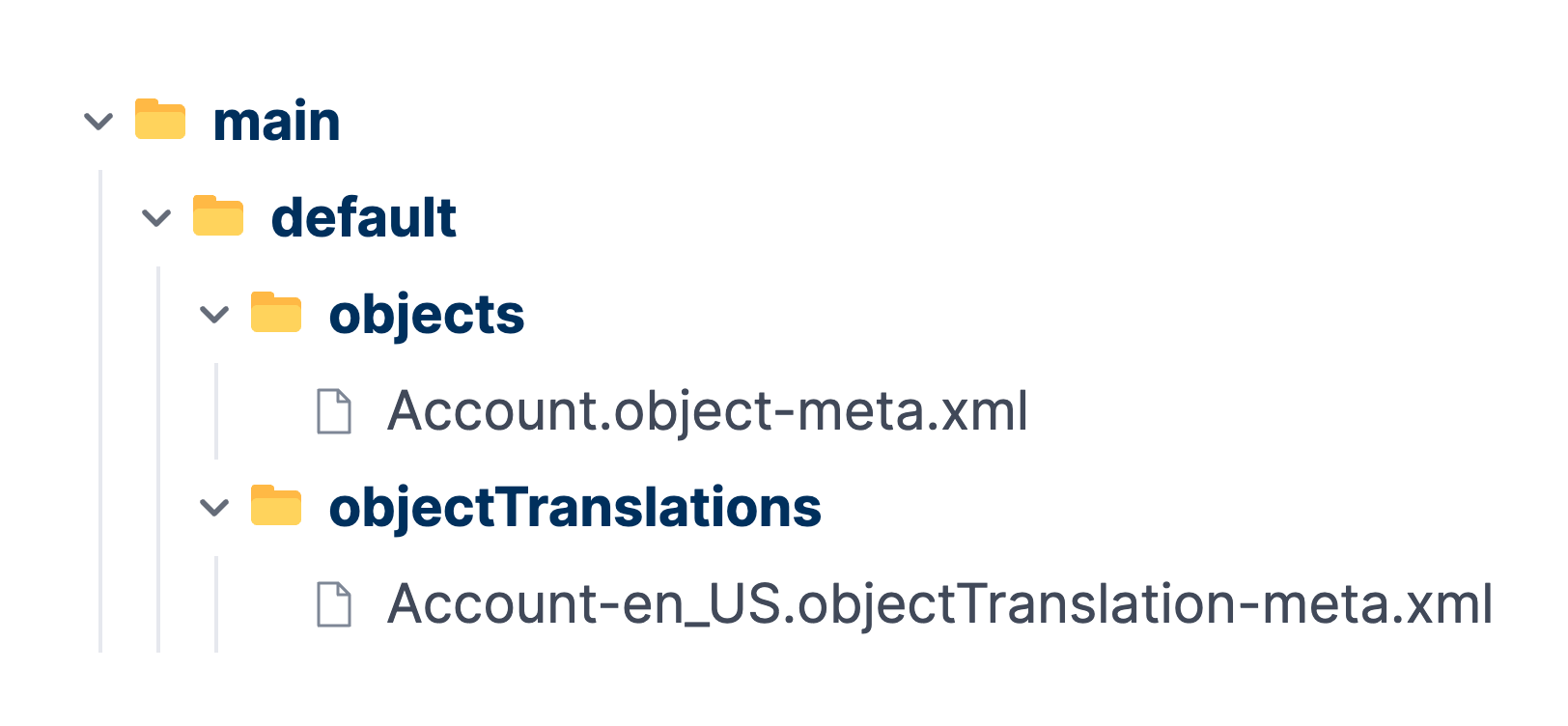
In this format, related components sit together. A single custom object file holds its fields, validation rules, list views, and more in one long XML file. A package.xml manifest is required too: it sits alongside your folders and lists every component in a deployment.
A retrieved org uses a flat directory layout — for example, an objects folder, a classes folder, and a layouts folder. Open Account.object and you’ll find every customization for that object packed into a single file. The structure mirrors how the Metadata API hands metadata back to you, so it feels familiar to anyone who has scripted a deployment.
This was the only option for years, and plenty of teams continue to deploy this way today. The Metadata API itself remains the engine Salesforce uses to move metadata between orgs, whatever format you store it in.
The trade-off appears once that metadata reaches your version control. When dozens of fields and rules share one file, even a small change rewrites a long block of XML inside that single file. That’s where teams start to run into recurring merge conflicts and spend time untangling failed deployments.
Here’s a typical metadata format repository:
What is source format?
Source format arrived with Salesforce DX to support source-driven development — an approach where your Git repository, not your org, becomes the source of truth. It describes the same metadata, but breaks it into smaller, modular pieces.
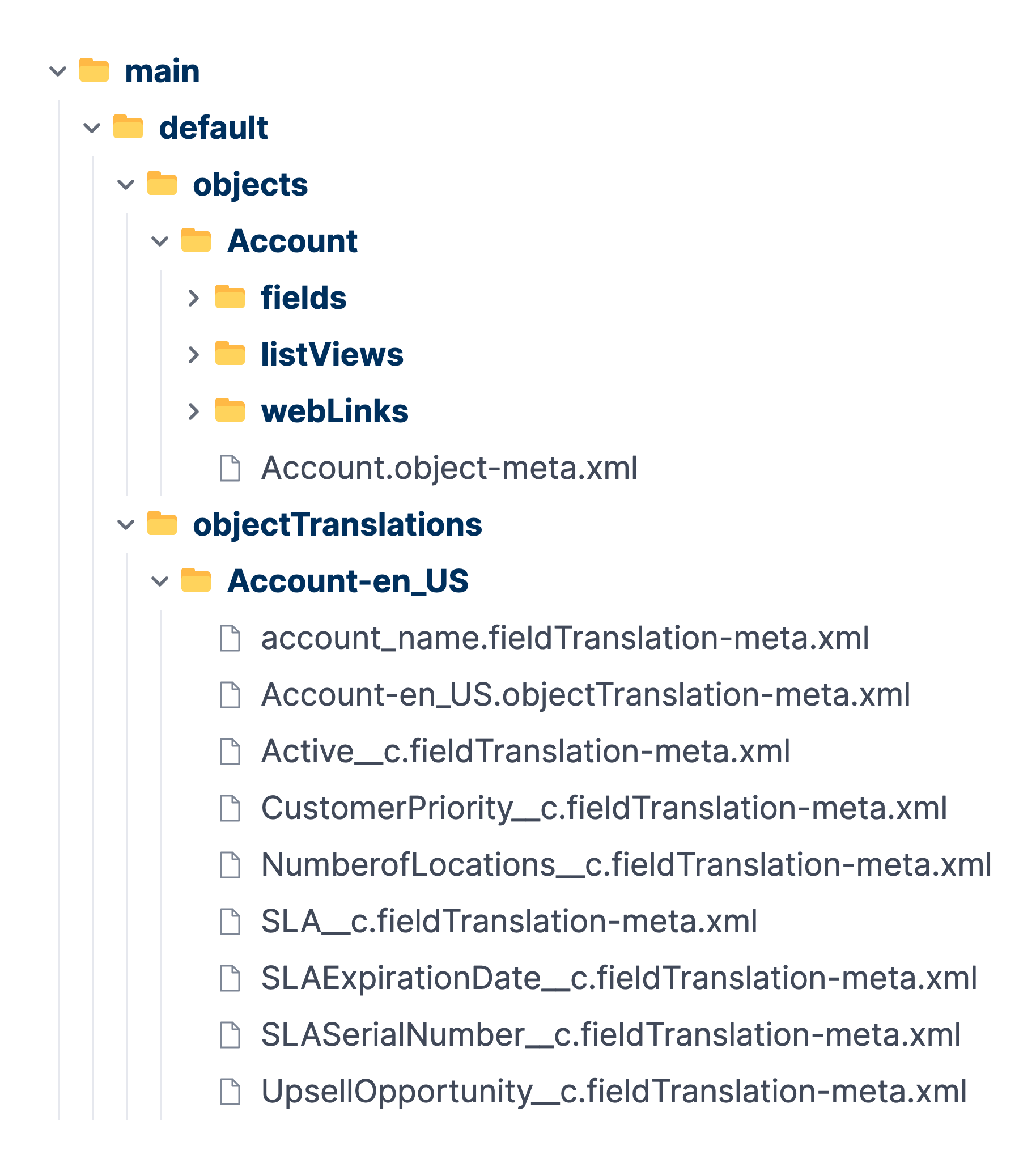
Instead of one file per custom object, source format gives each field, validation rule, and list view its own file inside a clear, hierarchical folder structure. An sfdx-project.json file defines your package directories, so Salesforce knows where each piece belongs.
The Account object becomes a folder under force-app/main/default. A fields directory inside it holds one file per field, a listViews directory holds the list views, and so on. Apex classes, email templates, and other types follow the same pattern. Nothing is lost — the same metadata is simply spread across many small files instead of packed into a single object file. This breaking down of large files into smaller ones is called decomposition.
You’ll see source format if you’re a Salesforce developer working with scratch orgs, sandboxes, the Salesforce CLI, or an SFDX project set up for modern development. The CLI converts metadata between the two formats: sf project convert source and sf project convert mdapi move the same org between representations.
Smaller files are optimized for the way Git and other version control systems track changes, and they keep review performance high as your codebase grows. When your team works in broken-down folders rather than one large file, merge conflicts become far less likely.
Here’s a typical source format repository:
Salesforce metadata format vs source format: why the difference matters
Both formats deploy the same metadata, so the choice can look cosmetic. It isn’t. The structure of your files decides how readable your changes are and how often your team’s work collides. That’s the practical core of the Salesforce MDAPI vs source format question, and two areas show the difference most clearly: code review and merge conflicts.
What cleaner diffs mean for your reviews
A diff shows what changed between two versions of a file. In metadata format, a single edit to one field alters a large object file, so the diff carries the contents of the whole object — far more than the actual change. Reviewers have to find the real edit among unrelated lines.
Source format keeps each component in its own file. When a Salesforce developer creates a field, the diff shows that field and nothing else. Your reviewers see exactly what changed, accept it with confidence, and move on. Cleaner diffs mean faster, more reliable code reviews — and fewer mistakes slipping through.
For example, take a routine pull request that creates two fields and edits a validation rule. In metadata format, all three changes land in the same single file, and the diff can run to hundreds of lines once the formatting shifts. In source format, the reviewer sees three small, separate files, and the intent is obvious at a glance.
Granular files mean fewer merge conflicts
Merge conflicts happen when two people change the same part of the same file. In metadata format, two Salesforce developers editing different fields on the same custom object touch one shared file, so Git flags a conflict even though their work doesn’t actually clash. Someone has to stop and untangle the XML by hand.
Source format avoids many of these cases. Different fields live in different files, so parallel work rarely collides. As your team grows and more changes land at once, that difference compounds into fewer conflicts, less manual cleanup, and a team free to continue building.
Where source format still leaves gaps
Source format reduces merge conflicts sharply, but it doesn’t remove them. By default, Salesforce DX decomposes custom objects and custom object translations — not everything. Profiles, permission sets, sharing rules, workflows, and external services still land in large, shared files, so two Salesforce developers working on the same profile can still collide.
You can opt into decomposing some of these types, though several remain in beta. A whole ecosystem of community merge drivers exists precisely because the gap is real. For example, teams routinely add a custom driver just to handle profile and permission set merges. So, source format is the right default, but the format alone won’t resolve every conflict.
Why moving to source format is harder than it looks
Given the benefits, switching to source format sounds like a quick win. But the reality is more involved, because format isn’t a single setting you toggle on and off.
Moving to source format means converting your repository, then adjusting everything built around it. Your branching strategy, your automations, and the commands your team relies on may all assume the old structure. Converting the files is the quick part. Reworking the pipeline that depends on them is the larger, heavy lift job.
The conversion itself has traps. Convert a large repository in one pass and Git often fails to detect the renames, so you lose the history that makes version control valuable in the first place. Doing it safely means converting in smaller batches and raising Git’s rename limit so it accepts the moves as renames — slow, careful work.
Some environments add another constraint. Restricted or regulated orgs don’t always offer the same capabilities as standard ones, and a workflow that runs fine in one place may not exist in another. Teams sometimes discover this partway through a migration, after the planning and early conversion work are already done — which turns a routine upgrade into wasted effort.
The effort also depends heavily on your DevOps platform. Some legacy platforms, like Copado, treat source format as a separate pipeline type, so adopting it means migrating from one pipeline to another. If you’re facing a migration inside your existing platform, the rework required to upgrade your existing setup can take more work than moving to a different platform altogether.
Weighing your options
Once you decide source format is worth it, you have four realistic paths. Each carries a different mix of effort, risk, and long-term payoff, so be honest about the trade-offs before you commit.
Stay on metadata format. This is the lowest-effort option, and a reasonable one for a small, stable team. Nothing changes — but nothing improves either. The unreadable diffs, merge conflicts, and review friction stay as they are, and they grow with your team.
Convert your existing repository in place. You keep your history, your platform, and your current processes, and you gain cleaner diffs. The cost is the rework above: converting carefully, then updating the branching strategy, automations, and commands built around the old structure. For a large repository, that can run to weeks.
Migrate your repository and modernize your tooling together. Rather than rework a pipeline that was never built for source format, you move to a platform built for source-driven development and adopt source format as part of the same project. It looks like a bigger change, but it often takes less total effort than upgrading a legacy setup — and it leaves you better positioned as you scale.
Start fresh on a modern platform. If you’re setting up Salesforce DevOps for the first time, there’s no migration at all. You start on source format from day one and skip the conversion question entirely.
There’s no default winner. The right path depends on your starting point, your DevOps maturity, and how much disruption you can absorb.
When migrating platforms is the easier move
Upgrading a legacy pipeline to support source format can take weeks of careful rework and you finish on the same platform that made the move hard in the first place. Moving to a platform built around source-driven development can take less effort and leave you in a stronger position overall.
When your repository is empty, Gearset writes your metadata in source format, so you start on modern footing without a conversion project surfacing later. It even creates the sfdx-project.json for you, so the structure is correct from the first commit. That holds even in regulated environments — even teams on GovCloud get source format from day one too.
Because Gearset understands Salesforce metadata rather than treating it as plain text, Pipelines resolves many merge conflicts automatically — including conflicts on the profiles and permission sets that source format doesn’t fully decompose. The format question stops being something you manage and becomes a default you rely on.
For a team facing a painful pipeline upgrade, moving to a platform built for source-driven development can be the smaller, more durable project — and the one that keeps delivering as you scale.
Choosing the right path for your team
There’s no single right answer, but the first question is the simplest: are you starting fresh, or working with an existing setup?
If you’re building a new Salesforce DevOps setup, start on source format. It’s Salesforce’s recommended default for new projects, because it aligns with the modern development model and supports Git-based development, CI/CD, scratch orgs, and packaging. There’s no advantage to starting on metadata format and converting later.
If you already have an existing repository, the decision is more involved — and it depends on more than team size. Weigh your current DevOps maturity, how much parallel work your team does, the size and complexity of your repository, the constraints in your environments, and whether you have the bandwidth to convert from metadata format to source format.
A small, stable team making occasional changes may find metadata format manageable for now, so the move can wait. But once parallel work rises and merge conflicts cost you time each week, source format will repay the effort.
Want to see how a platform built for source-driven development handles source format and merge conflicts from the start? Book a demo or sign up for a free 30-day trial now.

