
More Salesforce teams move from Copado to Gearset every quarter. The trigger is rarely one missing capability, but the accumulated cost of running a DevOps platform that installs inside your Salesforce org.
Teams switch from Copado to Gearset for a variety of reasons that compound over time: complete visibility into your code, fewer failed deployments, more responsive support, and a lower total cost of ownership. Underneath both platforms sits one structural difference — how each is built.
This post covers what drives the switch, where Copado is still the right choice, and what migrating actually involves, including how to move before your Copado contract ends.
The same job, but not the same platform
Both Salesforce DevOps platforms handle the same job: moving Salesforce metadata — the Apex, flows, validation rules, and email templates behind your configuration — from a developer’s sandbox into production safely and repeatedly. That’s the essence of Salesforce DevOps: source control, automated testing, and deployment pipelines applied to a platform that wasn’t originally designed for them.
On the core CI/CD checklist, Copado and Gearset look similar. Both offer CI/CD (continuous integration and delivery, which automatically tests and releases changes as your team makes them), Git-based version control, automated testing, and release management across multiple Salesforce environments.
Look beyond deployment, though, and the platforms diverge. Gearset is a full DevOps platform, covering the end-to-end lifecycle in one place: native backup and restore, sandbox seeding, and complex Salesforce data and CPQ deployment that maps record relationships for you. Copado leaves gaps here. It has no dedicated backup and restore of its own, partnering with a third party instead, and moving CPQ (now Revenue Cloud) configuration and reference data typically means add-ons, scripts, and manual rework that break on relationships and record IDs.
But when it comes to the core Salesforce DevOps tools, the question isn’t only what one does — it’s how they’re built, and the underlying architecture that everything revolves around.
The architecture differences between Gearset and Copado
The biggest difference between Copado and Gearset is where each platform runs. It sounds like an implementation detail, but what a lot of teams don’t realize is that it’s actually the root cause of most of the reasons they switch.
Managed package vs off-platform SaaS
Copado installs into your Salesforce org as a managed package — a self-contained app that lives inside the Salesforce platform itself. Gearset is available through the Salesforce AppExchange but runs as an external SaaS app, connecting to your Salesforce environments through the API and working entirely in your browser. It layers on top of your existing source control, whether that’s GitHub, GitLab, Bitbucket, or Azure DevOps.
The benefits of an off-platform SaaS app ripple through deployment success, reliability, upgrades, and cost.
What the managed-package model costs you
Because Copado lives inside your org, it inherits your org’s constraints. It’s subject to Salesforce governor limits (the platform’s caps on how much processing runs in a single transaction), it needs a manual upgrade each release cycle, and its tooling will go offline during any Salesforce outage.
Gearset avoids all of that. There’s nothing to install, nothing to upgrade, and no managed package competing for resources inside your org. Your pipelines, deployment history, and backups stay available even when Salesforce is down.
It also keeps your org clean. A managed package installs its own objects, fields, and permission sets into the very org you’re trying to manage — more metadata to wade through every time you deploy. Running off-platform leaves your org untouched. And because the heavy lifting — metadata comparisons, dependency analysis, large data moves — runs on infrastructure built to scale, it isn’t throttled by the governor limits that slow an in-org package down on exactly the large, complex orgs where it matters most.
Gearset vs Copado: a side-by-side view
Here’s how the two platforms line up on the points that most often drive a switch. Copado earns credit where it genuinely delivers — the differences that matter are structural, not cosmetic.
| Capability | Gearset | Copado |
|---|---|---|
| Architecture | External SaaS, connects via the Salesforce API | Managed package, installed inside your org |
| Setup time | Days | Months, usually needing help from an implementation partner |
| Upgrades | Automatic, nothing to manage | Manual, each Salesforce release cycle |
| Governor-limit exposure | None — runs outside your org | Subject to your org’s governor limits |
| Metadata comparison | Deep, visual org-to-org and org-to-source diff | Available |
| Dependency resolution | Automatic, with 100+ problem analyzers before deploy | Often traced by hand at deploy time |
| Merge conflict resolution | Guided, in-app resolution | Often manual branch editing |
| Source control | Git-first, works with GitHub, GitLab, Bitbucket, Azure DevOps | Git, managed behind Copado’s opaque middle layer |
| Change control | PR-based approvals, continuous production monitoring | Unapproved changes can slip through |
| Automated testing | Built in | Built in (Copado Robotic Testing) |
| Code review | Built-in static analysis across Apex, flows, Lightning web components, and more | Static analysis needs a separate integration |
| AI and agents | A virtual teammate submitting changes to your pipeline | Separate per-stage chatbots with a standalone orchestration layer |
| Data & CPQ deployment | Native, maps record relationships for you | Add-ons, scripts, and manual rework |
| Sandbox seeding | Built in | Available as a separate capability |
| Multiple orgs | Manage many orgs from one platform | Supported |
| Rollback | Snapshot-based, available after any deployment | Opt-in per deployment — no rollback for anything not set up for it beforehand |
The table makes the pattern clear: Copado matches Gearset on core capability, but its in-org architecture adds friction to the everyday work of shipping changes.
Salesforce DevOps in the age of AI: is your custom pipeline ready?
The reasons teams actually make the move
These are the switching triggers teams cite most often, drawn from independent review data and from the teams we speak to often who want to make the move to Gearset.
Full visibility into your Git repository
With Gearset, your pipeline sits back-to-back with your own Git repository. You see exactly what’s being deployed, down to the individual change, and you approve it before it goes to production. Nothing hides behind a hidden layer, and you stay in total control of what changes go live.
Copado manages Git for you, behind its own opaque middle layer. That can feel convenient, but it obscures what’s actually in your repo — and it’s how environments quietly drift out of sync, or how teams end up with a sprawl of stale branches no one can account for.
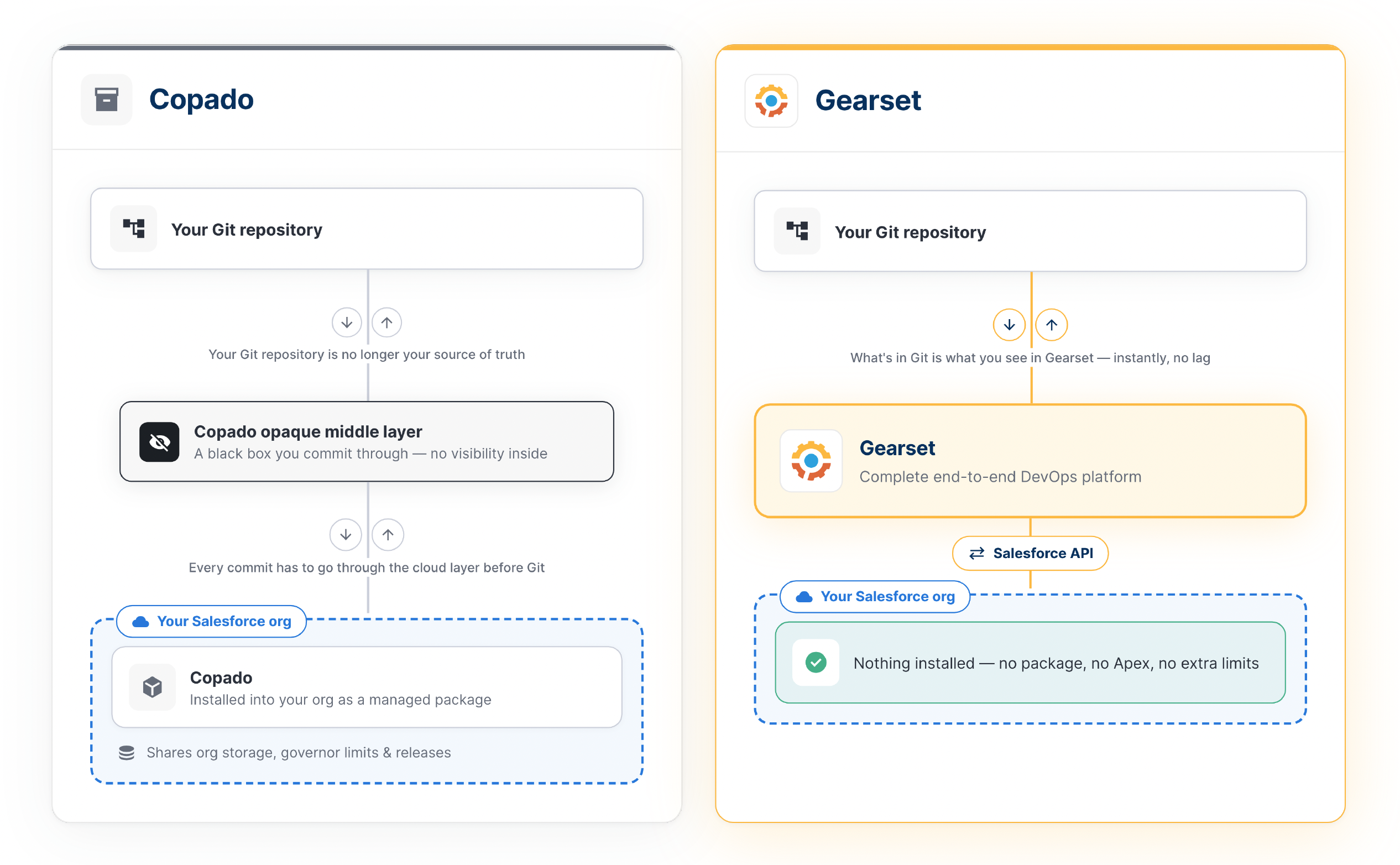
Gearset keeps your source control and your orgs in sync. It continuously compares environments, so metadata stays in sync, drift shows up the moment it appears, back-promotion is straightforward instead of painful, and your branching stays clean.
That visibility extends to control over what reaches production. Every change flows through a pull request, so nothing ships without review and unapproved edits can’t slip in — and Gearset monitors production continuously, tracing every change back to whoever made it. For a growing team, that combination of transparency and control is often the difference they notice first after moving off Copado’s abstracted model.
Fewer failed and derailed releases
Missing dependencies are the classic cause of failed Salesforce deployments. In Copado, they often surface at deploy time as failed validations, leaving your team to trace the missing metadata by hand.
Gearset takes a different approach to dependency resolution. Over 100 problem analyzers check your deployment before it runs and pull in dependent metadata automatically, so more changes succeed on the first attempt and your deployment success rate climbs. That removes a large chunk of manual work from every release. Jesse Fusselman, Manager of Business Applications at Thumbtack, put the daily impact plainly:
“We hit so many errors that it was actually painful to deploy changes into production with Copado.”
Merge conflicts are another common complaint. In Copado, resolving them often means editing feature branches by hand — slow and easy to get wrong under deadline. Gearset surfaces conflicts clearly and resolves them in a guided interface, so merges stay clean and releases stay on schedule.
Between dependencies caught up front and conflicts resolved cleanly, more releases land first time — with fewer rollbacks and fewer blocked sprints.
Support that answers in under five minutes
Of everything on this list, support is where teams feel the difference most sharply. When a deployment fails halfway through a release, how fast you reach someone who can actually help can be the decider on whether you ship today or slip the sprint.
Copado support runs on tickets. You log the issue, wait in a queue — often for a first reply that points you back to docs — and a single problem can drag on for weeks while your release stalls. Gearset gives you in-app chat staffed by engineers, not a first-line queue, answering in under five minutes — a real answer while the context is still in front of you.
The gap shows up in the scores. On G2, Gearset users rate quality of support at 95% against Copado’s 84% — and it doesn’t stop at support. Reviewers report going live in half the time (an average of one month versus two) and reaching ROI a third faster (eight months versus twelve). You can see the full breakdown in the G2 comparison report.
Different visions for the agentic era
AI is reshaping how Salesforce teams build and deliver changes, and a vendor’s AI direction now carries as much weight in the decision as its current feature list.
The two platforms are taking different paths. Copado has added an AI chatbot to each tool across the lifecycle (plan, build, test, release, operate). These need coordinating by a separate orchestration layer, Agentia, which sits outside the core DevOps managed package.
In contrast, Gearset’s agent is a virtual teammate that picks up tickets and brings back a pull request. Where LLMs are trained on Salesforce documentation, the Gearset agent has built-in practitioner knowledge about how teams really build on Salesforce. It knows the context of your org and learns your patterns and standards.
For teams picking a platform to grow into, that trajectory of one contextual agent built into the pipeline, rather than chatbots layered onto each stage and stitched together, is increasingly part of why they choose Gearset.
Where Copado still makes sense
No platform wins every scenario, and pretending otherwise would be dishonest. Copado is a strong choice in a few specific situations.
If you’re a very large, highly-regulated enterprise with a large dedicated implementation budget, Copado’s services-led model fits how you already buy and deploy software. If keeping every workflow inside the native Salesforce interface matters more than anything else, its in-org architecture delivers that.
If this describes your team, Copado deserves a serious look. If it doesn’t, the reasons to switch outweigh the reasons to stay.
What switching actually involves
The biggest blocker to switching usually isn’t whether Gearset is the better fit. It’s the fear that moving will be disruptive. In practice, the move is more straightforward than most teams expect.
You don’t have to wait for your Copado contract to end. If you’re feeling the pain, it’s better to explore your options sooner rather than later. Many enterprise teams run an evaluation while their existing contract is still active, then transition when they’re ready. Because Gearset connects to your orgs through the API, there’s no managed package to install and only a very minimal amount of cutover time to schedule.
Gearset’s approach guides the migration, including the move away from Copado’s MDAPI-based format, so you’re not doing it alone.
That’s a world away from a Copado rollout, which comes with additional fees and often runs for weeks or months, usually with an implementation partner to configure deployment pipelines and train the team. Gearset teams are typically productive within days, whether they’re smaller teams of two or three or larger enterprise development teams onboarding dozens of Salesforce admins and developers. You get a dedicated onboarding team to guide the switch, and depending on your process, access to a DevOps Architect too.
How to decide
The Copado vs Gearset decision comes down to one question: what’s actually slowing you down? The right choice follows from the pain you’re trying to remove.
If your team loses hours to failed deployments and manual dependency hunting, or you can never quite see what’s in your repo, Gearset’s transparent Git model and deployment success approach target exactly that. If you’re tired of slow onboarding, upgrade cycles, and support tickets that stall releases, the architecture and support model are why teams like yours move. If your one hard requirement is staying fully native inside Salesforce alongside a large systems-integrator engagement, Copado may still be your fit.
Want to discuss your switch to Gearset?
Copado helped a generation of Salesforce teams move past change sets. For many of those teams, Gearset is the next step — the same release discipline, without the managed-package overhead.
See how the two line up on the Gearset vs Copado comparison to see what moving looks like for your team.
Want to try it yourself? Sign up for a free 30-day trial now.