
Every Salesforce org has metadata that nobody fully understands. Fields that were added for a project three years ago. Flows built by someone who’s since left. Apex classes that definitely do something important, but no one’s quite sure what.
The problem isn’t that this metadata exists — it’s that you can’t safely change anything until you know what depends on it. Salesforce gives you several ways to investigate, but none of them tell the whole story.
This guide covers how to search Salesforce metadata at scale. We’ll look at native tools and their limits, what the APIs can (and can’t) tell you, and how to get genuine dependency visibility across your Salesforce orgs using Gearset’s Org Intelligence.
Why searching Salesforce metadata is important
Without proper metadata search, seemingly simple changes can break production. Here are the scenarios where searching metadata stops being optional — these are the moments when not knowing what’s connected to what costs you hours of troubleshooting, emergency fixes, or worse.
Retiring a custom field: Before you can delete a custom field, you need to remove every reference to it. Salesforce blocks deletion if anything still uses the field, but the real challenge is finding those references. A field might be buried in a Flow that calls another Flow, hidden in Apex logic written by someone who’s left the company, or referenced in a validation rule you forgot existed. Safe retirement means finding and removing every dependency first.
Searching Apex code: Setup doesn’t offer cross-codebase search — you’re expected to work locally in VS Code or Code Builder. Text search is essential for finding error messages, debug statements, hard-coded values, and dead code across classes that have accumulated over years.
Finding hard-coded IDs and URLs: Record IDs are environment-specific. An ID that works in a sandbox may not exist in production, or worse, point to something completely different. The same goes for instance URLs like na1.salesforce.com. These need to be found and replaced before deployments or org migrations.
Cleaning up unused metadata: Every org accumulates clutter — fields no one uses, Flows that were replaced but never removed, Apex classes that haven’t run in years. Search helps find candidates, but safe cleanup requires checking dependencies too. A field with no data might still be referenced in a validation rule.
Uninstalling managed packages: Salesforce blocks uninstallation if anything references a packaged component — even an old email template. You need to find every SBQQ__ reference (or whatever the namespace is) before you can cleanly remove a package.
Security audits: Before release, scan for high-risk permissions like ModifyAllData that crept in during development, hard-coded API keys that should be in Named Credentials, and sharing rules that expose data to guest users.
Org splits and mergers: Hard-coded IDs, instance URLs, and email addresses will break when metadata moves between orgs. Search surfaces these so they can be replaced with dynamic alternatives like Custom Metadata or Custom Labels.
Does Salesforce have native metadata search tools?
Salesforce gives you several native ways to investigate metadata, but there’s no unified search feature. Instead, you get targeted tools — useful for quick checks, but with real limits on what they can surface.
For simple questions, they’re usually enough. But for anything involving scale, chained dependencies, or comprehensive metadata analysis, they’re a starting point at best.
The “Where is this used?” tool
“Where is this used?” is Salesforce’s most familiar dependency tool. You’ll find it on custom field detail pages in Setup — click it and you get a list of components that reference that field, with links where possible.
The tool covers layouts, validation rules, formula fields, Apex, Flows, Lightning components, and some reports. For quick, low-risk changes, it’s a reasonable first check.
The limits are worth knowing. It only works for custom fields and caps results at 2,000. It also won’t reliably show you managed package references in subscriber orgs, and it can’t follow the chain — so if a Flow calls another Flow that uses your field, you won’t see that connection. Some report relationships and complex Apex patterns slip through too.
It’s a reasonable starting point for quick checks, but if you’re planning anything more than a minor change, you’ll want a fuller picture of what’s connected.
The Metadata API
For comprehensive, repeatable metadata operations, Salesforce’s Metadata API is the foundational tool. It’s designed for bulk retrieval and deployment of configuration, and it underpins source control, CI/CD pipelines, and modern DevOps workflows.
Teams use it to retrieve metadata as structured XML files that can be versioned, compared across environments, and deployed in a controlled way.
That said, it’s worth setting the right expectations. The Metadata API isn’t optimized for interactive search or dependency analysis — it’s built for moving metadata around, not exploring it.
For more targeted inspection, Salesforce provides the Tooling API, which exposes metadata as queryable objects via SOQL. Dependency relationships are available through the MetadataComponentDependency object, but there are caveats. It’s been in Beta since Summer ’20 with no GA date in sight, isn’t covered under standard Salesforce support agreements, caps results at 2,000 records per query (100,000 total), and excludes reports entirely — those require Bulk API 2.0. Large orgs also need to keep an eye on API consumption.
In practice, teams layer these tools. The Metadata API handles bulk operations, the Tooling API supports interactive queries, and dependency data — used cautiously given its beta status and limits — informs impact analysis. Salesforce’s DevOps Center now abstracts much of this complexity for clicks-and-code teams, while platforms like Gearset add comparison, rollback, testing automation, and governance on top.
Salesforce DX
Salesforce DX is Salesforce’s modern development toolchain, designed to make metadata retrieval, search, and deployment repeatable and automation-friendly. At its core is the Salesforce CLI, which lets developers interact with an org by running commands instead of clicking through Setup.
For metadata search, the CLI is typically used to pull metadata locally so it can be inspected with standard development tools. Commands like sf project retrieve start download selected metadata as XML files (in source format), while sf project generate manifest --from-org <orgname/alias> creates a complete package.xml listing all the metadata types available in the source org. This makes it practical to retrieve large, complex configurations without manually enumerating components.
Once metadata is local, search becomes straightforward. Editors like Visual Studio Code allow global text search across all files, making it easy to find error messages, API names, or hard-coded IDs. Regex support enables pattern-based searches — useful for detecting 15- or 18-character record IDs or environment-specific URLs that would be difficult to locate through the UI.
The CLI also supports incremental workflows. Source tracking keeps tabs on what’s changed between environments, reducing the need to repeatedly retrieve entire orgs. For teams comfortable with Git and the command line, this approach offers transparency, repeatability, and speed.
The Tooling API for targeted searches
The Tooling API solves a specific problem: how to inspect and query metadata interactively, without downloading an entire org. It’s designed for fine-grained access to development artifacts and is especially useful when you know what you’re looking for and want fast answers.
Unlike the Metadata API, which works in bulk and file-based operations, the Tooling API exposes many metadata components — Apex classes, triggers, validation rules, Flows, custom fields — as queryable objects. This lets you ask focused questions like “Which Apex classes contain this text?” or “Which validation rules reference this field?” and get results directly from the org.
This makes the Tooling API ideal for interactive tooling, custom scripts, and IDE features. Many Salesforce developer tools, including VS Code extensions and browser-based IDEs, rely on it behind the scenes to power search, navigation, and real-time inspection.
It’s worth noting that the Tooling API is optimized for targeted queries, not full-org analysis, and it doesn’t expose every metadata type. For understanding relationships between components, it’s often paired with the Dependency API (also part of the Tooling API), which provides structured reference data — though with the same beta status and query limits mentioned earlier.
In modern workflows, the Tooling API complements the Metadata API: one enables fast, precise searches; the other supports bulk retrieval and deployment. Together, they form a practical foundation for exploring and managing Salesforce metadata without relying on manual Setup navigation.
The Dependency API: mapping metadata relationships
Understanding how Salesforce metadata is connected is often more important than finding where a string appears. That’s where the Dependency API comes in. Exposed through the Tooling API via the MetadataComponentDependency object, it provides structured relationship data showing which components reference other components.
This API answers questions like “What uses this field?” or “Which components will be impacted if I change this Apex class?” Instead of relying on text matching, it models dependencies explicitly — making it far more reliable for impact analysis than searching XML files or code alone.
But it’s important to understand what it can and can’t do. The Dependency API remains a Beta feature, has been in preview for several years, and isn’t covered under Salesforce’s standard support agreements. It only returns direct dependencies, so if you need to trace deeper chains — a field used in a Flow that’s called by another Flow — you’ll need to query recursively. It also enforces strict query limits and excludes reports and dashboards, which require separate Bulk API-based analysis.
Because of these constraints, the Dependency API is best used as one input, not a single source of truth. Teams typically combine it with bulk metadata retrieval, targeted Tooling API queries, sandbox testing, and higher-level tooling that automates dependency traversal.
When used appropriately, the Dependency API provides valuable structural insight. But in modern Salesforce environments, comprehensive dependency mapping requires layering multiple approaches.
Gearset’s Org Intelligence: advanced metadata search
Org Intelligence gives you instant visibility into your Salesforce org’s metadata — components, dependencies, permissions, and change history — without repeatedly querying APIs, exporting files, or navigating Setup pages.
By eliminating the one to two weeks many teams spend exploring an unfamiliar org before real work begins, Org Intelligence turns metadata discovery into an instant, team-wide capability rather than a specialist task.
Dependency visualization and impact analysis
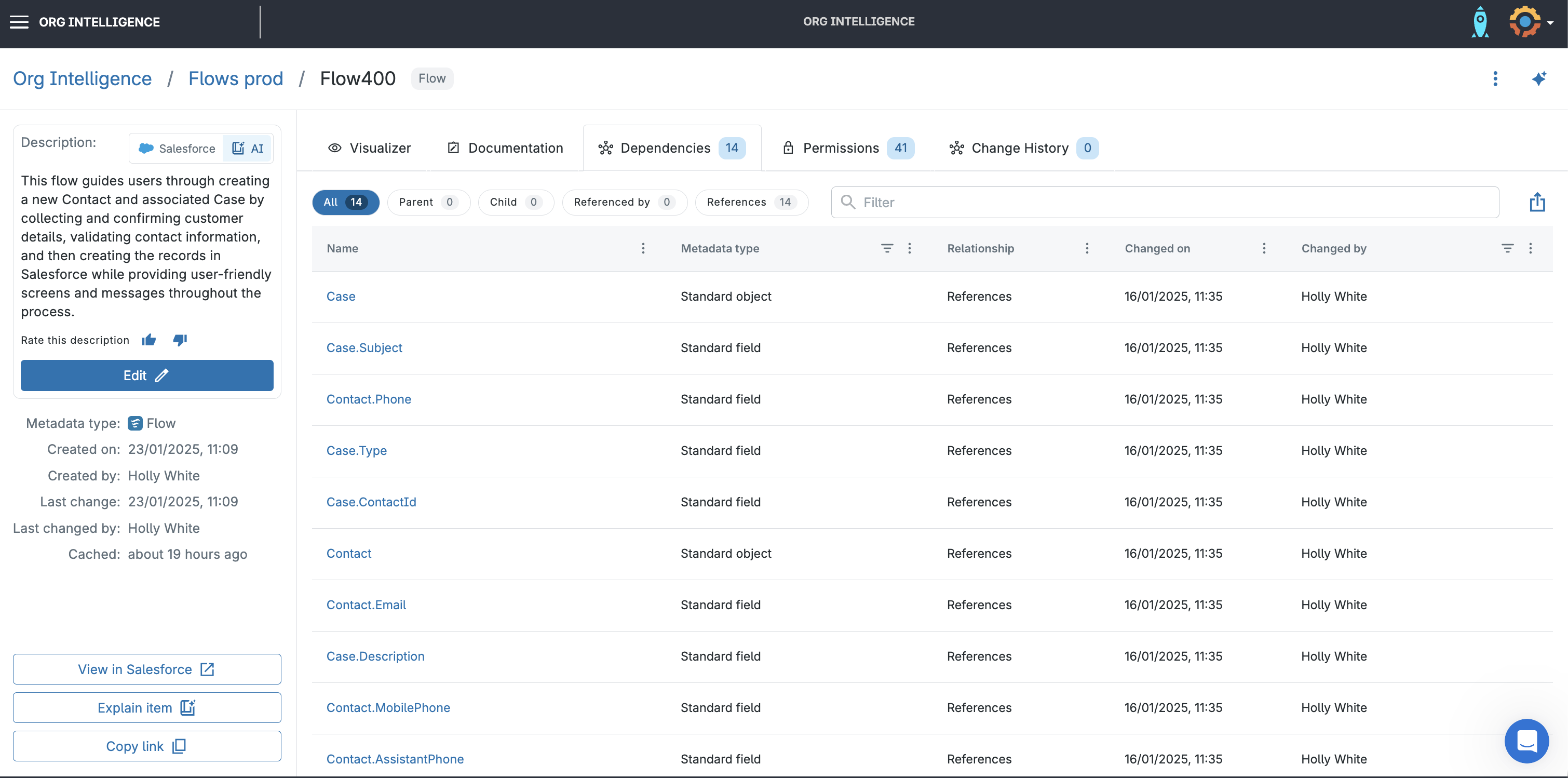
Gearset builds and maintains its own dependency graph, going beyond Salesforce’s native dependency data to surface multi-level relationships. You can see chains like a field used in a Flow, triggered by another Flow, invoked by Apex — all in a single view.
This turns impact analysis into a repeatable process. Before making a change, you can see the full blast radius, reducing deployment failures and last-minute surprises.
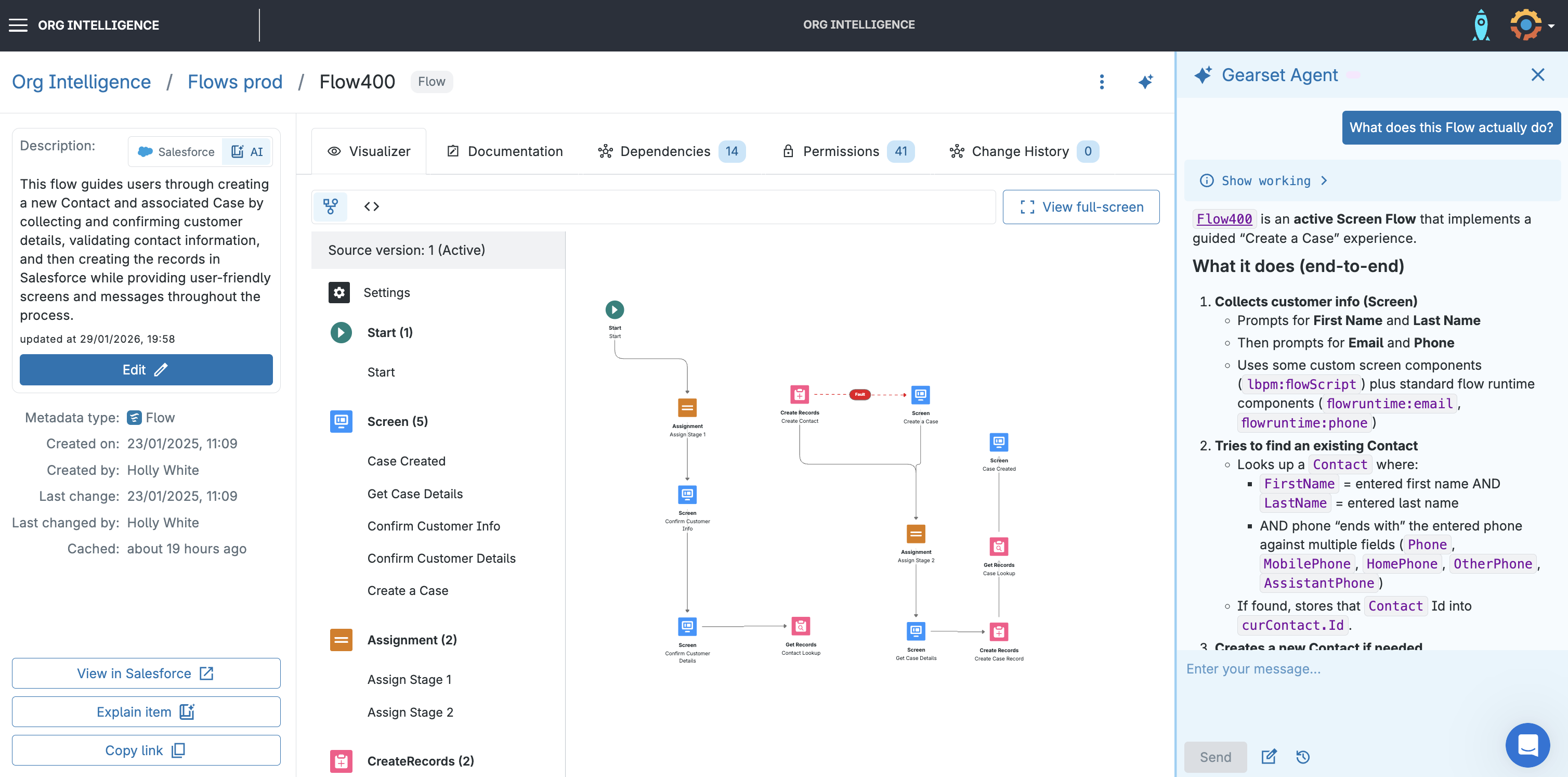
Org Intelligence also includes an interactive Flow Navigator. Click through Flow logic step by step, with AI-generated explanations you can reuse for documentation and reviews.
Searching and filtering metadata
Org Intelligence makes it easy to locate and understand metadata without navigating dozens of Setup pages or writing API queries.
Search is component-focused, not text-based. Find a specific Email Template, Flow, custom field, or permission set, then immediately see how it’s used elsewhere in the org. Filter by metadata type, last modified date, or who made the change — useful when investigating recent issues or preparing a release.
Cross-checking automation takes seconds. See where a field is referenced across Flows, validation rules, Apex, and other logic without jumping between Setup sections or running multiple API calls. Permission visibility shows which profiles and permission sets grant access to a component, instantly answering “who will be affected by this change?”
Every component includes change history: when it was created, last changed, and by whom. This answers “what changed before this broke?” without digging through Setup or Git logs.
AI-powered assistance with Gearset Agent
Gearset Agent adds a conversational layer on top of Org Intelligence. Ask natural-language questions like “Which Apex classes don’t have test coverage?” or “What does this Flow actually do?” and get answers grounded in your actual org metadata, not generic Salesforce guidance.
When the Agent references a component, it’s clickable — taking you directly to its dependencies, permissions, and change history. This makes exploration feel easy and interactive, not frustrating.
For developers, the Agent can generate starter artifacts like test class scaffolding or documentation summaries. Because it’s tightly integrated with Org Intelligence, responses stay accurate and current.
Identifying technical debt and unused metadata
Org Intelligence also helps teams systematically uncover unused metadata. By analyzing its dependency graph, Gearset highlights components with no incoming references — fields, Apex classes, or automation no longer used anywhere in the org.
This goes beyond simple inactivity checks. Combine dependency insights with change history and ownership to understand why a component exists and whether it’s safe to remove. Built-in problem analyzers surface risks early, reducing guesswork and over-reliance on the knowledge of one person — causing a single point of failure.
The result: a leaner org with faster tests, simpler deployments, and lower long-term maintenance costs — without requiring every decision to run through a single architect.
Streamline metadata search in your org with Gearset
Salesforce gives you multiple ways to search metadata — from quick native checks, to APIs, to full local retrieval with Salesforce CLI. Each approach has its place. But as orgs grow, these methods become time-consuming, fragmented, and dependent on deep technical expertise.
Gearset Org Intelligence changes that. Your entire team gets instant access to dependencies, permissions, change history, and technical debt indicators — all in one shared, continuously updated model of the org.
Faster decisions. Safer changes. Fewer surprises at release time.
Ready to move from manual metadata hunting to confident, organization-wide visibility? Book a demo or start a free trial and see how Gearset brings clarity to your Salesforce orgs.

