

"The only additional software you truly NEED for Salesforce."
Gearset vs Selenium
Manual Selenium scripts break every Salesforce release, forcing your team into endless maintenance cycles instead of building features.
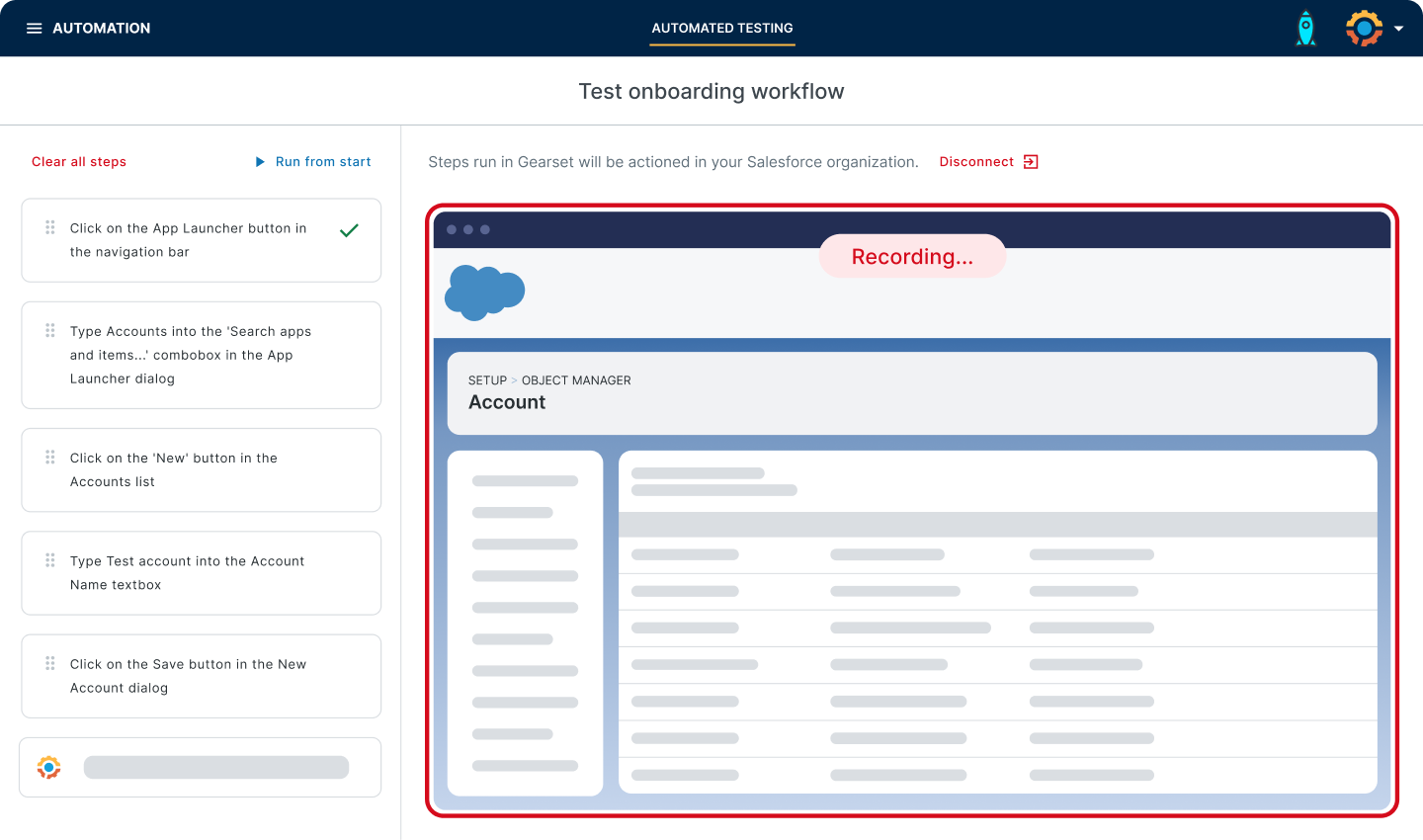
Gearset’s Automated Testing speeds up the test phase & increases confidence in every release!
National Philanthropic Trust





10,131
93.7%
$625K
$202K
300+
98%
00:02:17
Selenium requires constant script maintenance and technical expertise just to keep tests running. Gearset’s Automated Testing gives you resilient, Salesforce-aware UI testing without the overhead.

Build tests through natural language or guided clicks. Non-technical users create and maintain tests without learning Selenium or complex programming frameworks.
Focus on visible elements and user interactions, not fragile locators that break with each release. Tests adapt automatically, reducing maintenance by up to 70%.
Validate workflows across different user roles using real profiles and permission sets, catching access issues and workflow failures before they reach production.
Handle Shadow DOMs, Lightning components, and dynamic IDs automatically — eliminating the constant script updates Selenium requires after every Salesforce platform change.
Run tests automatically with Gearset Pipelines. No separate job scheduling or webhook configuration — testing becomes a seamless part of your release workflow.
Surface test results directly in your pipeline with clear visibility into failures. Shorter feedback cycles mean faster fixes and fewer production incidents.
You don’t always catch everything when you’re reviewing by eye. Now we’ve got a second set of eyes on every pull request — and it’s looking for exactly the right things.
Salesforce Applications Engineer IV, HackerOne

Having all of those tools together just makes life so much easier for us... Gearset is definitely a good return on investment and worth every cent.
People Configuration Consultant, Sage
Gearset just works! It’s more intuitive than any other solution and is the full package that we needed. It’s completely changed how we deploy.
Senior Developer, Payroc
Here’s what you should expect from a Salesforce automated testing solution — and how Gearset delivers:
Gearset is ISO 27001 certified and offers you enterprise-grade security. Your Salesforce data and metadata are encrypted in transit and at rest, hosted on the same AWS data centers trusted by Salesforce, with 24/7 intrusion detection. These security foundations support compliance requirements across regions and give teams of all sizes the freedom to move fast and innovate with confidence.






It comes down to whether you want to maintain test scripts or ship features. Selenium is a powerful open-source framework, but it requires dedicated resources to write scripts, manage browser drivers, configure test infrastructure, and constantly update locators when Salesforce’s UI changes. Each Salesforce release can break dozens of tests, forcing QA teams into firefighting mode instead of expanding coverage.
Gearset’s Automated Testing is purpose-built for Salesforce. It handles the platform’s complexity automatically — Shadow DOMs, Lightning components, dynamic IDs, and permission-aware testing — without requiring your team to become Selenium experts. Tests adapt to UI changes automatically, reducing maintenance overhead by up to 70%. You get resilient, Salesforce-aware testing without the infrastructure headaches or constant script rewrites.
If your team has dedicated automation engineers with deep Selenium expertise and time for ongoing maintenance, Selenium can work. But most Salesforce teams need testing that keeps pace with rapid release cycles without pulling developers away from building features. Gearset delivers that.
Salesforce ships three major releases each year, and traditional Selenium tests rely on fragile technical identifiers like element IDs, CSS classes, and DOM structure. When Salesforce updates Lightning components, adjusts page layouts, or changes how elements are grouped in the Shadow DOM, these identifiers shift — breaking tests even when the user experience hasn’t changed.
Selenium has no built-in understanding of Salesforce. It treats the platform like any other web application, so tests that check a specific button’s class name or element path will fail when Salesforce redesigns that component. Teams spend days after each release updating locators, re-running tests, and verifying fixes — time that could be spent on meaningful development work.
Gearset’s AI-powered approach focuses on what’s visible to users and how they interact with Salesforce, not brittle technical details. Tests look for buttons by their labels, validate screens by their content, and understand Salesforce-specific patterns like related lists and Lightning actions. When Salesforce updates the underlying structure, Gearset’s tests adapt automatically because they’re anchored to stable user-facing elements, not implementation details that change with every release.
Yes. Gearset supports scriptless test creation, allowing admins, business analysts, and other non-technical team members to build tests without writing code. You can describe tests in natural language or use guided clicks to record user journeys — no Selenium WebDriver knowledge required.
This makes automated testing accessible across your entire Salesforce team, not just specialist QA engineers. When more people can create and maintain tests, you get broader coverage without bottlenecks, and testing becomes a shared responsibility rather than a gatekeeping function.
Gearset Automated Testing is built for Salesforce, so it understands the platform’s architectural patterns. Shadow DOMs, Lightning Web Components, dynamic IDs, and permission-based visibility are handled automatically — no XPath debugging and no manual locator updates.
Selenium requires constant configuration to handle these elements. You’ll write explicit waits, traverse Shadow DOM boundaries manually, and rebuild locators when Salesforce changes its component structure. Gearset eliminates that work by understanding how Salesforce renders UI elements and adapting to those patterns natively.
Gearset Automated Testing integrates directly with Gearset Pipelines, so tests run automatically as part of your release process. No separate infrastructure to configure, no webhook scripting, no job scheduler setup. Tests execute when changes move between environments, and results surface directly in your pipeline view with clear pass/fail status and diagnostic details.
If you’re using Jira or Azure DevOps for work item tracking, Gearset connects there too. Test results link back to user stories and deployment records, giving your team full traceability from requirement to validation.
Gearset scales with your org. As you add more business processes, user roles, and custom objects, you can expand test coverage without worrying about infrastructure limits or execution time bottlenecks. Tests run in parallel, results aggregate automatically, and you get clear visibility into which areas of your org are well-covered and which need attention.
Unlike Selenium, where scaling often means managing Selenium Grid, handling more browser instances, and dealing with flaky tests from concurrency issues, Gearset handles execution complexity for you. You focus on what to test, not how to run it reliably at scale.
Selenium is open-source and free to download, but the total cost of ownership tells a different story. You’ll need engineers to write and maintain scripts, infrastructure to run tests, time to debug failures after each Salesforce release, and resources to manage browser drivers and test frameworks. Many teams find that Selenium’s hidden costs — in engineering time, delayed releases, and missed bugs — far exceed the cost of a purpose-built solution.
With Gearset you get predictable costs with world-class support included, no surprise infrastructure bills, and your team spends time building features instead of maintaining test scripts.
Also, if you’re already using Gearset for other DevOps capabilities, Automated Testing extends that investment without adding separate licensing complexity.
Migration timelines vary based on your existing test suite, but most teams start creating new tests in Gearset immediately while gradually replacing legacy Selenium scripts. Because Gearset’s scriptless approach is faster to build with, you can often achieve better coverage in less time than it would take to maintain your existing Selenium suite.
Many teams run both solutions in parallel during transition, using Selenium for tests that haven’t been migrated yet while building new coverage in Gearset. This phased approach reduces risk and lets you validate that Gearset meets your needs before fully committing.
Yes. Gearset Automated Testing works across sandboxes, scratch orgs, and production environments. You can run the same tests in different environments to validate that changes behave consistently as they move through your release pipeline, or create environment-specific tests when workflows differ between development and production.
Gearset’s integration with Pipelines means tests automatically execute in the right environment at the right time. When a change deploys to QA, QA tests run. When it reaches UAT, UAT tests run. This environment-aware testing happens automatically without manual coordination or separate test execution scripts.
Gearset Automated Testing is part of the full Gearset platform, which means testing is deeply integrated with deployment, version control, backup, and code reviews. You get a unified workflow where testing isn’t bolted on — it’s a natural part of how changes move through your pipeline.
Provar and AccelQ are standalone testing tools that require separate integration work to connect with your DevOps process. They’re powerful solutions if you need testing in isolation, but Gearset’s integrated approach reduces context switching, eliminates data sync issues between tools, and gives you a single source of truth for release quality.
If your team values tight integration between testing and deployment, or if you’re already using Gearset for other DevOps capabilities, Automated Testing extends that investment without adding another tool to manage.
Gearset is a comprehensive Salesforce DevOps platform that includes automated testing as one of several integrated capabilities. Testing sits alongside deployment, version control, code reviews, and backup — creating a unified workflow where quality and delivery are inseparable.
Standalone testing tools require separate integration work, duplicate configuration, and manual coordination with your deployment process. With Gearset, test results appear directly in your pipeline, test data syncs automatically with your sandboxes, and testing governance aligns with your release standards — all within one complete platform.
For teams building a complete DevOps practice, Gearset offers depth and integration that standalone tools can’t match. For teams with simple testing needs or existing testing infrastructure, standalone tools may be sufficient.
Get a closer look at Gearset’s Automated Testing and see how it fits into your workflow.
Arrange a tailored demo with our DevOps experts. Kick off the process with a 15-minute call to discuss your requirements.
Talk to an expert in minutes with a 4.9/5 customer happiness rating.