


"The only additional software you truly NEED for Salesforce."
Gearset vs Salesforce Code Analyzer
Eliminate blind spots in your code reviews. Gearset covers Apex, Flows, LWC, Agentforce & more.
Deployments and code quality used to be a major topic in every project. Now? It’s barely a topic of conversation. Thanks to Gearset, deployments just happen.”
Unit Lead, Project Delivery, DIGITALL


-
-%
$-K
$-K
-+
-%
-
See why Salesforce DevOps teams trust Gearset's insight-driven code reviews. Fix issues automatically, track improvements, and ship safer deployments — beyond what Salesforce Code Analyzer can do.

Gearset’s Code Reviews scans 300+ metadata types including declarative config — Code Analyzer focuses primarily on Apex with limited Flow coverage.
AI-generated code needs validation you can trust. Gearset applies deterministic checks against OWASP Top 10 standards and the latest Salesforce release, so you’re protected against AI hallucinations & blind spots.
Unlike Code Analyzer, Code Reviews provides centralized reporting that tracks org health, team productivity, and code quality trends — eliminating manual reporting and spreadsheet analysis.
Code Analyzer can’t distinguish between new code and existing tech debt. Code Reviews highlights new issues and tech debt separately, keeping reviews clear, actionable, and noise-free.
Code Reviews flags and applies fixes automatically in pull requests. Code Analyzer flags issues only — requiring manual fixes or separate AI tool suggestions.
Code Analyzer only supports GitHub. Gearset integrates natively with GitHub, GitLab, Bitbucket, and Azure DevOps — no custom script or platform-specific workarounds needed.
Code Reviews performs call graph and data flow analysis to detect vulnerabilities across your codebase — going beyond static file scanning that reviews code in isolation.
“Code Reviews helps us catch issues earlier and our deployment success rate has improved massively. With Gearset, we know there won’t be issues when deploying to production.” — Ergon
We now have defined standards to follow, increasing our productivity, and eliminating a lot of tech debt with this simple proactive approach.
Vice President of Global Services, MTX Group
You don’t always catch everything when you’re reviewing by eye. Now we’ve got a second set of eyes on every pull request — and it’s looking for exactly the right things.
Salesforce Applications Engineer IV, HackerOne

In the past we saw a lot of issues that we can now easily solve with Code Reviews — like missing entry criteria and fault paths in flows. You can easily miss these in an implementation project because it needs to be finished quickly.
Senior Consultant, DIGITALL
Here's what to expect and how Gearset delivers:
Gearset is ISO 27001 certified and offers you enterprise-grade security. Your Salesforce data and metadata are encrypted in transit and at rest, hosted on the same AWS data centers trusted by Salesforce, with 24/7 intrusion detection. These security foundations protect against security vulnerabilities, support security reviews and compliance requirements across regions, and give teams of all sizes the freedom to deliver secure code with confidence.



It comes down to how much of your Salesforce org you need to review. Salesforce Code Analyzer (SFCA) is a free, CLI-based scanner that focuses primarily on Apex, with limited support for Flows. It’s useful for pulse checks on code, but leaves declarative configuration — which makes up 95%+ of most orgs — largely unchecked. The reports show everything at once, mixing new issues with legacy problems, and you’ll need to build custom workflows if you want to integrate beyond GitHub or track improvements over time.
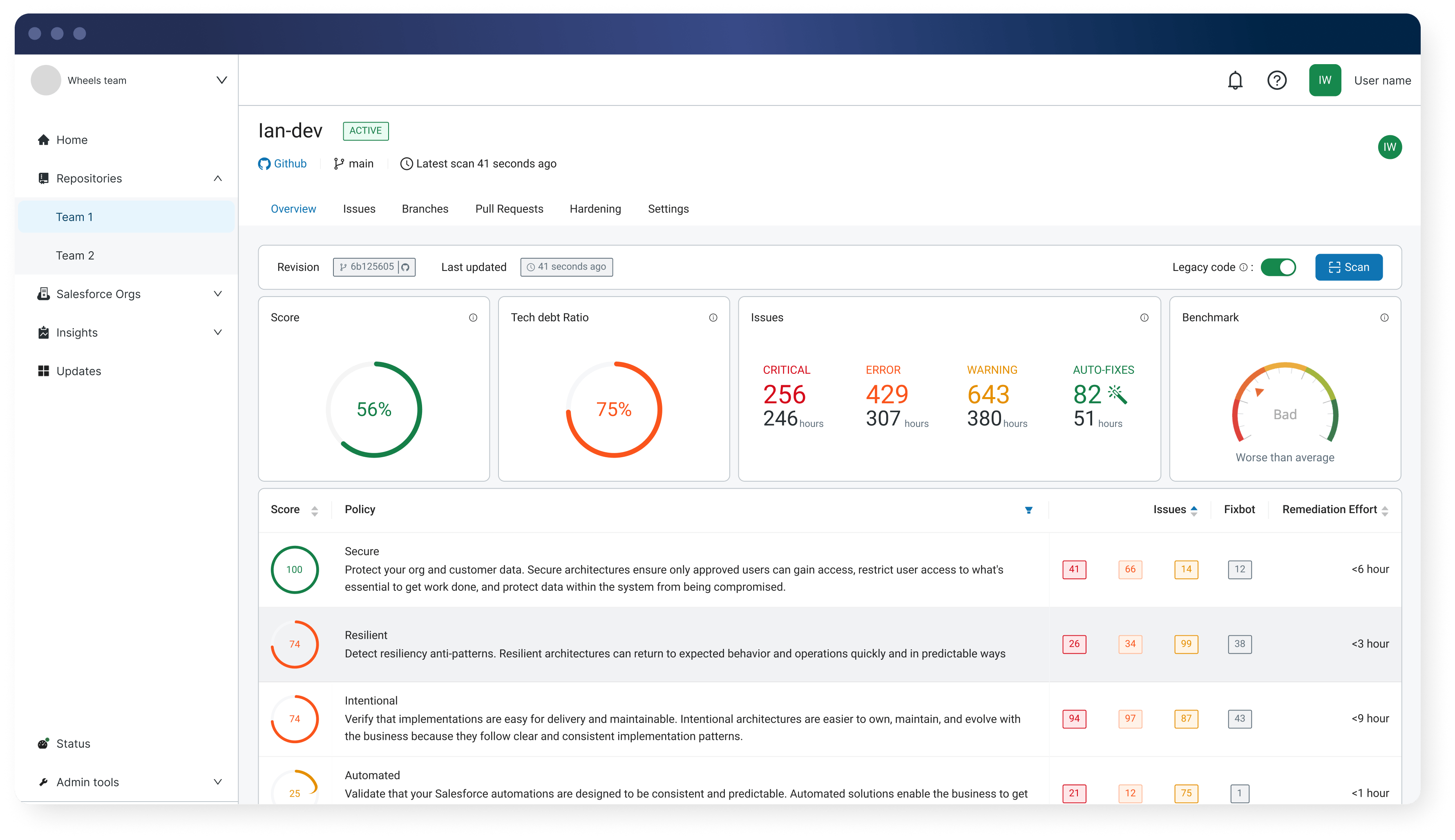
Gearset’s Code Reviews is purpose-built for teams who want to improve code quality systematically. It scans 300+ metadata types including declarative configuration like custom objects, field-level security, permission sets, validation rules, and more. Code Reviews automatically fixes common issues, generates pull requests, and tracks org health and team productivity over time. It separates new issues from technical debt using Protection Mode, integrates natively with GitHub, GitLab, Bitbucket, and Azure DevOps, and provides continuous visibility into how your code quality is trending — not just a snapshot of problems. Our rules stay current with every Salesforce release.
Gearset helps teams shift left, automate remediation, and maintain visibility into code quality without manual reporting or custom integrations.
Free tools have hidden costs. Salesforce Code Analyzer requires time to set up custom integrations for non-GitHub platforms, manual effort to aggregate and analyze one-off reports, and ongoing work to update rules with each Salesforce release. Teams spend hours building dashboards, tracking trends, and writing scripts to make the tool fit their workflow — time that could be spent shipping features.
Code Reviews eliminates that overhead. You get automated fixes, trend analysis, team insights, and native VCS integration out of the box. The value isn’t just in catching issues — it’s in how quickly your team can resolve them and how clearly you can demonstrate improvement to stakeholders. Predictable per-user pricing means costs scale with your team, and all Salesforce-specific checks are included as standard.
Code Reviews tracks org health over time, measures team productivity, estimates remediation effort, and benchmarks your code quality against industry standards like OWASP Top 10. You can see how many issues were introduced, fixed, or dismissed across specific time periods, which developers are contributing the most fixes, and where technical debt is accumulating.
Salesforce Code Analyzer provides a snapshot report of issues found during a single scan. To track trends or team performance, you’d need to manually export results, build custom dashboards, and maintain custom reporting over time. Code Reviews gives you those insights automatically, with no additional setup or maintenance.
These built-in insights help you demonstrate the impact of your code review process to leadership — showing how code quality trends over quarters, where investment in fixes pays off, and how your team’s development practices are improving over time.
Yes. Code Reviews automatically generates pull requests to repair common Salesforce issues like sharing violations, missing @IsTest methods, insecure endpoints, and more. These fixes follow Salesforce best practices and are deterministic (applied consistently every time), making reviews faster and more reliable.
Salesforce Code Analyzer flags issues and points you to Agentforce Vibes in the IDE for AI-suggested fixes. This requires manual intervention, context switching to a separate tool, and doesn’t close the loop back in your version control system or track time saved. Code Reviews completes the full remediation cycle automatically and feeds the results into your Gearset Pipelines workflow.
Code Reviews integrates natively with GitHub, GitLab, Bitbucket, and Azure DevOps with no custom coding required. You connect your Git provider, choose your repositories, and scans run automatically on every pull request as part of your development process.
Salesforce Code Analyzer has an official GitHub action. For GitLab, Bitbucket, or Azure DevOps, you’ll need to write custom scripts, test them, and maintain them as SFCA updates. This “build vs buy” decision creates ongoing technical debt and requires dedicated engineering time to keep your integration working.
Code Reviews scans 300+ Salesforce metadata types including declarative configuration like custom objects, field-level security, permission sets, validation rules, workflow rules, process builder, and more. Since 95%+ of Salesforce metadata is XML-based, this comprehensive coverage ensures you’re not leaving blind spots in your reviews.
Salesforce Code Analyzer focuses primarily on Apex, Flows, and Lightning Web Components. While it technically scans XML, it doesn’t have bespoke rules for specific Salesforce metadata types — meaning it treats your declarative platform configuration as generic XML rather than understanding the Salesforce-specific risks and best practices for each component type.
Code Reviews uses Protection Mode to separate new issues introduced in a pull request from existing technical debt in your codebase. This means reviewers see only what changed and can focus on preventing new problems without being overwhelmed by legacy issues.
Salesforce Code Analyzer scans entire files and reports everything it finds, mixing 10 years of accumulated technical debt with the 5 lines you changed today. Teams often have to fix all their debt before they can use SFCA effectively in their workflow, or manually filter results to understand what’s new versus what’s been there for years.
Gearset’s Code Reviews integrates directly with your existing Git workflow — whether you use GitHub, GitLab, Azure DevOps, or Bitbucket — so you can apply consistent quality checks without changing how your team collaborates.
When you use Code Reviews with Gearset Pipelines, you build a complete Salesforce DevOps pipeline with quality governance at every stage. Pipelines orchestrate environment progression, approvals, and automated deployments, while Code Reviews enforces high-quality changes before they move forward. Together, they give you clear control over every stage of your release lifecycle and help teams deliver safely and predictably at scale.
Code Reviews evaluates changes in the context of your Salesforce org, considering configuration, object relationships, and how components interact during deployment and runtime. This org-aware analysis reduces false positives and helps distinguish between expected patterns and real risks.
Salesforce Code Analyzer is a static code analysis tool that reviews code in isolation. While SFCA offers the Salesforce Graph Engine for deeper analysis, it’s still in developer preview with limited rules. Traditional static analysis tools don’t understand your org’s architecture, existing customizations, or how different components work together — leading to more false positives and missed issues that only appear when metadata interacts across your platform.
You connect your Git provider, choose your repositories, and Code Reviews starts running checks immediately. There’s no custom rules configuration or Salesforce-specific setup required. Teams get value from the first scan with pre-configured policies that can be customized later.
Get a closer look at Gearset Code Reviews and see how it fits into your workflow
Arrange a tailored demo with our DevOps experts. Kick off the process with a 15-minute call to discuss your requirements.
Talk to an expert in minutes with a 4.9/5 customer happiness rating.

