

UI testing is essential for keeping your Salesforce org stable through every change, but it’s rarely straightforward. The platform changes three times a year, and those updates can sometimes alter the structure your tests rely on. Lightning Web Components use a web standard called Shadow Document Object Model (Shadow DOM), which keeps each component’s code self-contained and can make it hard for UI tests to locate elements on the page. And many elements lack stable IDs or their IDs change with each render. These issues make most conventional UI test suites fragile.
This guide breaks down the main options for UI testing in Salesforce, including Salesforce’s own UTAM framework and several third-party tools that Gearset integrates into the DevOps process. These integrations let you turn UI testing into an automatic quality gate every time you deploy. By the end of the guide, you’ll know how to choose and implement a solution that gives you stable, automated testing that fits your team’s tools, skills, and budget.
Understanding Salesforce UTAM: the native solution
UTAM (UI Test Automation Model) is Salesforce’s open-source solution for tackling the specific UI testing problems that come with the Lightning Experience. It’s built around the Page Object Model (POM), a common testing pattern that creates reusable representations of pages or components in the UI. In standard POM, you write code to define page elements and interactions. With UTAM, you describe page-object definitions in JavaScript Object Notation (JSON), and then compile them into Java or JavaScript classes your tests call. UTAM works alongside frameworks such as Selenium or WebdriverIO, which handle running those tests in the browser.
This declarative method helps solve two major problems in Salesforce UI testing:
- Maintenance: When Salesforce updates the DOM during one of its three yearly releases, you only need to update the relevant JSON file. You’re not searching through dozens or hundreds of test scripts. This makes test maintenance faster and more efficient.
- Shadow DOM access: Lightning Web Components (LWCs) use the Shadow DOM, which hides their internal structure. Standard tools can’t access these parts of the UI. UTAM has built-in support to navigate through the Shadow DOM, removing the need for custom solutions.
UTAM helps avoid issues with unstable element IDs by allowing developers to define components using stable CSS selectors and attributes. This keeps tests reliable across Salesforce updates, while still targeting the specific elements needed for accurate automation.
TDX
A UTAM use case: writing effective tests for Lightning Experience
Lightning Experience is Salesforce’s modern UI, powered by the Lightning Component Framework, which supports both Lightning Web Components and the older Aura Components. UTAM works across multiple Salesforce interfaces, but it’s especially effective here.
Best practices for testing in Lightning Experience with UTAM
- Keep a single source of truth: UTAM uses JSON page objects to define buttons, fields, and components. You define each item once. If Salesforce changes, you update the file — not every test. This keeps your tests consistent and cuts down on errors from repeating the same definitions in multiple places.
- Avoid fragile IDs: Lightning often creates new element IDs on every load. Instead, use labels, roles, or data-test attributes that you define. These stay the same across updates, while dynamic IDs break test stability.
- Handle hidden components: Many LWCs are placed inside Shadow DOMs. UTAM can access these directly, reducing the need for complex scripts or browser-specific workarounds.
- Wait for the page to be ready: Some tests use fixed pauses to give the page time to load, but these static waits are unreliable — pages don’t always take the same amount of time. UTAM enables test authors to actively design wait conditions into their page objects using explicit waits so actions only happen when elements are ready. This makes your tests more reliable and avoids issues from slow network speeds or delayed page elements.
- Build reusable pieces: Lightning pages are made from nested components. UTAM mirrors this setup, letting you create small reusable definitions and combine them to build larger tests. It keeps your test logic clean and scalable.
- Test your custom components: For your custom LWCs you can author a UTAM JSON page-object definition alongside the component; the UTAM compiler turns it into testable classes, letting you treat the custom component similarly to built-in ones.
The open-source ecosystem: choosing your approach
UTAM doesn’t run tests on its own — it works alongside a test execution framework. You’ll need UTAM to handle page objects, and a separate framework like Selenium or WebdriverIO to actually run the tests.
Working with UTAM and test frameworks
For JavaScript projects, a common setup is to use UTAM together with WebdriverIO. The wdio-utam-service package connects UTAM with WebdriverIO, letting your test scripts use UTAM methods while WebdriverIO handles all browser interactions. For Java projects, UTAM can be paired with Selenium WebDriver, which provides the same browser automation layer for Java-based environments while UTAM manages the page-object model.
Alternative open-source approaches
You can also build your own UI testing setup without UTAM, using general-purpose frameworks:
Selenium-based setups give you full control, but come with heavy maintenance. You’ll need to build your own page objects, manage wait conditions, and work around Shadow DOM limitations. Salesforce updates can also affect locators or page structure, requiring maintenance to keep tests stable.
Playwright is another option, especially for modern apps. Built by Microsoft, it offers:
- Built-in support for Shadow DOM, so it can access nested components without extra setup
- Automatic wait handling to reduce test flakiness
- Faster performance than traditional Selenium setups
Still, both Selenium and Playwright require strong technical skills, and neither includes the Salesforce-specific features UTAM provides. Without UTAM’s model-based structure, you’ll need to handle all the unique Salesforce behaviors on your own.
The commercial landscape: purpose-built solutions
Commercial Salesforce testing platforms solve key problems that open-source frameworks often can’t — especially around test maintenance and ease of use. Every tool listed here integrates with Gearset, allowing teams to run automated UI tests as part of their deployment process.
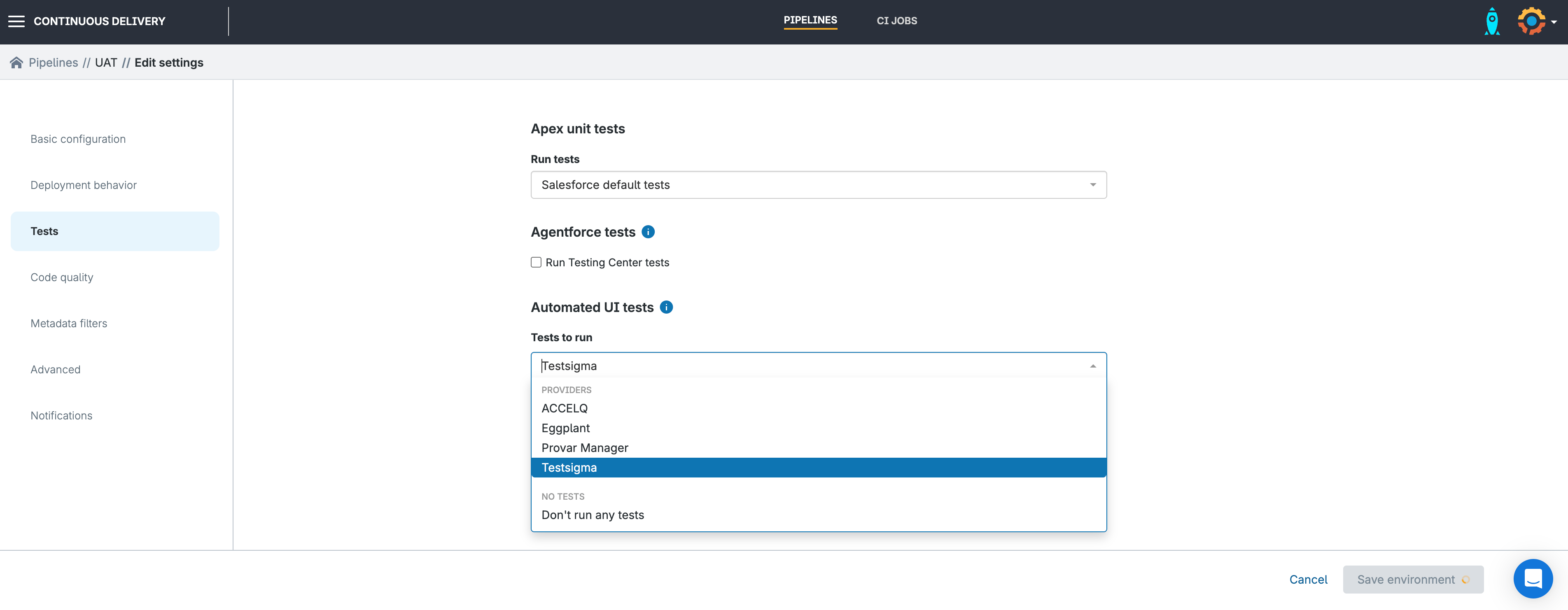
Gearset acts as the orchestrator for these tools. While the testing platforms handle test creation and execution, Gearset makes sure they’re properly connected to your release workflow. This means tests run automatically as part of each deployment, with clear logs of every run. You can track test history, spot trends in failures, and ensure tests are never left out of the process.
Provar
Provar connects tests to Salesforce metadata rather than relying solely on fragile DOM elements. This makes tests more stable when the UI changes, since they reference the underlying objects and fields rather than visual layout.
ProvarX extends this stability to LWC by supporting locators that automatically detect and traverse Shadow DOM boundaries. Once configured in the Chrome-based Test Builder, Provar automatically generates the necessary paths, reducing the need for manual scripts. Non-technical users can build tests through the Test Builder, while advanced users can extend them with SOQL or Apex.
ACCELQ
ACCELQ offers AI-driven no-code test automation that lets teams build and maintain complex tests without writing code. As an official Salesforce ISV partner, ACCELQ stays in sync with Salesforce’s release cycle. Shadow DOM handling is managed automatically in most cases, removing much of the manual setup required in open-source tools. ACCELQ supports UI, API, and backend testing in a single platform, allowing teams to manage all testing from one place with minimal complexity.
Testsigma
Testsigma provides a low-code approach to Salesforce UI testing, allowing teams to create automated tests in plain English without writing code. It supports dynamic element handling and integrates closely with Salesforce Lightning components to maintain test stability across updates. As one of Gearset’s built-in integrations, Testsigma tests can be automatically triggered after each successful deployment, helping teams continuously validate their key user journeys as part of the CI/CD pipeline.
Keysight Eggplant
Keysight Eggplant uses a different method: AI-powered image recognition and computer vision instead of traditional code-based scripts. It builds a digital twin — a visual model of your application — and runs test flows that mimic real user journeys.
Because it tests what’s on screen rather than the underlying code, Eggplant bypasses Shadow DOM issues. It’s particularly suited for end-to-end journeys that cross Salesforce, desktop apps, mobile interfaces, or even PDFs. This is especially useful in regulated industries where testers can only validate systems through the user interface, not by accessing the source code.
Tricentis
Tricentis focuses on full-process testing, not just Salesforce in isolation. It’s built to validate entire workflows that stretch across systems like Salesforce, MuleSoft, SAP, and others. Tricentis uses model-based and AI-assisted locators to make tests more resilient to UI changes, and it includes pre-built components for common Salesforce actions like record creation. Tests are codeless by default but can be extended with JavaScript for more advanced use cases. In Gearset, you can execute tests in Tricentis Test Automation for Salesforce using an outgoing webhook that calls Tricentis’ public REST API at the end of a CI or deployment run.
Transform UI testing with integrated DevOps
Salesforce testing has moved well beyond basic record-and-playback tools. Modern tooling handles complex challenges like Shadow DOM, dynamic element IDs, and frequent platform updates. Choosing between UTAM’s developer-centric model and more user-friendly third-party platforms will influence how effectively your team keeps up with rapid releases.
Continuous delivery works best when testing, deployment, and monitoring are fully connected. Teams that integrate UI testing directly into their DevOps process can release faster, encounter fewer issues in production, and work more efficiently.
Gearset integrates with popular UI testing frameworks and lets you trigger them automatically during deployments, ensuring quality checks are consistently built into your release pipeline. That means UI tests are built into your release workflow, with fewer tools to manage.
Start a free trial: Get 30 days of full access to the platform, with no credit card needed. That includes automated unit testing, UI testing integrations, and hands-on support to help you get results quickly.
Book a demo: See exactly how Gearset can streamline your Salesforce testing. Get a walkthrough based on your current challenges, how to connect your existing tools, and what steps reduce test maintenance over time.

