

Most Salesforce orgs contain tens of thousands of metadata items: custom objects, fields, flows, validation rules, permission sets. Even a small change, like adjusting a field or updating a flow, can have unintended consequences. A report stops working. An automation behaves differently. An integration fails in a place no one thought to check.
That’s the reality of working in a complex org. Changes are rarely isolated, and it’s easy to miss a dependency when you’re focused on delivering the next release. You test what you know about, deploy with confidence, and only find the issue when something breaks in production.
Metadata analysis removes that uncertainty. You need to see what exists in your org, how components are connected, where dependencies sit, and what the impact of a change will be before you deploy it. In this guide, we’ll look at how metadata analysis helps reduce deployment risk by exposing the relationships that are easy to overlook.
TDX
Three critical deployment risks without metadata analysis
Deployment failures disrupt your business. They waste time, lower stakeholder confidence, and delay project deadlines. Without thorough metadata analysis before a Salesforce deployment, you’re opening the door to three major risks:
Missing dependencies cause deployment failures
Salesforce deployment errors frequently happen when a component references another item that isn’t included in the deployment package. For example, attempting to deploy a Flow that references a custom field not present in the deployment will result in a deployment error.
Thankfully, Gearset’s deployment solution has problem analyzers that will catch missing dependencies and prompt you to include them in your deployment package. But it’s even better to be aware of these dependencies long before deployment, and factor those implications into the plan and build stages of the DevOps lifecycle.
Unknown dependencies create production incidents
Failing to spot the implications of dependencies doesn’t just lead to deployment failure. Sometimes a “successful” deployment can cause even more problems, if the changes you deploy cause regressions in production.
In interconnected Salesforce orgs, seemingly simple changes can trigger a cascading impact across multiple systems. For example, modifying a “Customer Tier” picklist field on the Account object. This single field might be woven throughout your entire system:
- Reports filter or group accounts by tier — executive dashboards suddenly show incorrect data
- Dashboard components display those reports, resulting in weekly business reviews that present misleading metrics
- Flows check tier values for routing logic, so now high-value accounts get misrouted to the wrong teams
- Apex triggers reference tier for discount calculations — pricing logic fails silently
- Validation rules enforce tier-based data quality, so legitimate records can’t save
- Page layouts display tier differently by profile — UI becomes inconsistent across users
- Permission sets control field-level access, so users lose visibility to critical data
- External integrations read tier values via API, which means marketing campaigns target the wrong customer segments
Getting a full understanding of dependencies and impact isn’t easy within Salesforce. The Where is this used? button in Salesforce shows some references but only supports custom fields, omits managed-package components, caps results, and can’t trace deeper flow logic or integration pathways.
Without comprehensive dependency analysis, you operate on guesswork, testing what you remember instead of what actually exists. Manual investigation doesn’t scale — checking one field’s dependencies consumes a lot of time. A deployment package with dozens of components becomes impossible to verify thoroughly, increasing the risk that something unexpected breaks in production.
Hidden technical debt compounds over time
Technical debt in Salesforce accumulates quietly, component by component, until your org becomes difficult to maintain, risky to modify, and performs poorly for end users.
- Unused components accumulate: Custom objects built for cancelled projects or fields for pilot programs that never took off can remain in the system indefinitely. Each unused component adds cognitive overhead for every future developer and admin.
- Obsolete automation isn’t replaced by newer alternatives: Your org might have workflows built with Workflow Rules and Process Builder — automation tools Salesforce retired and are no longer supported as of December 31, 2025. Orgs often have dozens or hundreds of automations that should migrate to Flow. Without systematic analysis, you can’t identify which are actively used versus those that have been abandoned from previous implementations.
- Redundant applications multiply across teams: Different departments often install separate packages to solve similar problems, such as marketing, sales, and service teams all installing different email tools. While each may address an immediate need, together they introduce unnecessary complexity, inflate licensing costs, and increase the risk of conflicts across the system.
- Ghost code lingers in your system: Apex classes and triggers built by long-departed developers serve no current purpose yet often remain in production. Test classes for deleted functionality add execution time and complexity during deployments and utility classes for features deprecated years ago create false dependencies.
The business impact of unresolved technical debt scales over time:
- Org performance degrades as unnecessary components consume resources
- Development costs increase as teams navigate avoidable complexity
- New team members face steeper learning curves during onboarding
- Security vulnerabilities hide in unmaintained code
Metadata analysis enables prioritization by helping distinguish between what’s just untidy and what’s actually harmful. An unused field on a rarely-accessed object creates minimal harm, whereas an obsolete Process Builder automation executing on every Opportunity update creates ongoing performance degradation and maintenance risk. Knowing the difference lets you focus cleanup efforts where they matter most.
Accelerate metadata analysis with Gearset’s Org Intelligence solution
Metadata analysis shouldn’t take weeks of manual investigation. Gearset’s Org Intelligence solution provides comprehensive visibility into your Salesforce org’s architecture and dependencies, turning the complex task of understanding your metadata into a straightforward, automated process.
Org Intelligence quickly helps you:
- Find metadata in your org. Not sure what you’re looking for? Ask the Gearset agent how things work in your org, and it will surface the relevant metadata items for you.
- Understand what metadata does. Get AI-generated explanations of all your metadata in seconds, and save to your documentation library in Gearset.
- Get the history of your org. See who created metadata items, who last edited them, and when.
- Identify all dependencies. Dig into all the relationships across your org so you can understand the implications of every change you make.
- Visualize metadata. Gearset renders your Flows the way they look in Flow Builder, helping you to explore and analyze in the way that makes most sense.
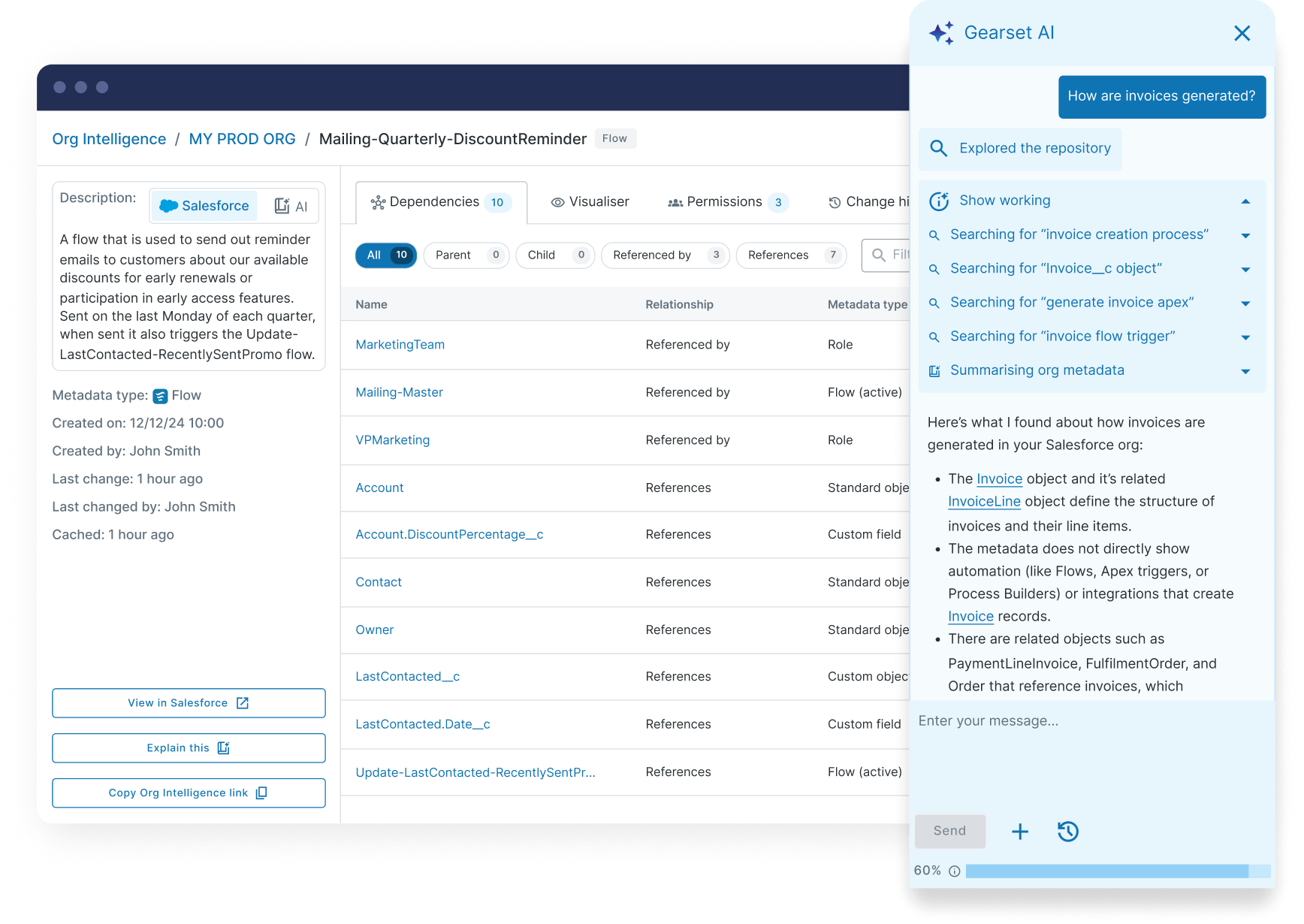
Many Salesforce teams dedicate a block of time entirely to org exploration and metadata analysis, understanding what exists, mapping component connections, and determining who built what. Org Intelligence massively accelerates this reconnaissance phase, supporting the plan and build stages of your DevOps lifecycle with proactive analysis before you make any changes.
Understand your org’s metadata in minutes
Metadata analysis has evolved from an advanced practice to a fundamental requirement. As orgs grow more complex, housing hundreds of integrations and thousands of metadata components, manual tracking becomes impossible. Invisible dependency webs lead to deployment failures that disrupt business operations, production incidents that damage credibility, and teams paralyzed by fear of breaking critical systems.
Full metadata analysis and insight gives teams the confidence they need to deliver the right changes, safely, and at pace. What may have typically required weeks of manual investigation can now happen in minutes. Complete architectural visibility transforms deployment planning from guesswork into confident, data-driven decisions.
Ready to eliminate reconnaissance sprints and deploy with confidence? Start your 30-day free trial to see first hand how Org Intelligence helps you understand your org’s architecture. Or book a demo to chat with one of our DevOps experts about how teams use Gearset to master their metadata and achieve reliable Salesforce delivery.

