

Salesforce recently announced that Agent Script is GA, and you can get deploying straight away. Gearset has been planning for this release, so we fully support Agent Script deployments already.
What is Agent Script?
Agent Script is Salesforce’s new way of defining how an Agentforce agent reasons, acts and communicates — all in a single, portable text file.
Think of it as the instruction manual for your AI agent, blending prompt engineering and business logic. An Agent Script file tells the agent who it is, what it’s allowed to do, how to use Salesforce tools — all in one place. Importantly, this file is easy to read and edit by humans and agents alike, as well as being the shared source of truth.
Agent Script is central to what Salesforce calls “hybrid reasoning” — the idea that production-grade agents need more than just a capable LLM. They need deterministic rules, clear checkpoints, and tight control over what context the model sees at every step.
With Agent Script, you get:
- One source of truth. Your agent’s full configuration lives in a single, versioned file — not spread across dozens of screens.
- Human and AI collaboration. Because the format is clean, structured text, both builders and AI assistants can read, write, and reason about it natively.
- Precision control. You can enforce deterministic logic for routing, validation, and permissions, while keeping model reasoning for the moments where it adds value.
- Full portability. The file can move through code reviews, version control, and deployment pipelines just like any other piece of Salesforce metadata.
Deploying Agent Scripts with Gearset
Gearset makes it easy for you to deploy Agentforce metadata, and that includes support for Agent Scripts.
Agent Scripts compile down to Salesforce metadata with dependencies on other metadata types. Here’s how you can deploy your Agent Script metadata — and how Gearset makes sure you don’t miss any dependencies.
1. Compare source and target environments
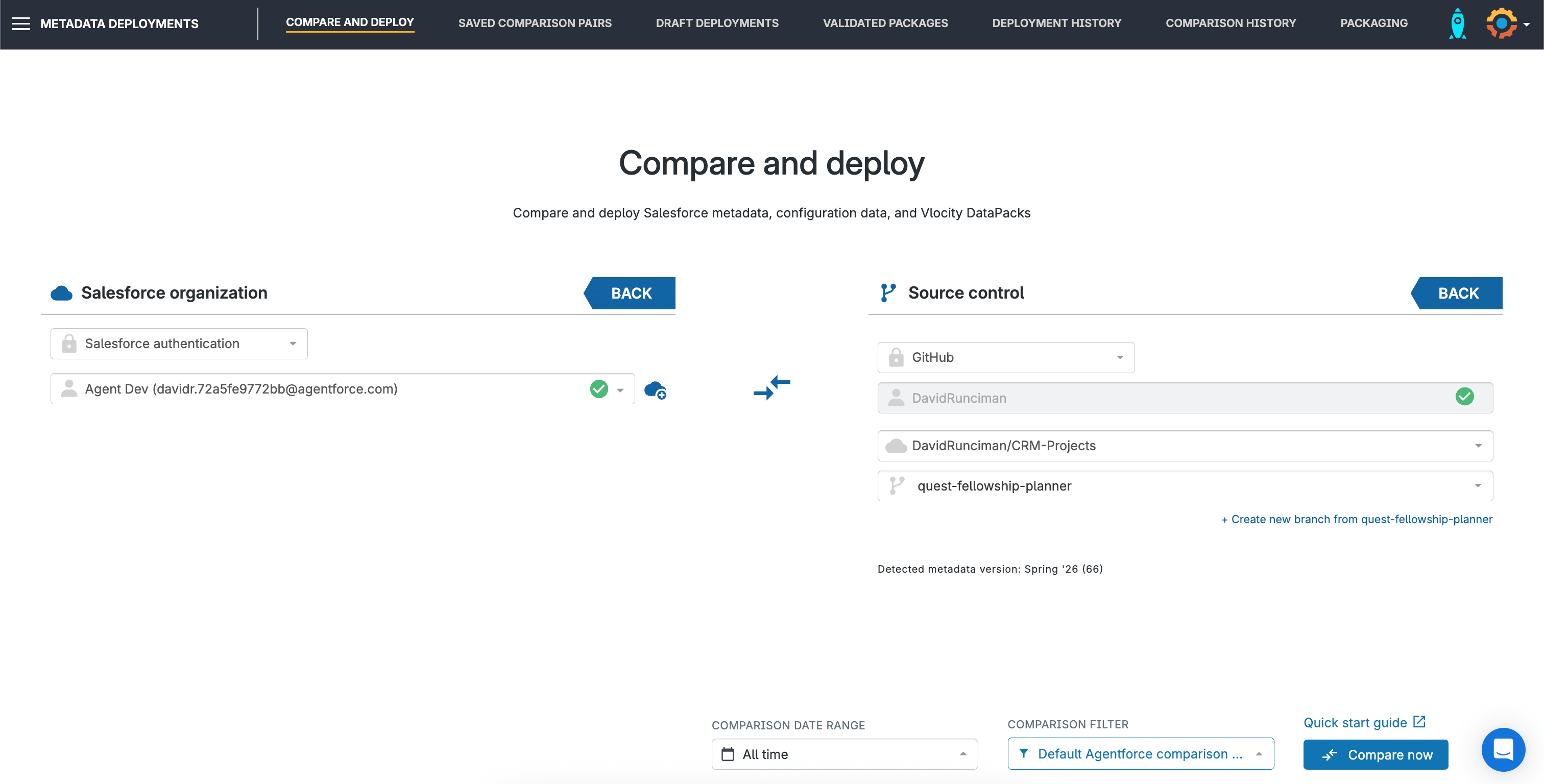
First, select the environments you need to move the Agent Script between. In this example, the source environment is a developer org and the target is a Git branch. Using Gearset’s default filter for Agentforce deployments will retrieve the metadata types you need to deploy an Agent Script. Hit Compare now.
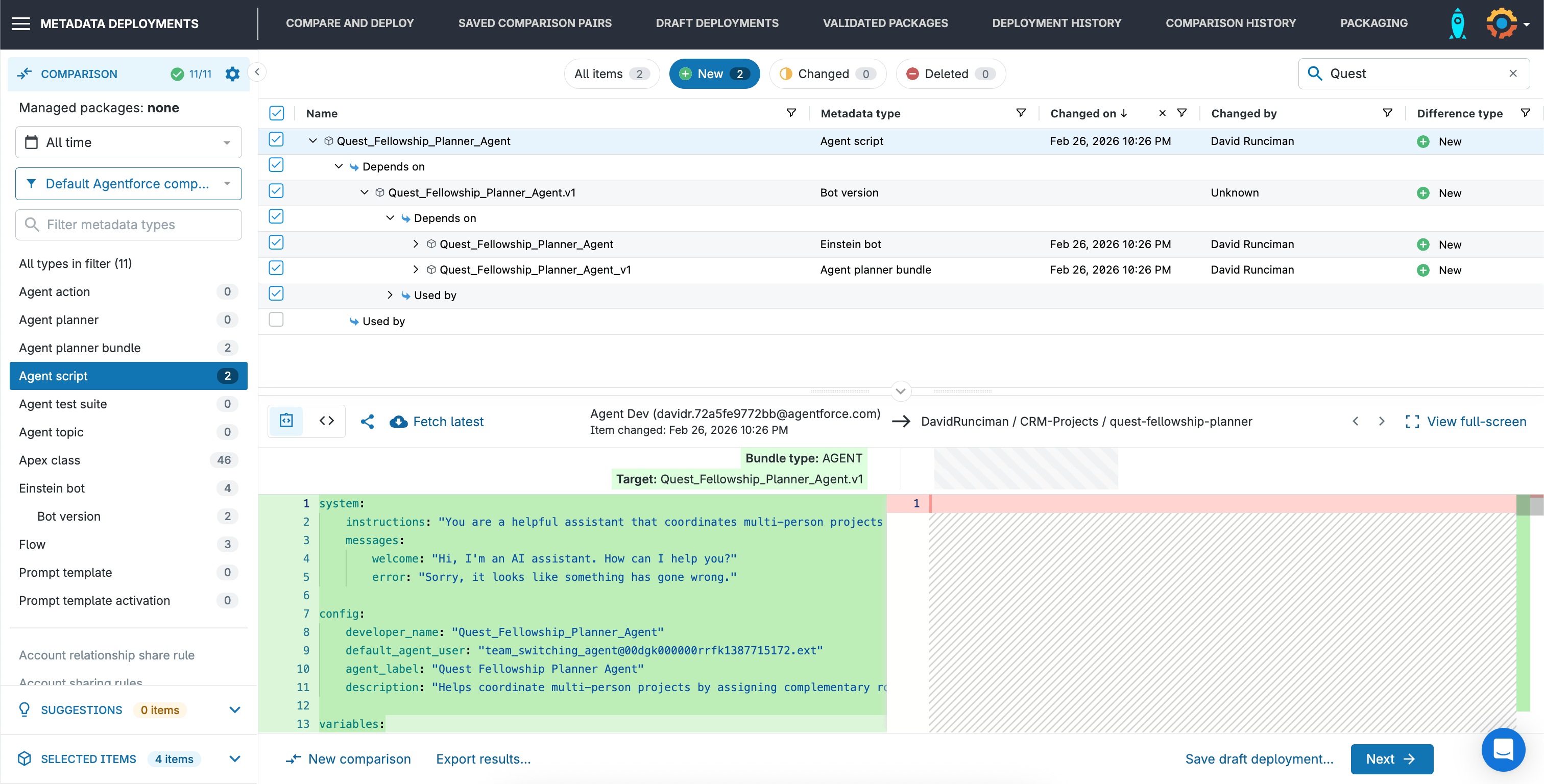
In the comparison view you can see what’s new, changed and deleted. This Agent Script is under the New tab, which means it’s in the source but not the target environment. Clicking on any item shows how it compares between the environments, and you can dig into dependencies as well.
A note on versioning: When Agent Scripts are retrieved via the Metadata API they’re given a numerical suffix showing the Agent Script version. In the Gearset comparison, you’ll see the latest version from the source compared to the latest version in the target. Deploying an Agent Script creates a new version in the target org.
2. Select the changes to deploy
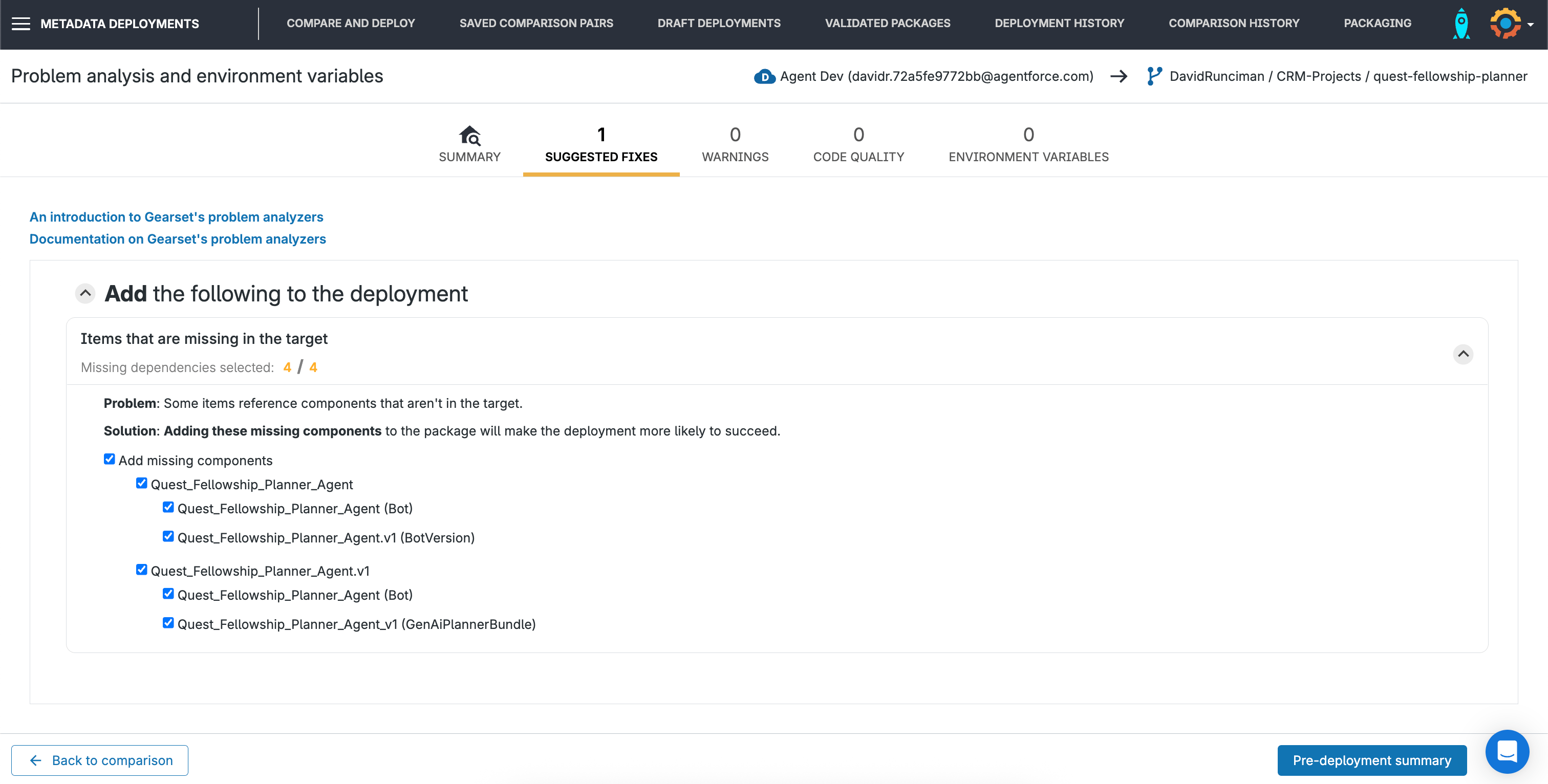
To deploy an Agent Script successfully, you need to deploy the related Bot Version, Einstein Bot, and Agent Planner Bundle (a friendlier label for the GenAIPlannerBundle metadata type).
If you were to miss a dependency at the comparison view, Gearset’s automatic problem analysis would catch this for you. Gearset will recommend including the missed dependencies to make sure the deployment is successful.
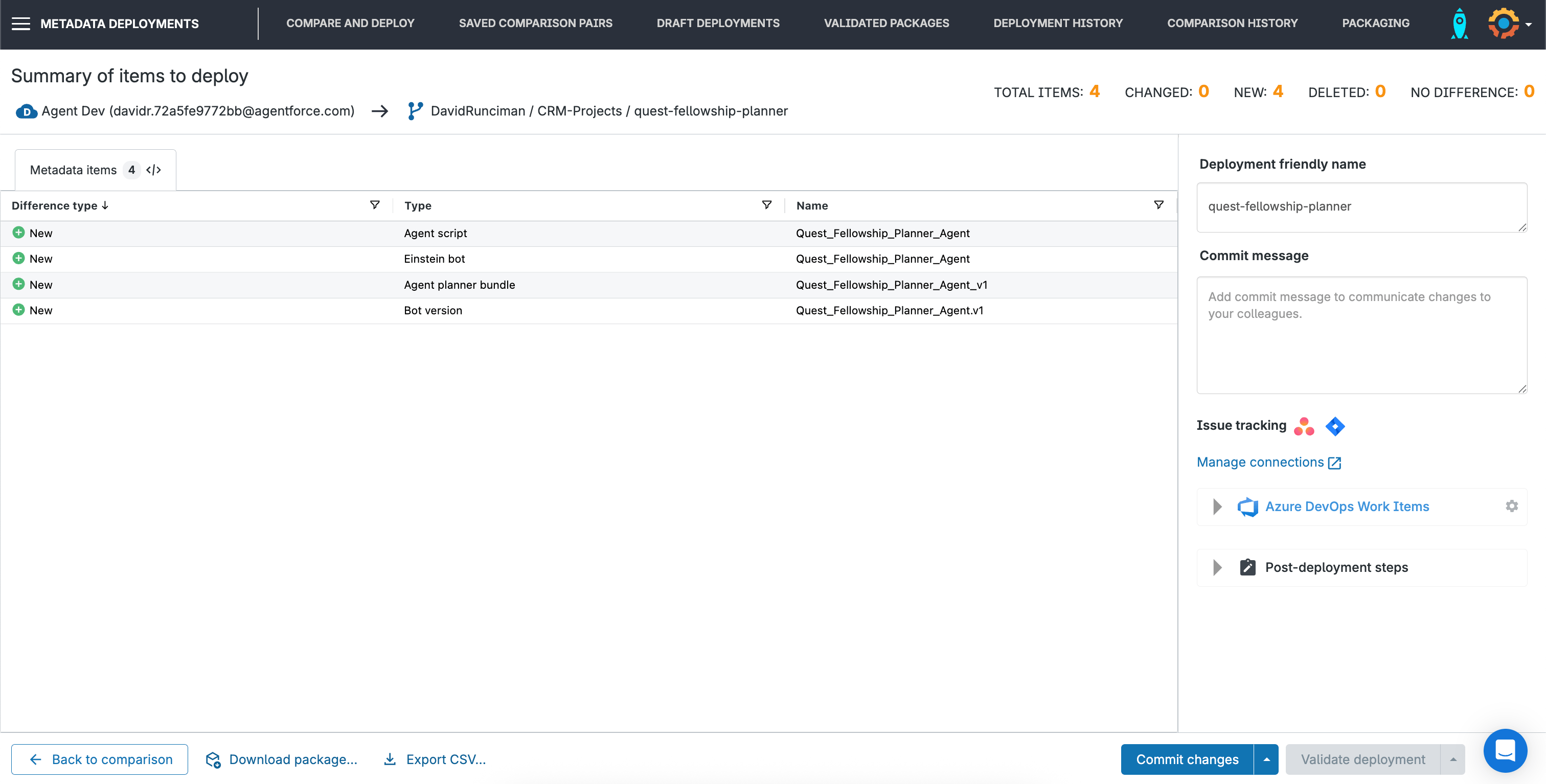
3. Deploy (or commit) your Agent Script!
The next screen in Gearset shows a summary of your deployment. You can give the deployment a name and leave a note, which will make your Gearset deployment history easier to review (as well as becoming the commit name and message when you’re committing to Git).
If you’ve integrated with an issue-tracking tool such as Jira, you can attach the deployment here. When deploying to a Salesforce org, you can kick off a Salesforce validation from Gearset and check the deployment will succeed. When you’re ready, you can deploy or commit the changes — or schedule for later if needed for a release window.
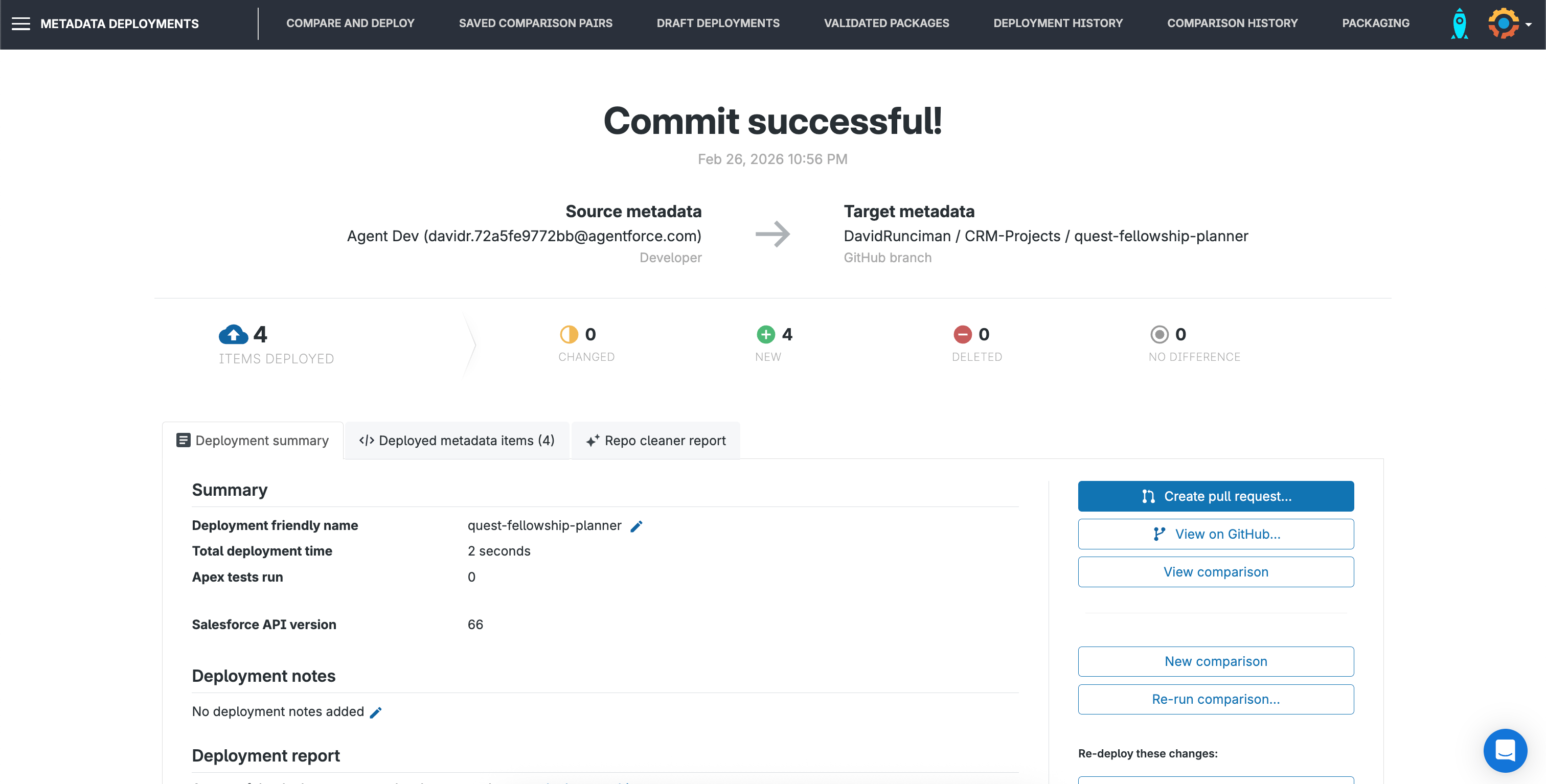
Once you’ve successfully deployed or committed your Agent Script, Gearset’s results page surfaces the most likely actions you’ll want to take next. In this case, you’d probably want to open a pull request next. But there are other options too, including full or partial rollback.
DevOps fundamentals for Agentforce success
To deliver success with Agentforce, your agents need to be built, tested, deployed and monitored like other Salesforce metadata. Deploying Agent Scripts with Gearset is just the start. The wider Gearset platform gives you an end-to-end process for the DevOps lifecycle, so you can innovate on the Salesforce platform with both speed and stability.
Get started with Agent Script
Don’t let deployment challenges hold you back from succeeding with Agent Script. Try Gearset today on a free 30-day trial to test out deploying your metadata in a few easy steps. And you can book a tailored demo with one of our DevOps experts to see how Gearset will help get your Agentforce implementation on track.

