
When something goes wrong in your Salesforce org, there’s no shortage of errors, alerts and logs generated. But understanding all this data and turning it into meaningful action can be challenging. And identifying and understanding what’s gone wrong is only half the battle — being able to fix the issue quickly is the key to minimizing business disruption.
With observability tools that come with AI built in, teams can go beyond simply spotting issues. They can instantly understand them, prioritise them, and quickly take action without the usual time spent digging through logs or piecing together context.
In this post, we’ll explore what observability means in a Salesforce context, why it’s essential for proactively minimizing production incidents, and how the Gearset Agent helps you move from reactive monitoring to fast, confident resolution of Flow errors.
Monitoring vs observability: what’s the difference?
Observability is often misunderstood as monitoring. But they’re not the same and, for Salesforce teams dealing with complex orgs and fast-moving releases, the difference matters.
Monitoring flags when something’s gone wrong, usually based on pre-defined failure scenarios or thresholds, and sends you a notification. However, teams can often get overwhelmed with the volume of alerts and emails from Salesforce, especially when there’s no easy way to understand what caused the issue, how to prioritize them, or what you need to do next.
Instead, you end up spending valuable time digging through logs, chasing symptoms, and relying on users to tell you what’s gone wrong. Even then, it can be really hard to distinguish meaningful spikes from all the background noise, so there’s a risk teams either miss critical issues or end up chasing false positives.
“Flow error alerts came through email — and that alone was a challenge. You’d miss things, there was no context, no sense of the growing volume of errors. You were constantly backtracking.” — Jolene Mair, HackerOne Salesforce Applications Engineer IV
Observability, on the other hand, gives you clear visibility of the current state of your org, based on your org’s outputs — so you can spot and understand trends or issues as they happen and often before they’re reported by an end user. It gives you a head start in answering questions like:
- What exactly has gone wrong and where?
- Who’s been affected?
- Why has it happened?
- How do I fix it?
- How do we prevent it happening again?
By arming you with these insights, you’re in a better position to identify issues proactively, uncover root causes, and resolve problems efficiently. It moves you from reactive fixes to ongoing improvement in the robustness of your org, helping you catch issues early and leverage key insights to resolve them before they start costing your business money or creating end-user frustration.
Why Salesforce teams need observability
Observability is a key part of the DevOps lifecycle. It provides a continuous feedback loop, to strengthen your current org health and create a more stable platform — enabling your team to move from firefighting to proactive org management.
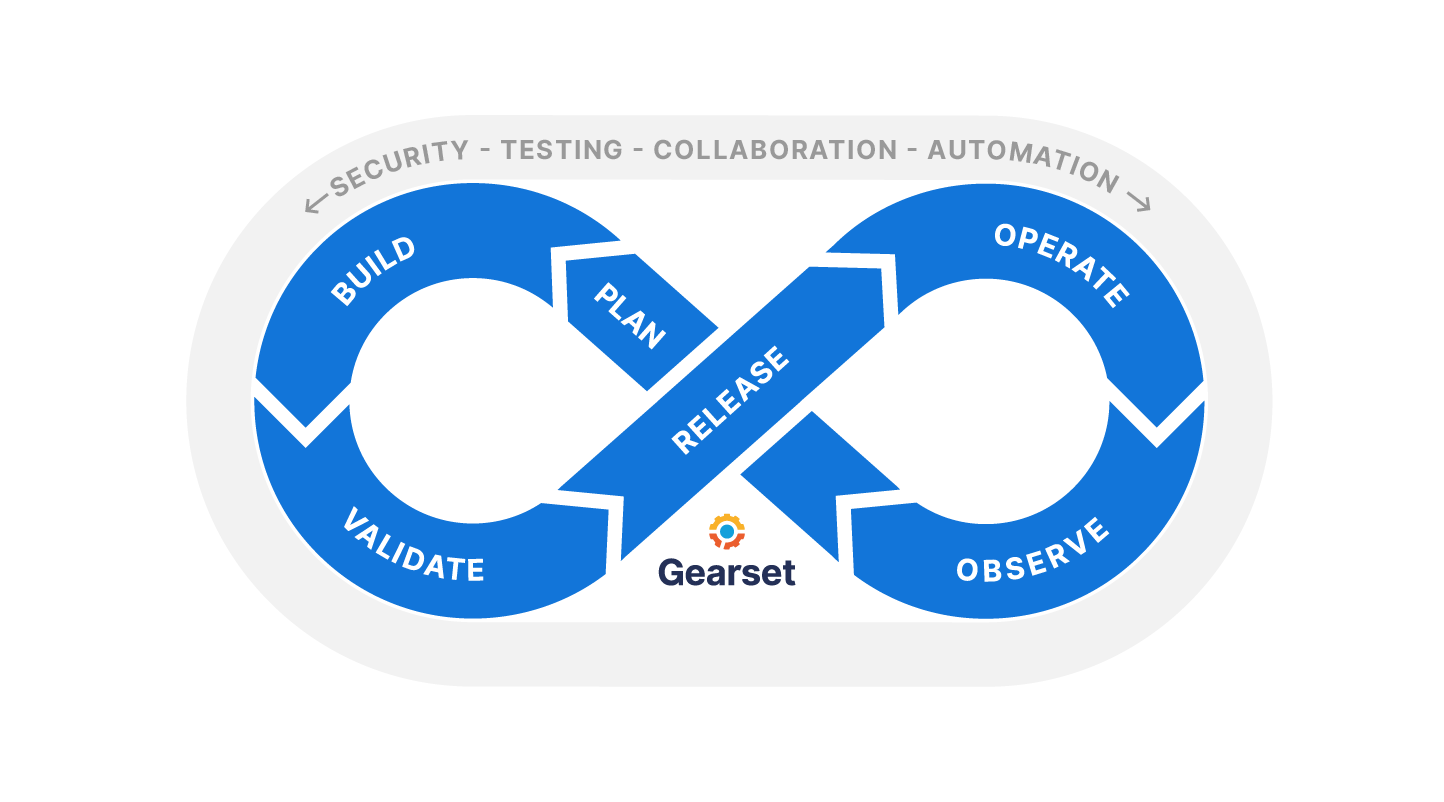
Up until now, the main focus for many Salesforce teams has been on building reliable deployment processes, as release day is often where the pain of change management is felt most acutely. As a result, observability hasn’t been as widely implemented in the Salesforce ecosystem.
The State of Salesforce DevOps 2025 found that 49% of Salesforce teams have no plans to implement observability tools. But without observability, issues often only come to light when an end user reports them, leading to disruption and costly system downtime. Teams that do have an observability solution were 50% more likely to catch bugs within a day and 48% more likely to fix them within a day, compared to teams without observability. This responsiveness is exactly why observability is a must for Salesforce teams looking to implement a robust DevOps process that proactively safeguards their orgs.
Does Salesforce have native observability tools?
Salesforce has some tools for monitoring performance and errors, but they are scattered in different areas and have limitations:
Free tools. Built-in tools like Debug Logs, Flow error emails, and Apex exception alerts help flag issues, but they’re reactive, disconnected, and often require significant effort to interpret and piece together.
Salesforce Shield (paid add-on). Salesforce Shield adds deeper visibility through event monitoring and auditing, but is primarily focused on security and compliance, with added cost and complexity that can limit its use for day-to-day DevOps troubleshooting.
Agentforce (AI-powered capabilities). Agentforce introduces AI into the Salesforce platform, but it’s broad in scope and not specifically designed to provide real-time, actionable insight into errors and system issues.
While these observability tools surface useful data, they still leave teams doing the heavy lifting to understand, prioritise, and resolve issues quickly.
Gearset Observability: monitor the health of your org easily
When something breaks in Salesforce, the process of finding and fixing the issue should be simple. Gearset’s Observability solution brings Apex and Flow errors, along with Salesforce org limits (such as daily API requests), together into a centralized, user-friendly dashboard with real-time updates. Here you can visually track your org’s health over time, letting you easily catch issues early, spot any trends quickly, and understand their impact at a glance. It also helps you categorise and prioritise fixes or make strategic decisions based on what has the biggest impact on your org health — without needing to sift through error emails or wait to find out about an issue from your end users.
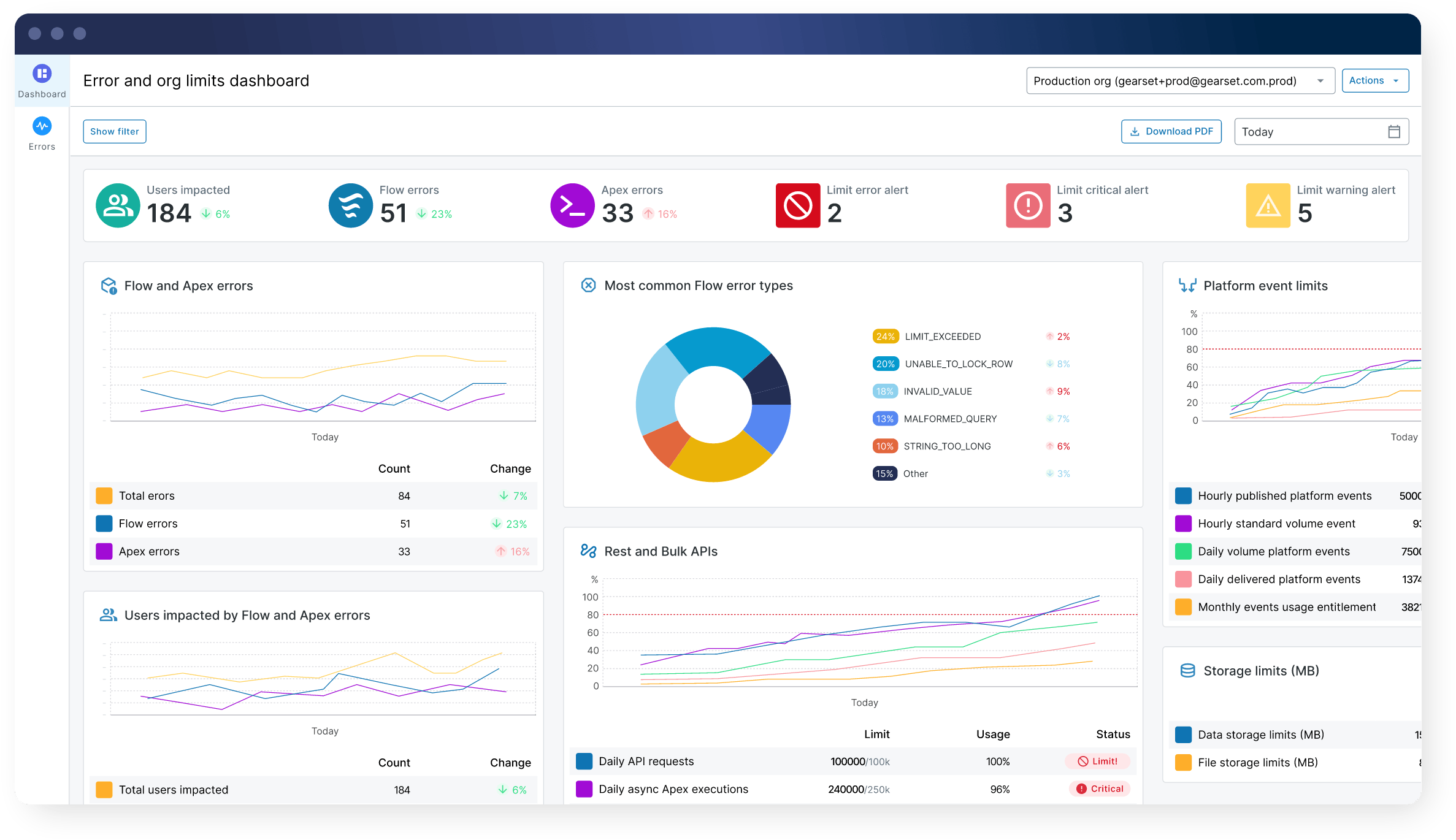
Once you’ve identified the problems that need to be tackled, you can streamline debugging with deployment history mapping — quickly identify which release coincides with when the issue started occurring, for quicker root cause analysis. Gearset also lets you automatically create tickets in Jira or Azure DevOps Work Items, so you can start the fix process seamlessly. This arms your team with the information they need to pick up the task and work through the resolution.
Action Flow insights swiftly with the Gearset Agent
While observability enhances your visibility and insight into your org, there still often comes the challenge of team capacity. Being able to dedicate the resources needed to scope and build the fixes can be difficult.
That’s where the Gearset Agent can help. The Agent comes built-in to the Observability platform and feeds directly from the Flow metadata and metrics within your org. When a Flow error happens, it gives you instant insight into three core questions:
1. What is the error? Get a clear, concise overview of the Flow error at the click of a button. Gearset’s Agent translates raw Salesforce error messages into easy-to-understand explanations, saving time and making this step accessible to both developers and admins regardless of their experience or knowledge level.
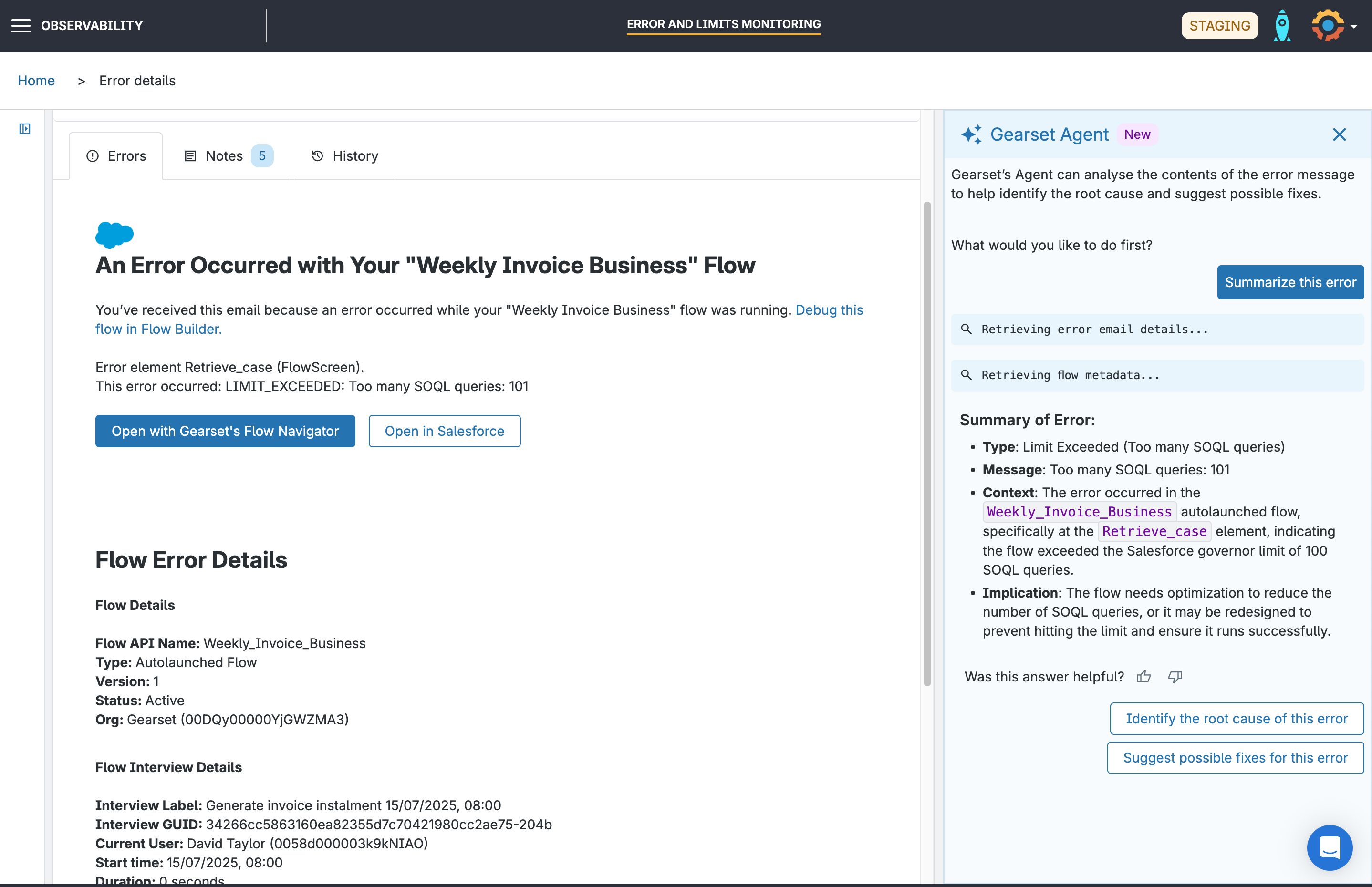
2. What caused this error? Gearset’s Agent quickly identifies the most likely root cause of the issue, ranked by probability. These insights are based on the Flow’s metadata and known behavior — giving you logical, evidence-based answers without manual investigation.
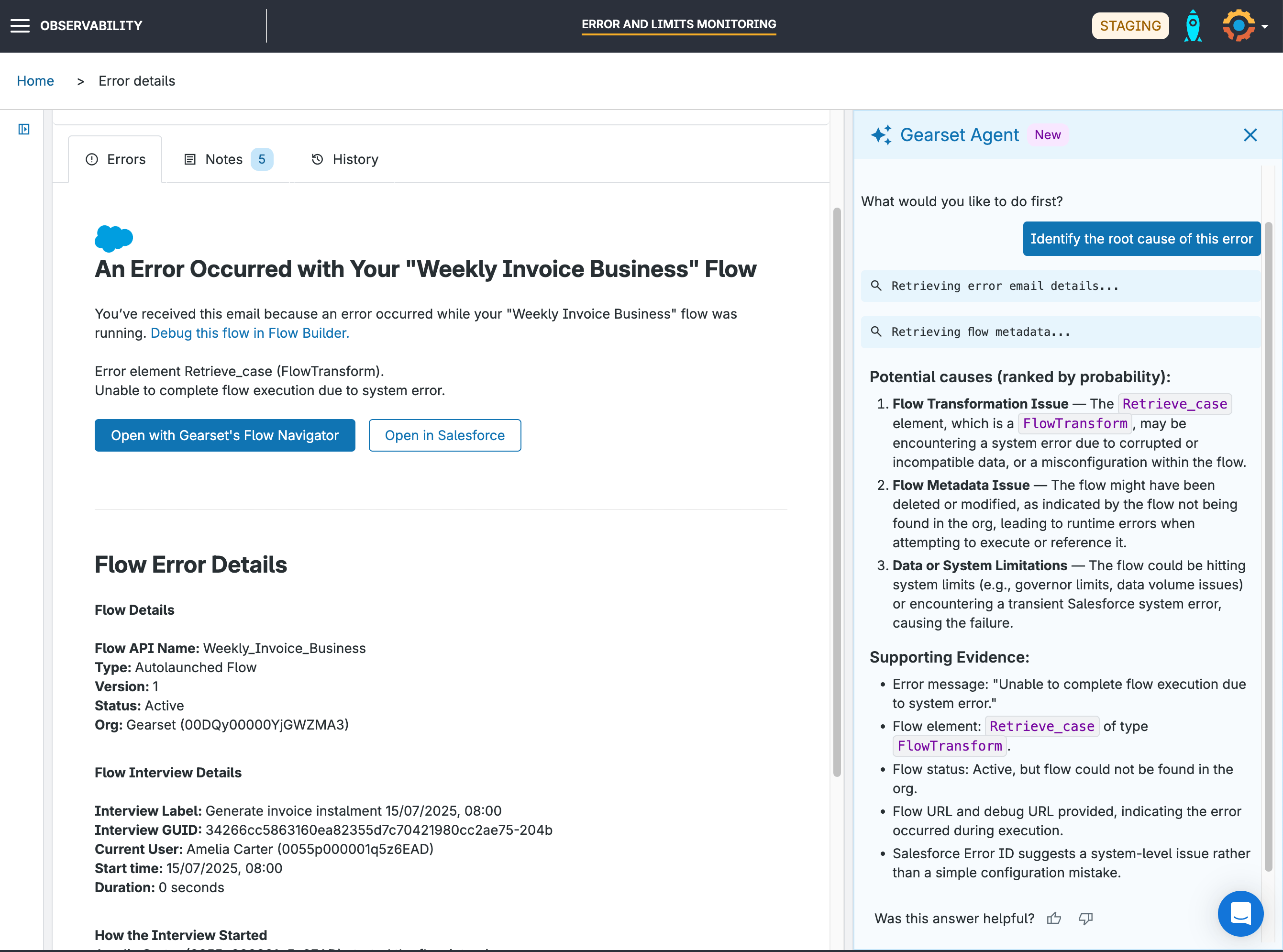
3. What are potential fixes for this error? Rather than working out the next step yourself, Gearset’s Agent suggests possible fixes with a single click, again ranked by likelihood. This arms your team with effective solutions, so they can focus on delivering a fix quickly.
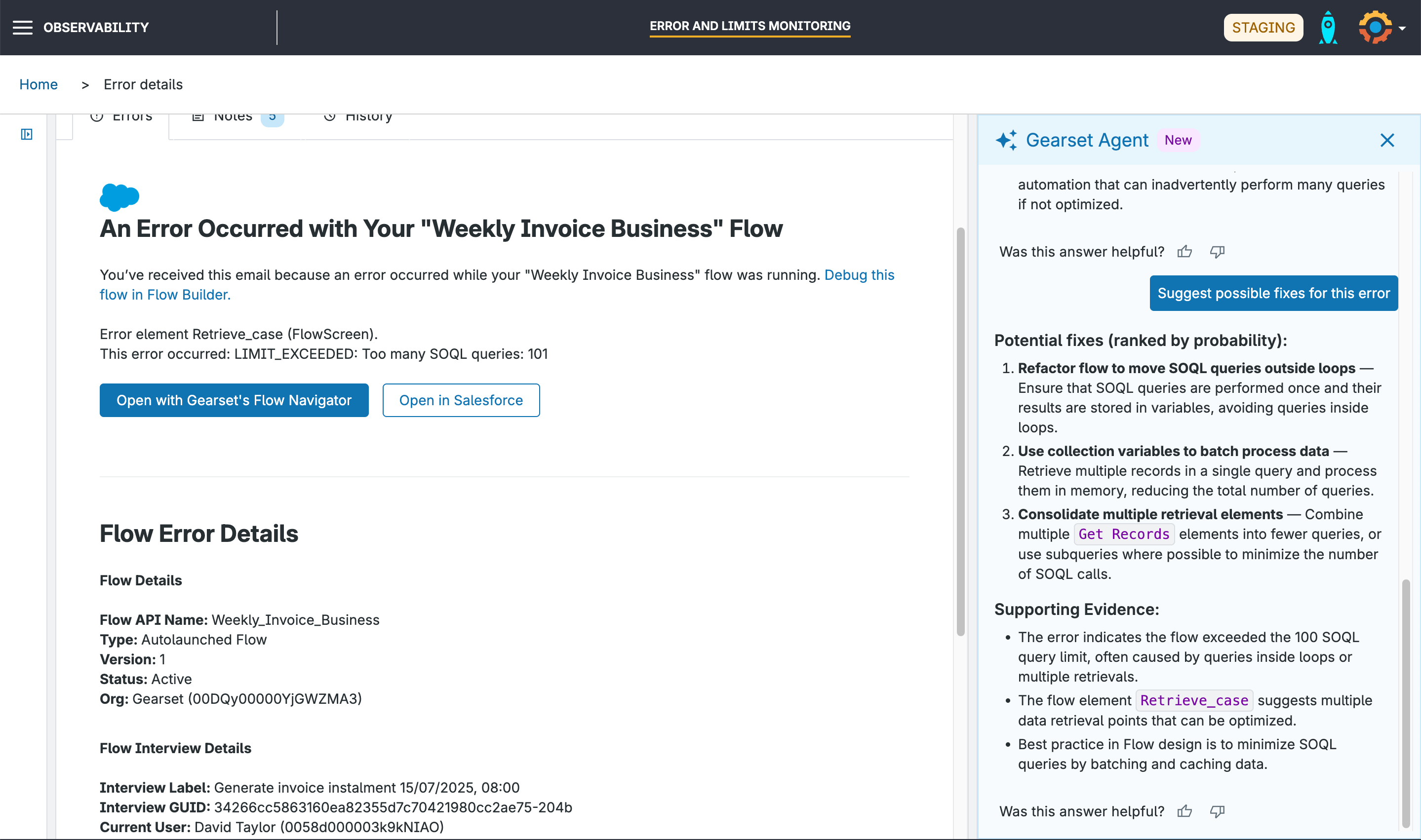
So when a Flow stops working, the Gearset Agent helps you resolve the issue with:
Speed. Cut down the time needed to diagnose, scope and resolve Flow issues with insights that instantly pinpoints them and suggests optimal fixes for a swift outcome.
Accessibility. Clear, simple explanations on the what, where, why and how that anyone on the team can understand and act on, without needing to understand the complexities or background of the Flow in question.
Intelligence. No guesswork or assumptions, just logical, deterministic answers based on a sound understanding of the Flow error and of the workings of your org.
This helps teams with limited capacity or resource constraints to focus time exactly where it’s needed, so Flow problems can be easily fixed with minimal upfront effort.
Stay one step ahead with the Gearset Agent in Observability
Gearset’s Observability solution brings best practices to Salesforce teams, without the need for specialist setup or ongoing maintenance. It gives you enhanced visibility, insights and context to any issues encountered, helping you plan better, respond faster, and improve platform stability and business outcomes. And when combined with Gearset’s Agent, you can also leverage that insight to give actionable solutions to Flow errors at speed.
Speak to one of our DevOps experts for a tailored demo to see how Gearset’s Agent in Observability can streamline your Flow error handling, or try Gearset today on a free 30-day trial.

