
Artificial intelligence (AI) is already helping DevOps teams succeed on Salesforce. For these teams, the foundations of good DevOps stay the same: human collaboration at every stage, automation that improves quality, security and velocity, and a platform that provides the support and guardrails that software quality depends on. Whether a change is made by a developer or generated by an agent, those principles don’t change.
AI should empower teams to move faster and focus on creating business value, not slow them down with new uncertainty. With strong DevOps foundations, teams are now confidently using AI where it makes sense, keeping humans in the loop, and measuring the real impact across their workflow.
Why artificial intelligence matters in DevOps
AI matters in DevOps because it’s already being applied across the software development lifecycle. The tools that support code generation, testing, and deployment increasingly have AI capabilities built in, shaping how development and operations teams work and make decisions. Ignoring that shift means missing opportunities to deliver faster and with more confidence, but adopting it blindly risks eroding the trust, security, and control that businesses depend on.
How AI is changing Salesforce development
Salesforce is regularly incorporating more AI into the software delivery on the platform. From the way users build apps and write code to how data is understood and decisions are made, AI now underpins more of the core functionality than ever before. That shift is showing up not only in new tools like Agentforce Vibes, bringing “vibe coding” to the platform, but also in the way Salesforce is now framing its products as Agentforce-led experiences rather than standalone clouds. AI in Salesforce isn’t a single feature or add-on anymore. It’s becoming part of the platform’s foundation, powering intelligent automation, contextual recommendations, and smarter tools for both developers and admins.
In our State of Salesforce DevOps Report 2025 we found that the vast majority of Salesforce teams are investing in AI in some way. 86% said they would be exploring new use cases for AI in 2025, and 37% said they would be optimizing existing AI-enabled processes.
The question isn’t whether to use it, but how to apply it safely, measure its impact, and keep the right guardrails in place so every change, human or agent-made, moves through a reliable DevOps process.
Agentforce Maturity Model: From Readiness to Delivery
The benefits of using AI in DevOps
AI in DevOps won’t look the same for every team. The right balance depends on your team’s skills and how ready your company is to embrace AI. The important thing is to find the approach that genuinely improves your deployment process.
Google’s 2025 DORA State of AI-Assisted Software Development report found that, of the 90% of survey respondents who reported using AI at work, more than 80% believe it has increased their productivity. Some of the main benefits of AI are making DevOps processes faster and unlocking new possibilities. By automating repetitive tasks, it can boost productivity by freeing teams to focus on creative problem-solving and architectural decisions.
Applied to the right problems, and paired with deterministic solutions, AI tools will:
- Accelerate non-deterministic tasks that couldn’t be automated before
- Democratize DevOps by lowering the barrier to entry through natural-language prompts
- Free up developer time for higher-impact work
- Reduce the time and cost of delivery
AI tools and use cases for DevOps
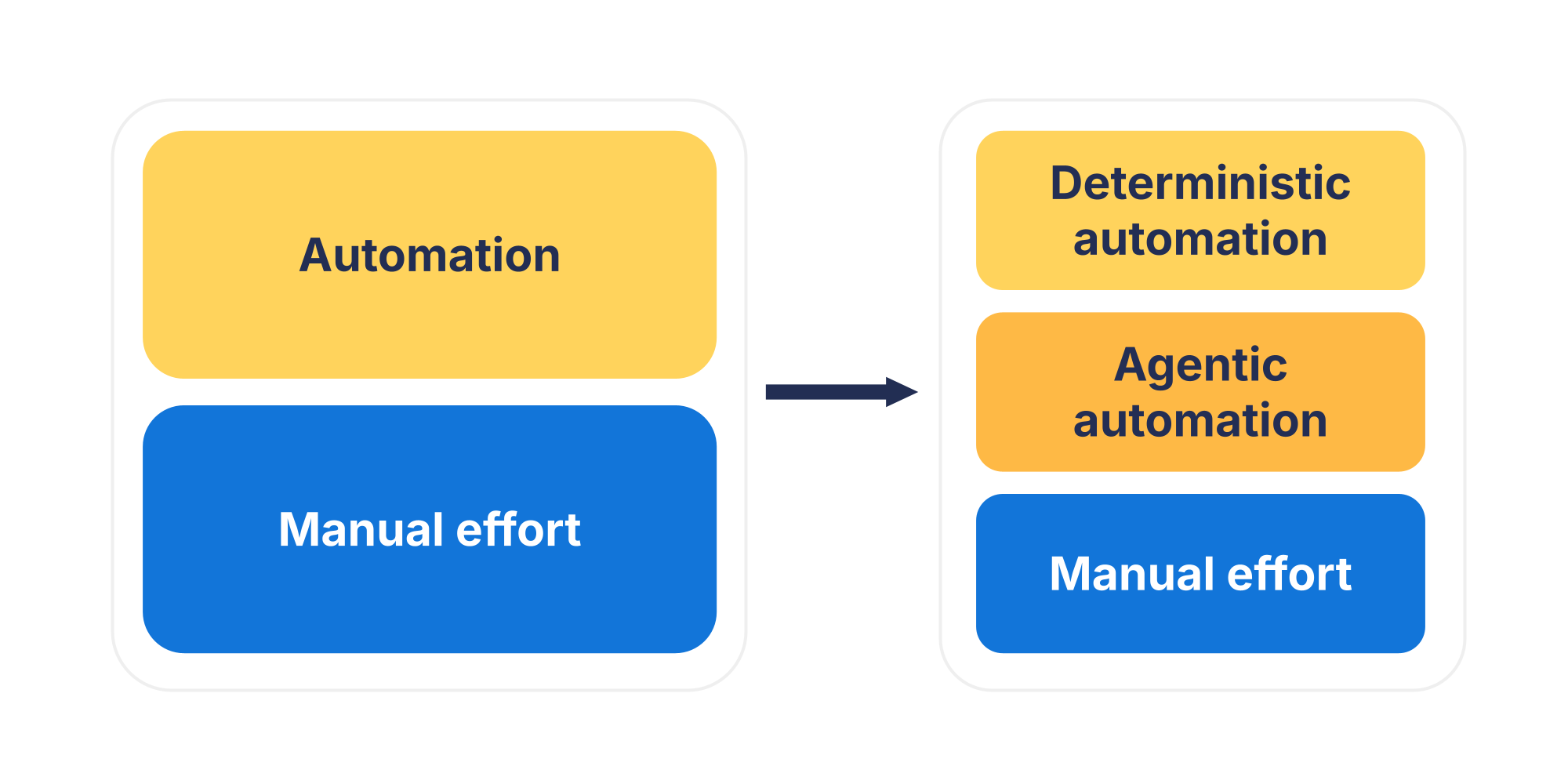
Not every part of the DevOps lifecycle benefits from AI in the same way. Some tasks are best handled by rule-based automation while others lend themselves to agentic automation. And there will always be moments that need human expertise and oversight. The key is knowing when to use which.
Org Intelligence
In Salesforce, one of the hardest challenges is understanding how metadata, automation, and dependencies interact. AI-driven analysis, in tools like Gearset’s Org Intelligence, can now do much of that heavy lifting automatically. Instead of relying on human intuition to predict downstream effects, AI can model how one change will influence another and help teams understand and control the complexity of their environments. By mapping relationships, highlighting redundant automation, and revealing potential risks before deployment, Org Intelligence gives teams a level of visibility that used to take days of manual work to achieve.
Development
Salesforce developers are increasingly using tools like GitHub Copilot, Cursor, and Agentforce for Developers to turn natural-language prompts into code suggestions. These tools can suggest code completions as you type and even generate documentation or unit tests. In the Salesforce ecosystem, that means Apex, Lightning components, and Flow logic can all be produced faster and with fewer repetitive steps.
AI technologies can also enhance collaboration. Features like Gearset’s AI-generated pull request notes improve daily workflows by giving reviewers clear, concise summaries of what’s changed and why, so they can understand the intent of a release without combing through every line of code. By adding this layer of intelligence directly into the development process, Gearset makes review cycles faster, decisions clearer, and teamwork smoother.
Testing/QA
Generative AI can produce realistic test data, propose new test cases, and predict where regressions are most likely to occur. Agentforce for Developers (formerly Einstein for Developers) provides an AI-assisted development environment that can automatically generate unit tests for Apex and Lightning Web Components based on your existing code. It understands the structure of your project and creates meaningful test coverage using natural-language prompts. Alongside test generation, tools like Salesforce ApexGuru use generative AI to analyze runtime behavior and flag performance anti-patterns early, helping teams catch scalability risks before they ship.
Beyond Salesforce’s native tools, AI-powered tools like GitHub Copilot help developers generate tests automatically as they code. The same prompt-first approach is starting to flow into UI testing too. Letting teams describe end-to-end behavior in plain English and have the test scripts take shape from there.
Deployment
As AI starts to show up in production features, teams need to deploy AI agents through the same reliable release path as everything else. Gearset makes deploying AI agents a smooth part of your existing DevOps process. You can deploy and manage agent configurations and tests just like any other metadata, with the same visibility, auditability, and control. This means teams can explore AI-driven functionality without needing new tools or risking the reliability of their delivery process.
Observability
Another important aspect of DevOps is visibility into system health. Salesforce Real‑Time Event Monitoring (part of the Salesforce Shield suite) uses machine-learning models to compare user activity to historical baselines and flag what it regards as abnormal behavior. Third-party tools like Splunk AI and Dynatrace Davis use machine learning models for incident management processes like anomaly detection and suggesting or even automating remediation steps.
What are the challenges and risks of using AI in Salesforce DevOps?
AI brings with it new challenges that DevOps teams have to manage carefully. As well as accelerating development, it can just as easily amplify existing risks around security, quality, and control. Like any DevOps automation, it won’t fix problems; it magnifies whatever you already have, good or bad.
Here are some challenges and risks to keep in mind:
- Security and compliance: AI increases the risk of exposing sensitive org metadata or customer data in prompts or model inputs, especially when using public AI tools. Agentforce is protected by the Einstein Trust Layer, which enforces encryption, data isolation, and compliance for AI interactions inside Salesforce.
- Trust, errors and hallucinations: Even within Salesforce’s ecosystem, AI tools can produce confident but incorrect outputs like misconfigured permissions, flawed automation logic, or references to non-existent metadata. These “hallucinations” can lead to deployment failures or hidden security flaws if not carefully validated.
- Team readiness and confidence: Salesforce teams are still learning where AI fits in their delivery process. Admins and developers may have very different levels of familiarity with generative tools, prompting strategies, or model limitations. Many worry about job displacement or loss of control. In GitLab’s 2024 Global DevSecOps Report 49% of respondents said they fear AI will replace their current role within the next five years.
- AI model fit and use cases: Not every AI model understands Salesforce context. General-purpose models, like those behind GitHub Copilot, are trained on large volumes of public code, not specifically on Salesforce’s Apex language, Flow metadata, or platform constraints. As a result, they can generate logic that looks correct but violates governor limits, skips CRUD/FLS security checks, or misconfigures automation.
- Review gaps in AI-accelerated pipelines: Salesforce pipelines already include high levels of automation, and AI tends to increase that level further by speeding up the delivery of changes. The problem isn’t automation itself, but when teams automate ahead of maturity, or speed up one part of the lifecycle without strengthening the others, changes flow through with too little scrutiny. AI-generated code changes should be matched by a robust review and validation tool like Code Reviews as an approval gate to ensure AI augments decision-making rather than replacing it.
- Tool sprawl: Introducing separate AI assistants for each stage can fragment visibility and weaken oversight. If QA, security, and development teams all rely on different AI tools, critical issues in metadata or configuration can go unnoticed until they reach production environments. Good governance is what counters that. Fewer, well-chosen tools that integrate seamlessly into the pipeline make it easier to define consistent policies, apply them everywhere, and see what’s happening end to end. A consolidated platform gives teams one trusted view of change and clearer accountability.
Implementation roadmap
AI in Salesforce DevOps works best when it’s introduced deliberately, not as a wholesale change, but as a gradual enhancement to how teams already deliver. Implementing AI should remove friction and free people to focus on building business value.
Start small and iterate
Begin with narrow, well-understood use cases where AI can make clear improvements — such as generating pull-request notes, analyzing dependencies, or writing test cases. These early wins help teams build trust in the technology while keeping risk low. Once the value is proven, you can expand into more complex or agentic automation, guided by the same DevOps principles you already follow.
Keep a human in the loop
Even the best AI needs oversight. Deterministic code review should do routine tasks like validation at speed, while people stay accountable for the system — setting guardrails, watching outcomes, and stepping in when intent or risk needs judgement.
Governance guardrails
A clear governance framework defines how AI tools are used, how outputs are reviewed, and what standards every change must meet before deployment. These guardrails don’t slow teams down — they give them confidence to move faster, knowing every change is traceable, tested, and compliant.
Review and accountability
As AI becomes more involved in creating and modifying changes, deterministic code review becomes one of the most important safeguards. Code analysis tools like Gearset’s Code Reviews are a vital quality and compliance check. Every change, whether human- or AI-created, is scanned, scored, and reviewed against your team’s own standards, giving you a clear view of security, maintainability, and technical debt.
Upskilling and culture change
Adopting AI successfully is as much about people as it is about tools. Teams need space to experiment and learn — to understand how to prompt effectively, interpret AI feedback, and recognize when manual control is still the right call. This shift is cultural: empowering developers to choose when to use rule-based automation, agentic automation, or hands-on work based on the complexity and risk of each task.
Consolidate your toolchain
As AI becomes part of every stage of the development cycle, you can end up with multiple tools. Bringing everything together on a single DevOps platform like Gearset embeds AI safely within the pipeline: Org Intelligence gives teams a clear view of dependencies and change risk before deployment, while Gearset Agent automates analysis and deployment checks without exposing sensitive metadata to external systems.
Measurement and ROI
Track baseline DevOps metrics like lead time, deployment frequency, and change failure rate, then compare them after introducing AI-assisted steps. Look for ways AI can improve efficiency in developer workflows — speeding up manual processes like dependency checks, PR reviews, and test creation — while also lifting release success rates and reducing rollbacks.
AI built in where it makes sense
AI in DevOps is most powerful when it’s built directly into the platform that teams already rely on. That’s why Gearset embeds AI in the DevOps lifecycle — not as separate add-on tools, but as part of the same pipeline you use to plan, build, and validate your deployments.
From Org Intelligence to Agentforce deployment support, every feature is designed to make delivery processes safer, smarter, and more predictable, without adding friction or risk.
See how Gearset can help your team deliver faster, safer releases with AI built in. Want to see it in action? Book a tailored demo to explore how teams are incorporating AI into their Salesforce DevOps workflows, or start a free 30-day trial.

