Is your Salesforce pipeline fit for admins, audits and AI changes?

In-house release tooling leaves admins waiting on developers, audits done manually and pipelines straining under the volume of AI-generated change. Gearset gives you a governed Salesforce pipeline — and puts the time you spend on upkeep back into building.

The modern enterprise uses Gearset to manage Salesforce

Intercom
Sage
Johnson & Johnson
Zurich
IBM
G2 Leader, Enterprise, Summer 2026

Customer story

How Ping Identity moved off DIY DevOps

Ping Identity’s Salesforce team released through a homegrown system built on the Salesforce CLI. Developers overwrote each other’s work, and CPQ changes were rebuilt by hand in every environment. When a merger doubled the team, they moved to Gearset Pipelines alongside GitHub — and went from deployments that took days to shipping continuously.

Sound familiar?

Scripts and generic CI weren’t built for Salesforce at scale

Whether you started with a few scripts or standardized on your company’s CI tool, you hit the same problems. Every Salesforce release adds, changes or deprecates metadata types, and your pipeline fixes compete with feature work for your developers’ time. Then add on the problems specific to how you built it.

Releasing with scripts or SFDX

  • Deployments fail on missing dependencies, profiles overwrite permissions, and deletions need a hand-built manifest.
  • Config data is rebuilt manually — CPQ teams can lose a day loading reference records
  • Changes can be traced in Git, but not tied to who approved and deployed them

Releasing with GitHub Actions or another CI tool

  • General-purpose CI doesn’t understand Salesforce metadata
  • Admins build in sandboxes, then hand everything to developers to release
  • Approval gates, quality checks and CD rules are custom workflow code that your team builds and maintains

Releasing more AI-generated change

  • General AI tools don’t know your org - its dependencies, automations or history
  • AI writes more changes than your review process was built for
  • Partners and contractors can deliver AI-generated code in large drops
  • More parallel work streams mean more open PRs, more merge conflicts and more time spent untangling them

Why now?

When maintaining your own pipeline starts to cost you

In-house tooling rarely fails all at once. It stops keeping up when something changes around it. If one of these is happening, it’s the right moment to assess whether to carry on building or buy a full platform.

  • A Salesforce release breaks your pipeline

    Three times a year, new API versions add, change and deprecate metadata types. If your scripts need repairing after every release, that’s a maintenance cost that you might not have budgeted for.

  • An audit is coming

    A compliance milestone means proving who changed what, who approved it and how to undo it — across every org.

  • Your org landscape is changing

    An acquisition or migration adds orgs, teams and processes faster than in-house tooling can absorb them.

  • You’ve lost data, or come close

    A failed restore is often the first time a team finds out its backups don’t work the way it assumed.

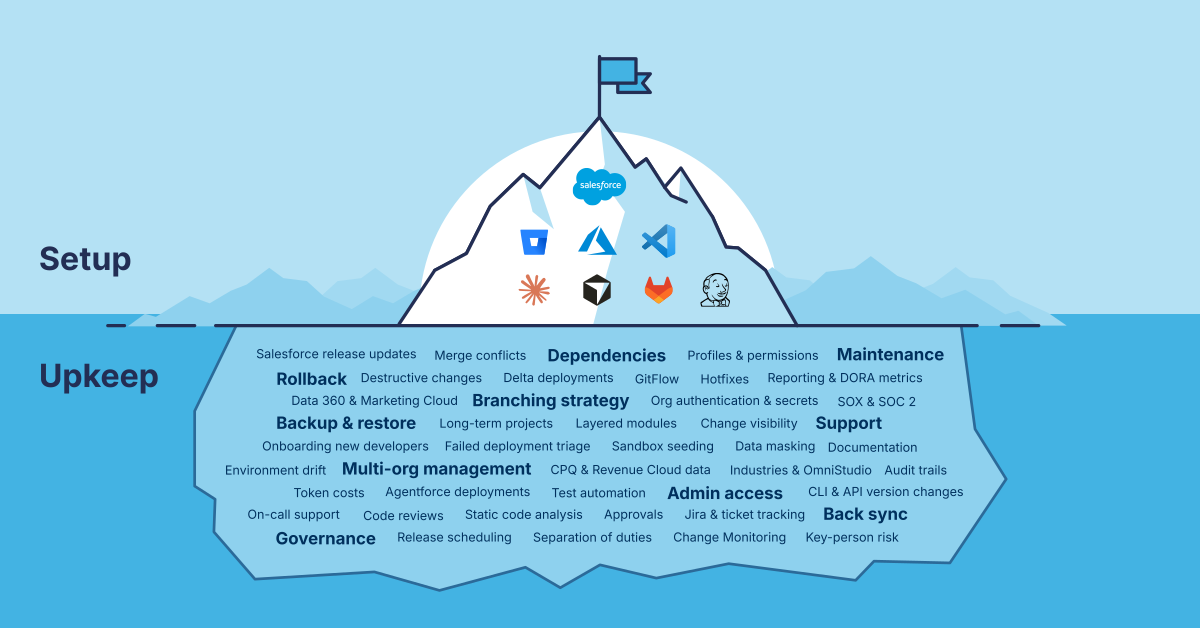
Setup and Upkeep

In-house tooling vs Gearset

More control. No maintenance overhead.

Here’s how in-house tooling compares with a purpose-built platform when Gearset takes on the Salesforce-specific work.

Build in-house compared with Gearset
What matters Build in-house (scripts, SFDX, GitHub Actions) Gearset
Time to first governed release Build in-house (scripts, SFDX, GitHub Actions) Months of scoping and build before teams are onboarded Gearset Up and running in weeks — connect your orgs and Git, build your pipelines and then start releasing
Salesforce metadata awareness Build in-house (scripts, SFDX, GitHub Actions) Dependencies, profiles and destructive changes handled by custom scripts; config data loaded by hand Gearset Built for Salesforce metadata and config data, including dependency analysis, profiles and destructive changes
Admin access Build in-house (scripts, SFDX, GitHub Actions) Admins trained on Git, VS Code and your custom tooling, and retrained when it changes Gearset Admins compare, commit and deploy in a UI built for Salesforce, alongside developers working in Gearset or Git
Rollback Build in-house (scripts, SFDX, GitHub Actions) Rebuilt by hand from Git history, usually by whoever knows the scripts Gearset Roll back from deployment history in a few clicks, with permissions controlling who can
Code reviews Build in-house (scripts, SFDX, GitHub Actions) Static analysis such as PMD, sometimes with AI rules, wired into CI and kept up to date by your team Gearset Context-aware code reviews on every pull request, with automatic fixes for security vulnerabilities
Apex testing Build in-house (scripts, SFDX, GitHub Actions) Test lists for RunSpecifiedTests maintained by hand, or run every local test and wait Gearset Tests selected from what's changing in each deployment, while still meeting Salesforce's code coverage rules
Pre and post-deployment steps Build in-house (scripts, SFDX, GitHub Actions) Custom scripts bolted on around the pipeline Gearset Built into the pipeline
Long-running projects Build in-house (scripts, SFDX, GitHub Actions) Hand-managed branches that drift from production Gearset Long-term projects that stay in sync with production
Audit trail and approvals Build in-house (scripts, SFDX, GitHub Actions) Approvals and change history stitched together from Git, CI logs and tickets Gearset Review, approvals and a full audit trail for every change
AI-generated change at volume Build in-house (scripts, SFDX, GitHub Actions) More parallel work streams and PRs than the pipeline was built for, with conflicts untangled by hand Gearset Pipelines that track every open PR across environments, flag conflicts early and help you resolve them
Keeping up with Salesforce Build in-house (scripts, SFDX, GitHub Actions) Three major Salesforce releases a year, each one a chance to break your release scripts Gearset New API versions are supported, and version mismatches between orgs are handled automatically
Support Build in-house (scripts, SFDX, GitHub Actions) Your own engineers, fitting pipeline fixes around their roadmap work Gearset Salesforce DevOps specialists on live chat, with a response in under 5 minutes
Total cost Build in-house (scripts, SFDX, GitHub Actions) A team to run it: typically a lead, a builder, operations developers and a coordinator, plus training in every org Gearset A predictable subscription, with your team of engineers focused on the roadmap

When building still makes sense

Some in-house pipelines are genuinely good. If yours is good, the question is whether your best engineers should be building release tooling that a vendor already ships. For a small developer team with low change volume, a well-maintained script may be all you need. As orgs, teams and audit scrutiny grow, so does the team you need to run it. If your release tooling isn’t what sets your business apart, it’s rarely worth maintaining yourself.

Security and compliance

Built for the world’s most regulated industries

Gearset helps enterprises in finance, healthcare, and technology deliver secure Salesforce innovation at scale.

Governance at scale

We combine advanced governance, compliance support, and scalable release management with a user-friendly interface and rapid onboarding, minimizing operational risk as you scale.

Compliance support

We support robust compliance — CCPA/CPRA, SOX, GDPR, and HIPAA — and provide enterprise‑grade security controls and hosting.

No heavy setup

Unlike DevOps tools that are installed within Salesforce, Gearset doesn’t require heavy setup and ongoing maintenance. Gearset delivers enterprise‑grade power without the overhead, which is why leading global organizations choose Gearset to underpin their enterprise DevOps strategy.

IBM
Veolia
McKesson
Tripadvisor
Sonos
Intercom
Sage
Zillow
Johnson & Johnson
Zurich
G2 Best Relationship, Enterprise, Fall 2026
G2 Best Results, Enterprise, Fall 2026
G2 Leader, Enterprise, Fall 2026
G2 Best Usability, Enterprise, Fall 2026
G2 Most Implementable, Enterprise, Fall 2026

In-person pipeline health check

Want Gearset to come to your office?

Register your interest for an in-person pipeline check. You’ll get a 1:1 workshop with our Salesforce DevOps experts, who’ll dig into the challenges your team is facing and show you practical ways to solve them with Gearset..

  • One-hour face-to-face meeting
  • We will diagnose weaknesses in your current setup
  • We can come to your office

Register your interest

Salesforce DevOps build vs buy: common questions

Should we build or buy a Salesforce DevOps solution?

Build if you’re a small, developer-only team with low change volume. Buy when multiple teams release to Salesforce, admins need a way in, or audits and AI-generated changes raise the stakes. At that point, the maintenance and operational risk of custom tools usually outweigh the cost of a purpose-built platform.

Can we keep using GitHub Actions?

Yes, for what it does well. Gearset takes over Salesforce validation and deployment, and can trigger the GitHub Actions workflows you still need — and many teams bring testing into Gearset over time. Git stays your source of truth.

What happens to our existing scripts and pipelines?

You don’t have to switch everything at once. Gearset works alongside your existing scripts, and we work with you to decide which can be retired and replaced by Gearset — and which to keep and how they fit into your pipeline, for example as status checks. That way you move over without disrupting releases, minimizing risk throughout.

Do our admins need to learn Git?

No. Admins compare, commit and deploy from the Gearset UI, while developers keep working in Git and the CLI.

How does Gearset handle AI-generated changes?

The same way it handles every other change. AI coding tools mean more changes, from more people, arriving faster — and each one still needs testing, review and approval before it reaches production. Gearset applies the same pipeline checks and audit trail whether a person or an AI tool wrote the change, so governance doesn’t rely on someone remembering to check. In-house tooling can do this too, but it’s more scripting to build and maintain as AI usage grows. Gearset’s agent, Cam, works within the same controls — it uses your org’s latest metadata and fixes validation errors before handing over a change for review.

Isn’t building cheaper?

The initial build often is. The ongoing maintenance and Salesforce release changes usually aren’t — and they rarely make it into the business case. Ping Identity estimates it would need a full DevOps team without Gearset, rather than one or two engineers.

How do we work out what our in-house tooling costs?

Start with five measures: the engineering hours spent maintaining scripts and pipelines each month, how many changes wait on a developer to release, how long a rollback takes and who can do it, how long audit prep takes, and how long it takes to rebuild config data in a new sandbox.

How long does it take to get started?

Enterprise rollouts include a dedicated onboarding manager to design your pipeline and branching strategy. Most Enterprise teams need a few hours to build their pipeline, with most teams up and running in weeks, not months.

Put your team’s time back into building

Book a review with a Salesforce DevOps architect. We’ll look at your current setup and business goals, show you what Gearset would replace and what you’d keep — and how much time your team gets back.