Arrange a tailored demo with our DevOps experts. Kick off the process with a 15-minute call to discuss your requirements.

The real cost of a homegrown Salesforce DevOps pipeline, and why AI is raising it
Who is this guide for?
This guide is for anyone deciding how their Salesforce team should release changes. That includes platform leads and architects weighing up the technical work, and CTOs or Heads of CRM who own the budget. Sections 1 to 3 cover the technical detail, and sections 4 to 6 cover cost, risk, vendors and the decision itself.
It’ll help whatever your experience of building release pipelines for Salesforce. We’ve found teams fall into four main groups.
- You’re still deciding. Section 2 explains the different ways to build and buy. Section 3 lists everything a full build involves beyond the first working version.
- You started building and it’s stalled. Section 3 shows what’s left to do. Section 4 shows what it’ll cost to finish.
- Your pipeline is struggling to keep up. Section 4 shows how costs grow as more teams and orgs join. Section 6 covers moving off it without pausing releases.
- Your pipeline works well. Compare it with the build list in section 3 and the costs in section 4. Section 6 covers what you can add alongside it and how to move off it later.
Section 6 also has questions to put to your platform team. The download pack includes a one-page summary for whoever holds the budget.
1. Why DevOps?
DevOps exists to get more change into production, more often, with fewer failures. For a Salesforce team, that means business requests reach the production org in days rather than at the next quarterly release, broken deployments get caught before production, and every change can be traced. Google’s DORA research has consistently found that teams releasing more often also fail less often, because each release is smaller and easier to check.
So most enterprises are working out how to do DevOps for Salesforce and who builds the pipeline. That’s harder than it sounds, because Salesforce doesn’t behave like the rest of your software estate.
A Salesforce team at a large enterprise is usually a mix of admins, developers, business analysts, a release manager and one or more systems integrators. Much of the change comes from admins building Flows, fields, permission sets and page layouts in a sandbox through the Salesforce UI. None of that starts life as a file in Git. A pipeline that only serves people who write code leaves half the team outside it, waiting for a developer to package their work.
An admin finishes a Flow change in a sandbox on Tuesday. On Friday a developer gets around to retrieving it, committing it and untangling the profile diff that came with it. Multiply that by forty changes a month and you have a queue nobody budgeted for, staffed by developers doing clerical work.
What makes Salesforce an awkward deploy target
A homegrown pipeline has three parts. A CI tool such as GitHub Actions or Jenkins triggers each deployment, the Salesforce CLI carries it out and your team’s scripts and plugins handle everything specific to Salesforce. Those scripts are where the effort goes, mainly because of Salesforce quirks like these.
- Production keeps changing. Admins and users change it directly and Salesforce changes it with every release, so production may hold reports, list views and hotfixes that never went near Git. If an admin fixes a validation rule in production during an incident and nobody back-promotes it, next week’s deployment from Git quietly puts the old version back.
- Deployments aren’t file copies. Salesforce checks every component against what’s already in the target org, and a deployment to production is all or nothing. One missing dependency or failing test rolls the whole thing back, so a release of 200 components can be blocked by one.
- Deletions need their own manifest. Removing a field means generating a separate
destructiveChanges.xml, choosing whether it runs before or after the main deployment and making sure nothing in the target org still references it. A deletion that’s correct in Git can still fail because someone built a formula field, validation rule or Flow on it directly in production last month. - Profiles and permissions are easy to get wrong. A profile retrieved from the wrong sandbox can revoke field access in production, and a new field deployed without a matching profile or permission set goes live invisible to the users who need it. Neither case produces an error. Salesforce has also dropped its plan to retire permissions on profiles, so many pipelines now handle profiles and permission sets side by side.
- Tests have rules of their own. Production deployments need 75% Apex code coverage across the org, and every trigger needs some coverage. If you run only a selected set of tests to save time, every class and trigger in the deployment has to meet that 75% individually. Org-wide coverage of 88% won’t save a single class sitting at 72%.
- The platform changes three times a year, and each release brings a new Metadata API version. Metadata shapes change too, as when Agentforce agents moved from GenAiPlanner to GenAiPlannerBundle. Some metadata types can’t be deployed through the Metadata API at all and must be changed by hand in each org.
- Configuration often lives in records. Salesforce CPQ price rules, product options and quote templates are data, not metadata, so
sf project deploydoesn’t move them. The same is true of much Revenue Cloud and OmniStudio configuration, so moving off CPQ doesn’t make the problem go away. Getting those records from UAT to production in the right order, with matching external IDs, is its own project.
Almost all these things can be solved with scripts and the Salesforce CLI. But someone has to write that code, keep it working through the next few Salesforce releases and fix it when it fails.
2. Build or buy
Most teams start with Salesforce’s own tools. Change sets move metadata between connected orgs, but they have no version control or rollback and can’t delete components. DevOps Center is free and adds Git-based work tracking, which makes it a clear step up for a small team, but it doesn’t cover config data, backup or automated rollback, and larger teams usually outgrow it quickly. Neither is really a build or buy choice, so this guide focuses on what teams do next.
“Build or buy” sounds like a choice between two things that you make once. In practice each side covers a range of options with very different costs.
What building looks like
Building is usually one approach at growing levels of investment.
- SFDX scripts. A developer or release manager writes shell scripts around the Salesforce CLI, run from a laptop or a single CI job. It’s the fastest way off change sets and tends to live in one person’s head.
- Your company’s CI standard, plus open source. This is what most platform teams will propose. You run Salesforce jobs in GitHub Actions, GitLab CI, Azure Pipelines or Jenkins, alongside everything else. You add open-source projects such as sfdx-git-delta for delta deployments, PMD or Salesforce Code Analyzer for static analysis, and perhaps sfdx-hardis or CumulusCI for more structure.
- An internal platform. A dedicated team treats Salesforce delivery as a product, with a roadmap, documentation and support for internal customers. It’s the most capable and most expensive form of build and where successful CI-plus-open-source setups tend to end up, planned or not.
Scripts move into CI when a second team needs them, and CI turns into an internal platform when looking after it becomes someone’s job. AI coding assistants have made each stage faster and cheaper to build.
What buying looks like
DevOps vendors either install inside Salesforce as a managed package or run as external SaaS. Some enterprises start with a hybrid, keeping their CI for linting, scratch-org tests and package builds, and using a platform for org deployments, config data, admin access, rollback and audit. It’s a sensible first step, but the glue between the two systems is still yours to maintain, and your audit trail is split across both. Most teams that start hybrid move more of their Salesforce delivery onto the platform over time, so every change runs through one place with one record.
What AI changes
AI makes the case for building look stronger than it is. Coding assistants write CI configuration and shell scripts in minutes, and they’re good at migrating deprecated CLI commands and fixing broken YAML. AI will shorten the scripting. But it won’t shorten much of the build list in section 3 (below), which is about how Salesforce behaves, who approves what and what evidence you keep. An AI assistant can draft the scripts, but it can’t choose your branching model, test your rollback or answer to your auditor.
AI has also changed how much flows through the pipeline, and that matters more. Developers, admins and partners all produce more change, faster, and much of it is written faster than anyone can properly review it. Google’s DORA 2025 research describes AI as an amplifier of whatever delivery system you already have, so a well-governed one gets faster and a weak one fails faster. A partner can now drop a 400-file AI-assisted change into your UAT on a Thursday, and your pipeline has to validate it, route it to the right approver and record who signed it off, at a volume it was never designed for. Section 3 covers what that does to a homegrown pipeline.
3. Technical implementation
Setup, starting with the first version
A competent developer can get pull request validation and deploy-on-merge working in a day or two. Setup means a certificate for the JWT bearer flow, an External Client App, an integration user and some CI secrets. The validation job installs the CLI, builds a delta with sfdx-git-delta and runs a check-only deployment against production.
# checkout with fetch-depth: 0, because sgd needs full git history
# assumes an earlier login step: sf org login jwt ... --alias prod
- run: npm install --global @salesforce/cli@${SF_CLI_VERSION} # pinned
- run: echo y | sf plugins install sfdx-git-delta@${SGD_VERSION} # unsigned plugin prompt
- run: |
    sf sgd source delta --from $(git merge-base origin/main HEAD) --to HEAD \
      --api-version ${API_VERSION} --output-dir delta # pinned, or sgd uses its latest
- run: |
    sf project deploy validate \
      --manifest delta/package/package.xml \
      --post-destructive-changes delta/destructiveChanges/destructiveChanges.xml \
      --target-org prod --test-level RunLocalTests --wait 120Code language: PHP (php)
This first version works and it’ll keep working for a while. Even these few lines carry decisions the build list comes back to, such as which commit to diff against and which API version to deploy at, and getting either wrong produces deployments that look fine and aren’t. It looks almost identical in GitLab, Azure DevOps or Jenkins, because the Salesforce logic lives in those few commands. It also knows about one environment, and it can’t explain itself to anyone except its author.
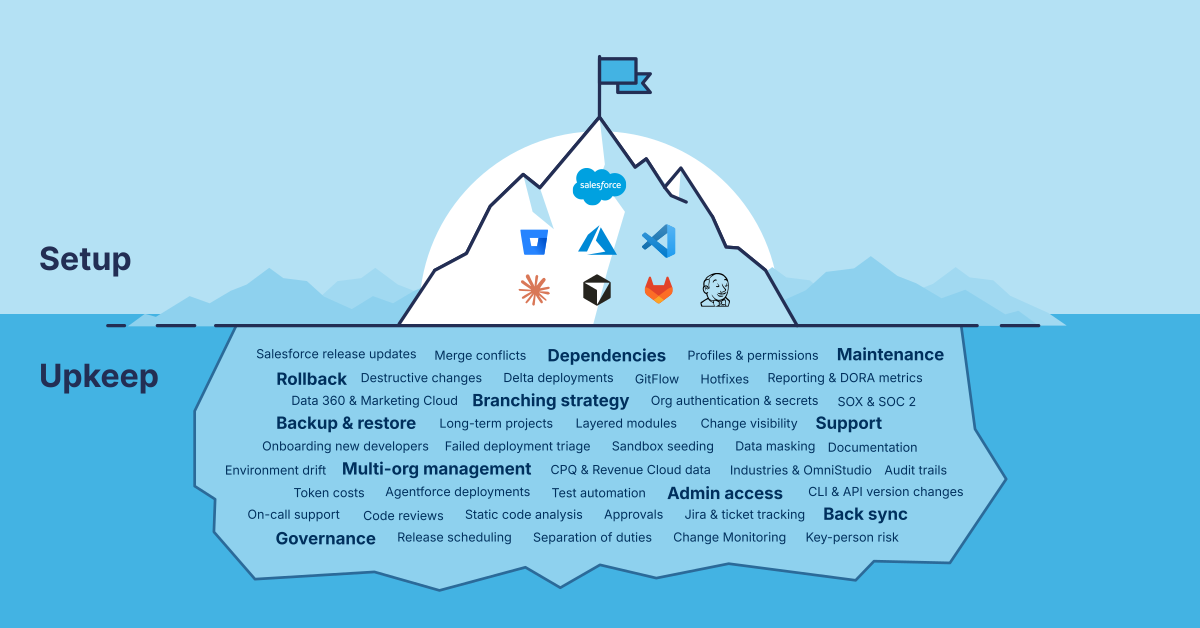
What you build next
The table below lists the work roughly in the order the pain arrives. Effort ranges are estimates and assume one experienced engineer who knows the CLI. Open-source projects such as sfdx-hardis and CumulusCI shorten several rows, and you then own their upgrades and the glue between them.
| What you end up building | Realistic effort | Why it’s harder than it looks |
|---|---|---|
| Promotion through several environments, plus a hotfix path | 1–3 weeks, then ongoing | The branching model gets encoded in YAML, so changing your process later means rewriting the pipeline. |
| Correct delta deployments | 1–2 weeks | The right diff base is the last commit deployed to each org, so the pipeline has to store that state per environment. |
| Destructive changes | 1–2 weeks, plus edge cases forever | Deletions fail when something only in production references the component. Renames are a delete plus an add, and they lose field data. |
| Merge conflicts in metadata XML | 1–2 weeks, then ongoing | Profiles, layouts, permission sets and translations are large XML files that many people edit at once. Git’s line-based merge produces conflicts nobody wants to resolve by hand, or clean merges that are valid XML but broken metadata. |
| Profile and permission strategy | 2–6 weeks, mostly not engineering | Moving to permission sets is an org-wide project with security and business sign-off. |
| Apex test selection | 2–4 weeks, then tuning | Specified tests trigger the per-class 75% coverage rule, and changes to triggers or shared utilities can break tests you didn’t select. |
| Pre- and post-deployment steps | 1–2 weeks, then ongoing | The Metadata API won’t make some changes, so you keep a manual checklist or a scripted hook system. |
| Config data such as CPQ, if you use it | 3–8 weeks for a first CPQ load, then ongoing per org | Records need external IDs, a dependency-ordered load and CPQ triggers disabled during the load. |
| A way in for admins | Weeks to months, often never finished | Admins either learn Git and VS Code, or someone builds a retrieve-and-commit flow for them. |
| Approvals and audit evidence | 1–3 weeks | CI logs expire, Setup Audit Trail keeps 180 days and auditors want a year of joined-up evidence. |
| Rollback | 2–4 weeks, rarely tested | Revert-and-redeploy depends on your delta tooling getting the diff base right. Even then, Salesforce won’t delete an active Flow, some field changes don’t reverse and deleted data isn’t restored. |
| Drift detection | 1–2 weeks, then noise tuning | A nightly retrieve-and-diff is easy to write and hard to make quiet enough that anyone reads it. |
| Several production orgs | Grows with each org | Each org brings its own config, sandbox chain and drift, and shared components must reach orgs that have drifted apart. |
| Governance for AI-assisted change | Ongoing, and grows with volume | More pull requests mean more validations queuing per org, more approvals and more audit evidence, and reviewers can’t read twice as much code. |
Add up the engineering rows and you get roughly 11 to 24 weeks of an experienced engineer’s time, or 14 to 32 with CPQ. That’s before the profile and permission work, which is mostly decisions and sign-off, and an admin workflow most teams never finish. The ranges assume the engineer already uses AI coding assistants, which speed up the scripting but not the testing, decisions and sign-off that take most of the time. Many platform teams propose two engineers for a quarter, which is about right for the build. The rest of this section is about running it once it’s built.
Performance
On a large org, a full RunLocalTests validation can take from 30 minutes to three hours or more, and Salesforce runs one deployment at a time per org, so validations queue rather than run in parallel. Test selection and quick deploy cut that time, but both need state your pipeline keeps, such as which tests cover what. Salesforce’s newer RunRelevantTests level helps, but you still own the fallback rules for triggers, Flows and shared utilities.
Maintenance, and the question of control
Control is the strongest argument for building. You own the code and set the priorities, but you also own every change Salesforce and its tooling make underneath you.
Salesforce ships three releases a year. Most won’t break a well-built pipeline outright. The preview window catches teams out. That’s when sandboxes on the preview instance run a release ahead of production. If sourceApiVersion isn’t pinned, the CLI retrieves at the preview sandbox’s newer API version, and the XML can contain elements production doesn’t recognize yet. The failure tends to arrive the night before go-live. Pinning helps, but someone still has to bump the version deliberately three times a year and watch for old versions retiring. It’s normal to budget one to three days a release for this.
The Salesforce CLI ships weekly, and in the past few years the sfdx executable gave way to sf and the old force: commands were retired. Unpinned, each change like that is a surprise red build. Pinned, it’s a planned upgrade every quarter or so.
Add credential rotation, sandbox refreshes that reset the integration user’s access, and flaky tests, at a day or two a month on a large org, and you have a steady load of maintenance that rarely appears in anyone’s plan.
Security
A homegrown pipeline holds one of the most powerful credentials in your company. The integration user it deploys as usually needs wide metadata permissions in production, and its private key sits in your CI secrets, where anyone who can edit the workflow file can usually reach it. Orgs that restrict login IP ranges often push teams onto self-hosted runners as well, which need patching.
Every plugin and CI action the pipeline installs runs with access to that key. The first version above pipes “y” into an install prompt because sfdx-git-delta isn’t signed. The safer option, allowlisting the plugin in unsignedPluginAllowList.json, is well known, but plenty of pipelines skip it, and that’s how supply-chain attacks get in. In March 2025, the widely used tj-actions/changed-files GitHub Action was compromised and printed CI secrets into the build logs of repositories that used it. Pinning versions, allowlisting plugins and narrowing the integration user’s permissions all help, and each is another job for whoever owns the pipeline.
Support
When a homegrown pipeline fails at 6pm on release night, the support process is whoever wrote it. If they’re on vacation, there’s no ticket to raise and nobody to escalate to.
Salesforce Support will take a case if the Metadata API itself misbehaves, but it doesn’t support your scripts, your CI configuration or the open-source plugins they depend on. Projects such as sfdx-git-delta and sfdx-hardis are maintained by their communities, so a bug in one becomes a GitHub issue and a wait, or a fork your team now owns.
Once several teams use the pipeline, its owner becomes an internal help desk too, answering “why did my deployment fail?”, onboarding new starters and reviewing change requests to the pipeline itself. If you run the Salesforce estate, that help desk sits in a team that doesn’t report to you, and your pre-release fix joins their backlog behind everything else. In our 2026 survey, 32% of Salesforce teams named skills or capacity gaps as a blocker to scaling their DevOps process.
Governing AI-generated change
AI’s biggest effect on your pipeline is volume. Developers with coding assistants open more pull requests, admins can generate Flows and formulas from a prompt, and partners can deliver in a week what used to take a month. Faros AI’s telemetry from more than 10,000 developers found that developers on teams with high AI adoption merged 98% more pull requests. Every one of those changes still needs validating, reviewing, approving and recording.
That volume lands where a homegrown pipeline is weakest. Salesforce runs one deployment at a time per org, so twice the pull requests means twice the validations queuing for the same UAT and production orgs, and a pull request validated on Monday can be invalid by Wednesday because something else merged. In the same data, pull request review time rose 91%, and people can’t read twice as much code in the same day. Reviewers either become the bottleneck or start approving changes they haven’t really read. In our 2026 survey, 43% of teams already review AI-generated changes no differently from human ones, though only 5% are extremely confident those changes are accurate.
Governance has to grow at the same rate. Each change needs automated checks that don’t depend on a busy reviewer, such as static analysis that understands Apex, Flows and Lightning components, run on every pull request, with rules someone chooses and keeps current. Each needs a named human approver, even when an assistant opened the pull request or an agent triggered the deploy. Your Git host can enforce that with branch protection, required reviewers and deployment approvals, but someone has to set those rules up for every repository and environment, and keep them in step as teams and orgs change. And each needs a record an auditor can follow, so twice the change means twice the evidence to assemble before every audit.
The pipeline also has to deploy the AI itself. Agentforce agents, topics, actions and prompt templates are metadata, and their shape changes between releases, as when GenAiPlanner gave way to GenAiPlannerBundle. Their behavior depends on data and prompts as well as metadata, so a green deployment says less about whether an agent works, and rolling back the metadata doesn’t undo anything the agent has already done to your records.
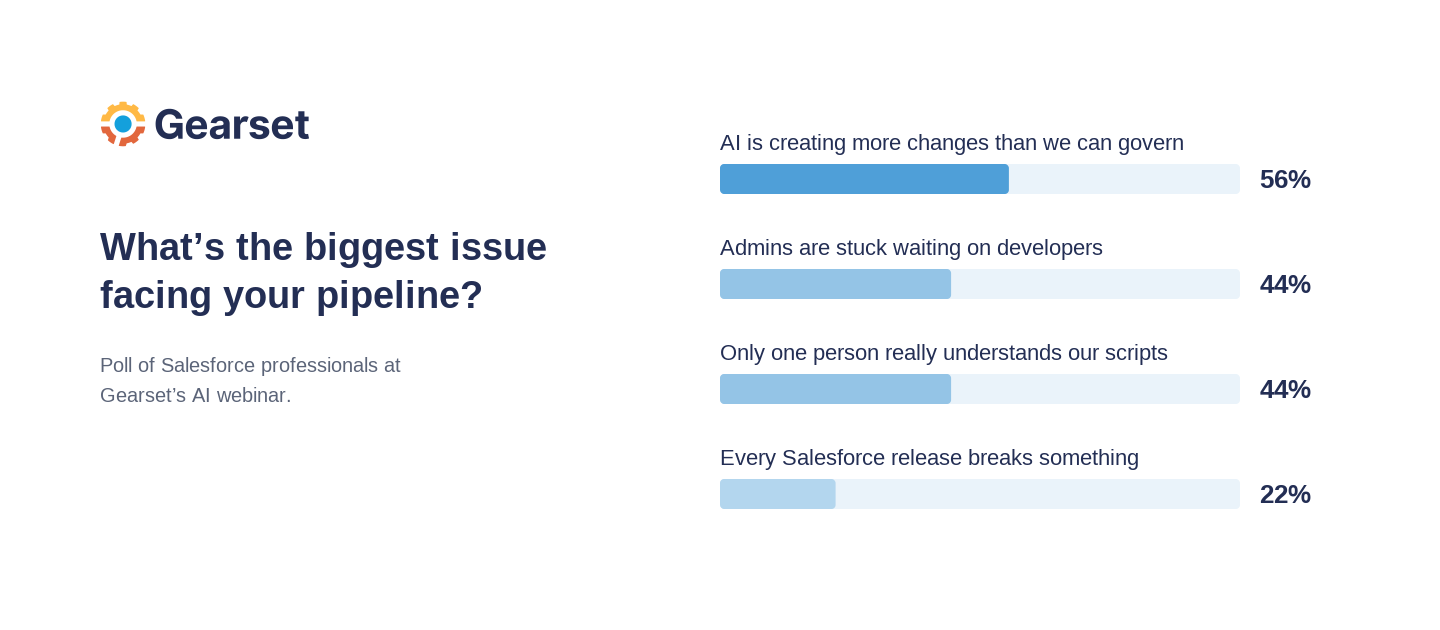
When we asked Salesforce professionals at our recent webinar about the biggest issue facing their pipeline, governing AI-generated change came out on top.
4. What it costs
Total cost of ownership
If you’ve already built some or all of your pipeline, what you’ve spent is gone whichever way you decide, so count only what’s still to come. That means finishing it, running it and, if you move, migrating off it.
The engineering time to build and run a pipeline appears in most business cases. The maintenance items in section 3 come to roughly 20 to 40 days a year for one org. That’s one to three days for each Salesforce release, about four days of CLI upgrades, and a day or two a month for credentials, sandbox refreshes and flaky tests, or a fifth of an engineer at most. Each extra production org adds its own sandbox chain, credentials and drift. The costs that rarely reach the CTO’s spreadsheet sit across the rest of the Salesforce team.
Where the money goes
Once there are several orgs and teams, these are the costs that usually decide it, roughly largest first.
- Support and change requests. Every team that joins the pipeline brings questions and requests. If someone spends a day a week on them, that’s around 46 days a year.
- Admin repackaging. Forty admin changes a month at an hour each is about 60 developer days a year spent retrieving and committing work someone else built.
- Key-person cover. A second engineer has to know the pipeline well enough to fix it on release night. That takes time every month, whether or not anything breaks.
- SI deployments and audit preparation. The days your SIs spend deploying by hand, at their day rate, and the hours your release manager spends assembling evidence before each audit.
None of these looks large on its own, and most of the time is spent outside the platform team, which is why the total tends to surprise people. Add them up for the estate you expect in two years rather than the one you have today. On the other side go licenses, implementation and a security review, plus the internal time a platform still needs. Someone has to own its configuration, onboard new teams and look into failed deployments, even with vendor support behind them. That time is usually far smaller than running your own pipeline, but it isn’t zero, so give it its own line. Note business days lost to waiting and slipped releases beside the totals rather than inventing a number. The download pack has all of this as a spreadsheet.
As a reference point for the SI and developer-hours lines, Veolia UK & IRE reports saving around 100 developer hours every two weeks and about £3,000 a week in outsourcing since moving to Gearset.
“Gearset has helped us take control of our platform, our releases, our products, and ultimately enable us to keep in line with the demands of our customers and stakeholders at a much reduced cost.”
Paul Watkeys, Head of Digital Products, Veolia UK & IRE
The opportunity cost question
The people who end up owning a homegrown pipeline are usually your most Salesforce-literate engineers. Price their time, then name two roadmap items they’d deliver instead. It’s usually the line that decides the business case.
Risk
Salesforce is where many enterprises run sales, service and quoting, so a failed release has a price. A broken validation rule can stop quotes going out, and a profile deployed from the wrong sandbox can lock a sales team out of the fields they need on the last day of the quarter. Put your own cost per hour of disruption beside each option.
For a homegrown pipeline, the biggest risk is usually a person. If the engineer who wrote your deployment scripts left tomorrow, could anyone else roll back a failed production release this afternoon?
Audit is the last piece. SOX change management asks who requested, tested, approved and deployed each change, and for EU financial entities the Digital Operational Resilience Act has required documented ICT change management since January 2025. In a homegrown pipeline, that evidence is split across your Git host’s review and approval records, CI logs with limited retention and Salesforce’s 180-day Setup Audit Trail. Each keeps it for a different length of time, and joining it into one record per change is work nobody budgets for. Changes made directly in an org skip every pipeline, a vendor’s included, so ask how each option detects them.
What one change record should show
Whichever option you choose, you should be able to pull a record like this for any production change.
- Change. Add
Discount_Reason__cand its Flow to Opportunity - Built by. Admin, in the UAT sandbox
- AI-assisted. Yes or no, with the tool recorded
- Reviewed by. Developer, on pull request #418
- Approved by. Release manager, with timestamp
- Deployed by. Pipeline, triggered by the release manager, with timestamp
- Components. One custom field, one Flow, one permission set
- Tests. Tests run and passed, with coverage per class
- Rollback point. The previous deployment of those components
- Segregation of duties. Builder, approver and deployer are different people
Return on investment
Take a baseline now, whichever way you decide, using metrics your engineering organization already reports, such as deployment frequency, lead time and change failure rate, plus the time from “done in sandbox” to “live in production”. In our 2026 State of Salesforce DevOps report, 48% of respondents hadn’t estimated their return at all.
The same survey found that Gearset users were more likely than users of every other approach to release several times a week (42%, against no more than 28% for any other approach).
5. Choosing a vendor
What to look for in a platform
If you buy, judge each platform on the work in section 3 rather than on its demo. Ask how it handles deletions, profiles, test selection and config data, how admins and partners get changes into the pipeline, and what one change record looks like (section 4 shows a good one). Ask how it reviews AI-generated changes at volume, how quickly it supports each new Salesforce release and what you keep if you leave.
Vendor risk
You can’t weigh a homegrown pipeline’s single points of failure without weighing a vendor’s. Your security team will want to assess any third party connecting to production. Under the EU’s Digital Operational Resilience Act, the vendor becomes an ICT third-party provider that belongs in your register of information and your exit plan. And if the vendor is acquired or changes direction, you need to know what you keep. A platform that connects to thousands of customers’ production orgs is also a bigger target than your own CI, so ask every vendor how those connections are stored, scoped and monitored. Gearset encrypts data in transit and at rest, with a unique key for each object, and runs 24/7 intrusion detection.
On our side, Gearset holds ISO/IEC 27001:2022 certification. Your metadata, its history and your branching model live in your own Git host rather than inside Gearset, and you keep all of it if you ever leave. You’ll find more information on Gearset’s security on our website.
How Gearset fits
Gearset is an external platform built for Salesforce DevOps. It connects to your orgs and your existing Git provider, so your repository stays the source of truth and developers keep working in their own editors. Unlike other platforms, Gearset sits back-to-back with your Git repo, meaning changes are instantly synced across. Other vendors force you to commit through a black box, making visibility into your code very poor.
Most of the work you would need to do yourself is built into Gearset.
- Promotion and hotfixes. Gearset Pipelines moves changes through your environments, validates each pull request against its target org and back-propagates hotfixes so lower environments stay in step. Your dev sandboxes are kept up to date with production with only one click.
- Deletions and dependencies. Gearset compares orgs and branches at the metadata level, includes deletions and flags missing dependencies before a deployment runs. More than 100 problem analyzers fix common deployment failures automatically.
- Profiles and permissions. Only the profile and permission set changes related to the components you’re deploying go with them.
- Config data. RCA (CPQ) and other record-based configuration deploys just like they were metadata, with external IDs and load order handled for you.
- Admins. Admins compare, commit and deploy in a UI, under the same review rules as developers. Manage permissions and add quality gates for added control.
- Rollback, backup and drift. Deployments can be rolled back from a snapshot, backups restore the data that metadata alone can’t, and org monitoring flags changes made directly in production.
- Audit. Every change keeps a record of who built, reviewed, approved and deployed it, with test results. Download in seconds to have a robust audit trail that will stand up to even the closest scrutiny.
Gearset’s code review runs deterministic checks on every pull request, including AI-generated changes. It won’t tell you whether the logic does what the business asked for, so someone still reads the diff, but it catches a defined set of problems every time, however tired the reviewer is.
Cam, Gearset’s AI agent
General-purpose AI assistants write Salesforce changes quickly, but they don’t know your org, and their changes are only as safe as the review around them. Cam is Gearset’s AI teammate for Salesforce work. You assign it a ticket and it works from your org’s current metadata, follows your team’s standards and asks clarifying questions before it starts building. It finds and fixes validation errors itself, then submits the change into the same pipeline as everyone else’s work, with the same automated tests, code review and named approver. Every change Cam makes leaves the same audit record as a person’s, so more AI-written change doesn’t mean less control.
You don’t have to move everything on day one. Many teams start by running Gearset alongside their CI for org deployments, config data, rollback and audit, then bring static analysis, testing and package builds across as they go, until all their Salesforce delivery runs in one place with one audit trail.
More than 3,500 teams use Gearset. Support comes from Salesforce DevOps specialists, with first response on live chat currently averaging less than 5 minutes.
Homegrown and Gearset side by side
| What matters | Homegrown pipeline | Gearset |
|---|---|---|
| Governed release with approvals, audit and several teams | Months of build, then ongoing | Weeks per team |
| Salesforce-specific logic (deltas, deletions, profiles, config data, rollback) | Scripts, open source and glue code your team maintains | Built in and maintained by Gearset. Salesforce’s own limits still apply, so restoring deleted data needs a backup. |
| AI-assisted change at volume | Static analysis and approval rules you configure and maintain in your Git host and CI | Code review on every pull request, with rules you choose and tune, and each approval recorded with its deployment. Cam, Gearset’s AI agent, works inside the same pipeline and approval rules. |
| Salesforce releases and CLI changes | Your team tracks and tests each one | Maintained by Gearset |
| New vendor to assess | None | One that connects to your production orgs, so it needs a full security review |
6. Making the call
What building does well
A homegrown pipeline has solid strengths. Everything is code, reviewed and versioned like the rest of your software, and it runs on infrastructure and a security model you already evidence. There’s no new license and no procurement cycle. You can make it do anything without waiting for a vendor’s roadmap, and no third party holds a connection to your production org. Building one also teaches a team exactly how Salesforce deployment works, which stays valuable even if you buy later.
What buying costs you
Buying has trade-offs too. A vendor is a dependency, with its own pricing and roadmap. It also needs the security review covered in section 5, so start that alongside the evaluation. A platform has its own way of working, so if your release process is unusual, expect to adapt parts of it.
Keep what you’ve built and add to it
If your pipeline is good, keep it and keep an eye on whether Salesforce stays a small share of your platform team’s time as more teams and orgs join. The build list in section 3 is a quick way to check.
Even a good deployment pipeline tends to leave gaps. Redeploying metadata won’t bring back production records a bad data load overwrote, refreshed sandboxes start without realistic data and generic linters don’t know Salesforce’s rules for Apex, Flows and Lightning components. Gearset’s backup, sandbox seeding and code review run alongside your pipeline, so you can add them without replacing anything.
Move off it without stopping releases
If your pipeline works but you’re feeling pain or outgrowing it, you don’t have to switch everything at once.
Ping Identity made the move from build to buy. Its Salesforce team released through a homegrown system built on the Salesforce CLI.
“We would sometimes deploy old code, overwrite new code, or remove segments we didn’t intend to, which could impact the business.”
Marko Self, Salesforce Development Manager, Ping Identity
CPQ changes were also rebuilt by hand in every environment. When a merger doubled the team, it moved to Gearset Pipelines alongside GitHub and went from deployments that took days to shipping continuously.
“We would have a much larger DevOps overhead without Gearset.”
Andrew Kuttor, Senior DevOps Engineer, Ping Identity
A phased rollout, team by team or org by org, keeps releases moving. If your release manager built the current pipeline, involve them from the start. They usually end up designing the new process and setting its governance rules. They also spend far less time fixing it on release night.
Start on a platform
If you haven’t started, or you started and stalled, the build list in section 3 is the work a platform saves you. The first governed release then comes in weeks rather than after a quarter of build, and anything you’ve already built that lints, tests or builds packages can stay in your CI.
Is building right for you?
When building, or keeping what you’ve built, makes sense
A homegrown pipeline is often the right choice in these situations.
- A small, code-heavy team with one production org and low change volume. A tidy GitHub Actions workflow may be all you ever need.
- A team built around packages. ISVs building managed packages, and enterprises that have split their orgs into unlocked packages, are on the path the Salesforce CLI was designed around.
- A strong platform engineering team for whom Salesforce is a small slice of the estate. If they already run on-call, runner fleets and secret rotation, Salesforce adds less, until many orgs, admins, CPQ data, partners and auditors stack up.
- Hard constraints on third-party access that no vendor’s security review can meet.
Questions to ask before you commit
Put these to whoever is proposing the build, or whoever runs what you have now.
- Who rolls back a failed production release if the pipeline’s author is away?
- Can you show me a year of approval evidence for one production change?
- What happens to our deployments during the next preview window?
- How does an admin get a Flow change to production without a developer?
- Who approves a change an AI assistant wrote, and where is that recorded?
- What can the integration user do in production, and who can use its key?
- How many engineer days did the pipeline take last year, outside the original build?
Start with your own numbers
Work through the pipeline checklist and the cost spreadsheet with your platform lead. If you hold the budget, ask them for their run cost line by line and your Head of CRM for the hidden costs. If you run the Salesforce estate, add up the hidden costs first and take them to your CTO with the one-pager. All three are in the download pack, with the vendor checklist.
If you’d like a second opinion, book a pipeline review with a Salesforce DevOps architect. Bring your platform lead and your current setup, scripts and all, or your plan if you haven’t started. We’ll go through what it handles today, what it would need to handle at your scale, what Gearset would replace and what you’d keep. You’ll leave with a written gap assessment and a draft cost model built from your inputs, yours to circulate whether or not you buy.